Chapter 2: Using Basic Features
45
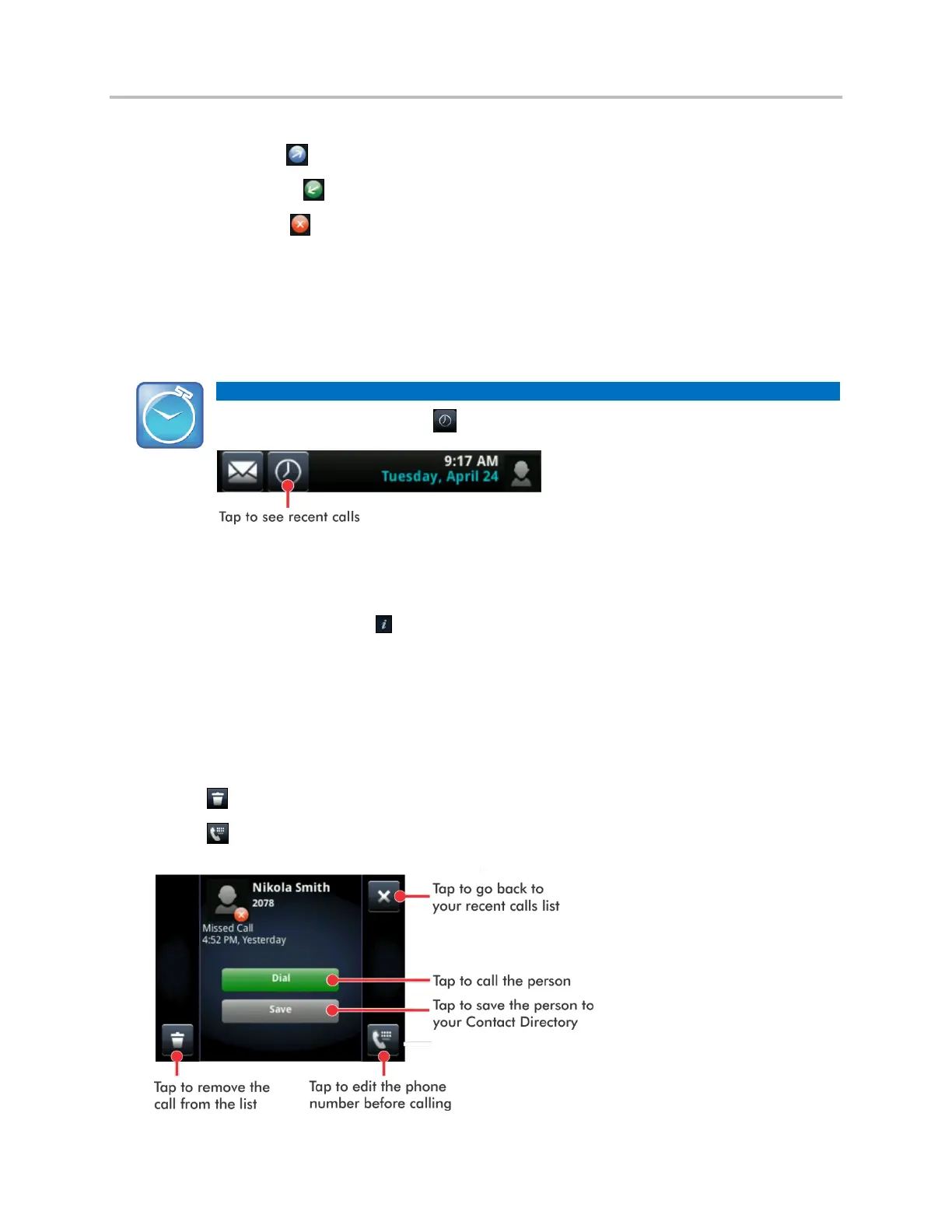
Icons display next to a call to indicate the call type:
Placed calls display .
Received calls display .
Missed calls display .
To view your Recent Calls list:
From Home view, tap New Call, and tap Recent. You can also access recent calls by tapping
Directories from Home view, and tapping Recent Calls.
Timesaver: Quickly Accessing the Recent Calls List
To quickly access recent calls, tap in Lines, Calls, or Active Call view, as shown next.
To manage a call record:
1 From your Recent Calls list, tap next to a call record.
2 From the call details screen, shown next, you can:
○ Tap Dial to call the person.
○ Tap Save to add the person to your Contact Directory. If the person is already in your
Contact Directory, but isn’t a favorite, Add to Favorites displays instead. Tap Add to Favorites
to automatically make the person a favorite.
○ Tap to delete the call from the list.
○ Tap to edit the phone number before you dial the person.



 To Next Page