Poly® VVX® 500 and Poly® VVX® 600 Business Media Phones User Guide
84
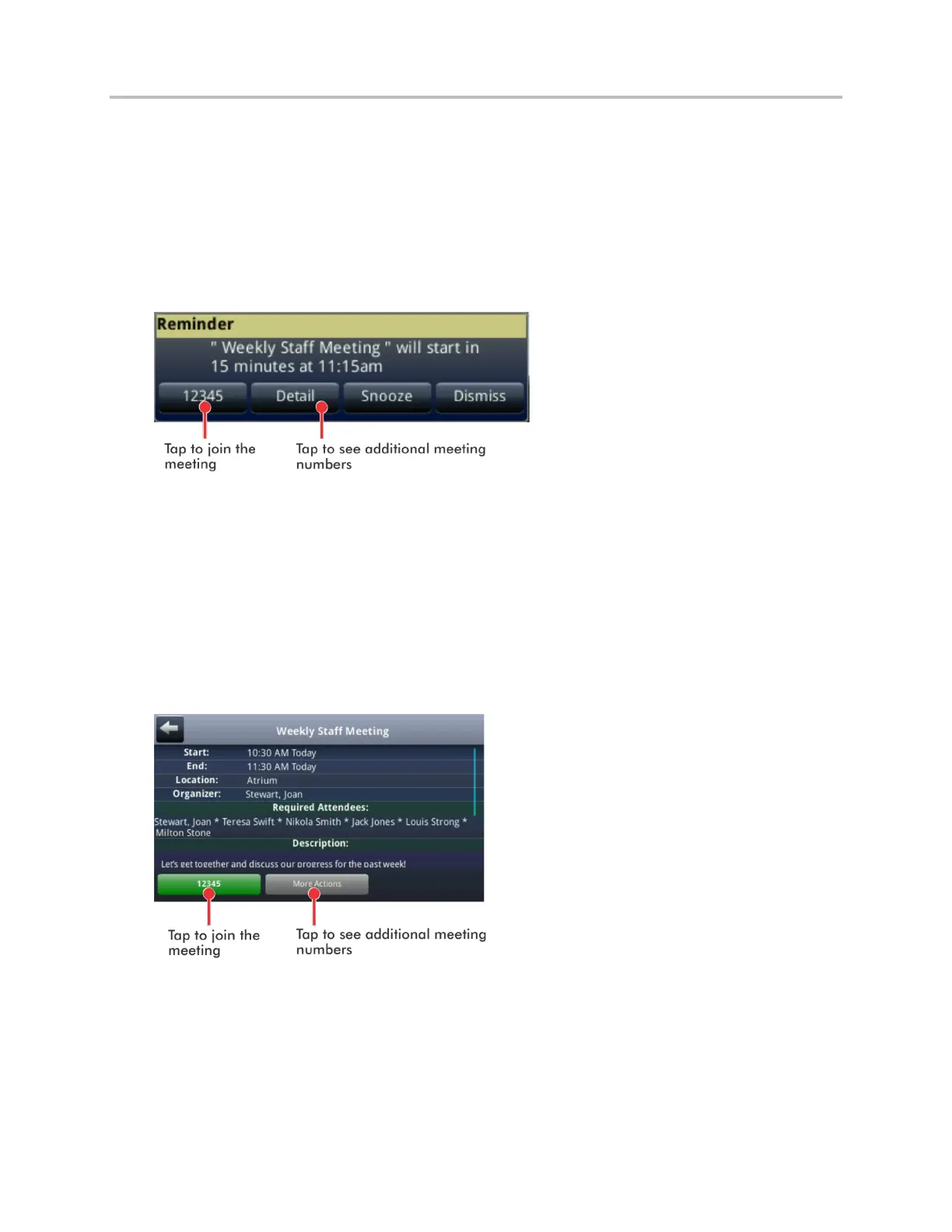
To join a meeting from a meeting reminder:
From the reminder, tap the meeting number that displays at the far-left of the reminder, as shown
next.
If you want to use another number to join the meeting, and the meeting organizer has specified
alternate meeting numbers you can call, tap Detail from the reminder, as shown next. The Calendar
displays Meeting view, which may list alternate numbers you can call. To dial these numbers, tap
More Actions, and tap one of the numbers.
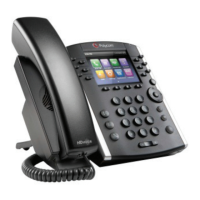
To join a meeting from Meeting view:
1 From Day view, tap the meeting you want to join.
2 From Meeting view, tap the meeting number, as shown next.
If you want to use another number to join the meeting, and the meeting organizer has specified
alternate numbers you can call, tap More Actions, as shown next. A list of numbers that you can
dial is displayed. To join the meeting, tap one of the numbers.



 To Next Page