11 | Chapter 1 : DVR User Manual
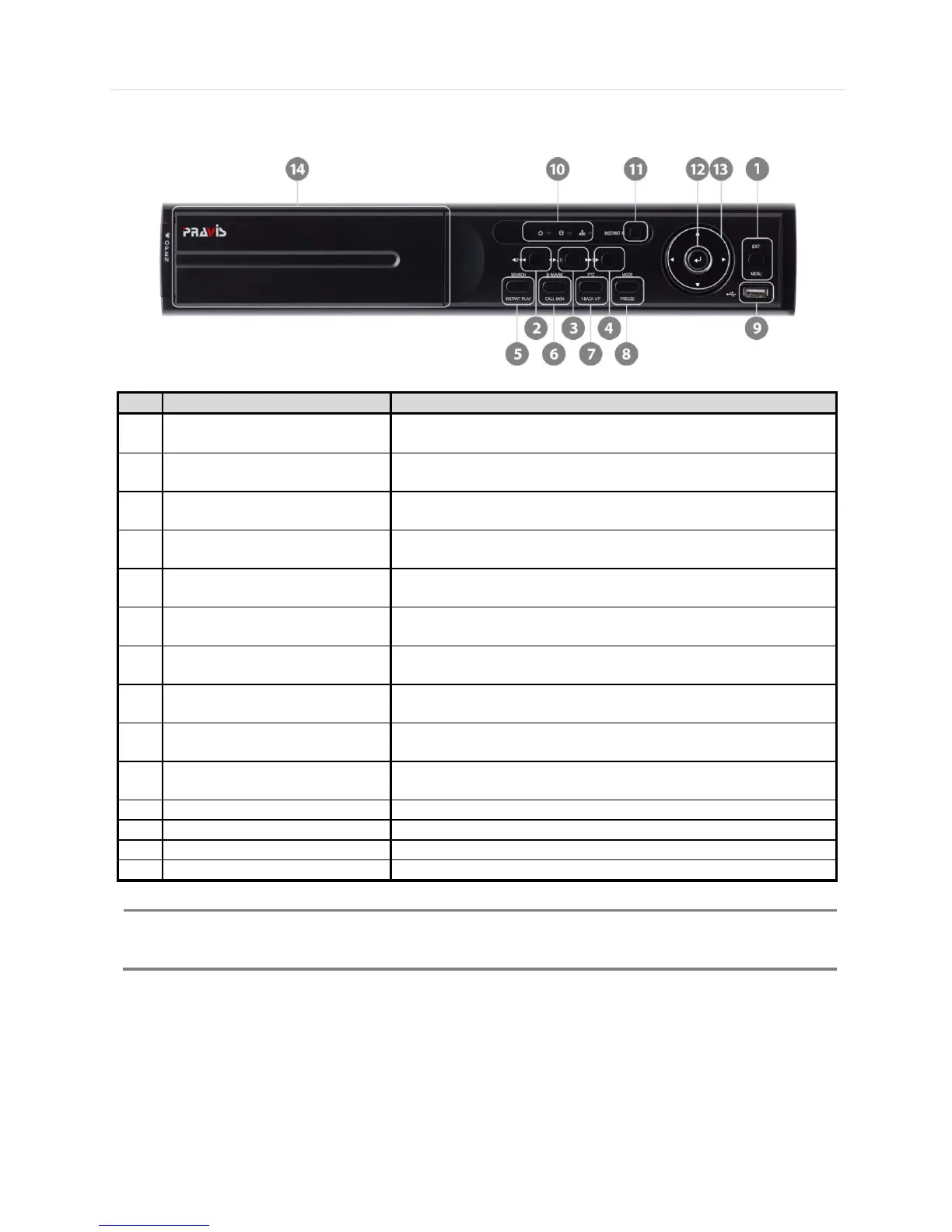
[4/8/16CH with DVD±RW (W)360x(H)66x(D)380mm]
1
Menu
Exit
Open system menu /
Return to previous mode
2 Fast Rewind Button
Forward Playback : Decrease the speed /
Reverse Playback : Increase the speed
3
Forward & Backward Play /
Forward play & Backward Play (Long Press) /
4 Fast Forward Button
Forward Playback : Increase the speed /
Reverse Playback : Decrease the speed
5
Search
Instant Play (Press and hold)
Go to search mode /
Used to initiate Instant Reverse Playback
6
Book-Mark
Call Monitor (Press and hold)
Used to display full screen video of a selected spot out channel
I-backup (Press and hold)
Bring up PTZ Camera control /
Used to initiate instant back up
Used to initiate Freeze function
9 USB Port
USB port (Ver. 2.0) for mouse operation and backup device or F/W
update
10 LED Indicator
Indicates system status
Power, Record, HDD and Remote Control
13 Direction Button Move to the direction that user wants to select
RW : Open to use a pre-installed DVD
I- Backup (Instant Backup)
In playback mode, the user can press the “I-backup” button on the frontal keypad to configure both “start” and
“End” time. Once the “Start” and “End” time is set, click the “Start” button to start the backup process.



 To Next Page