79 | Chapter 2 : ACS Client Software User Manual
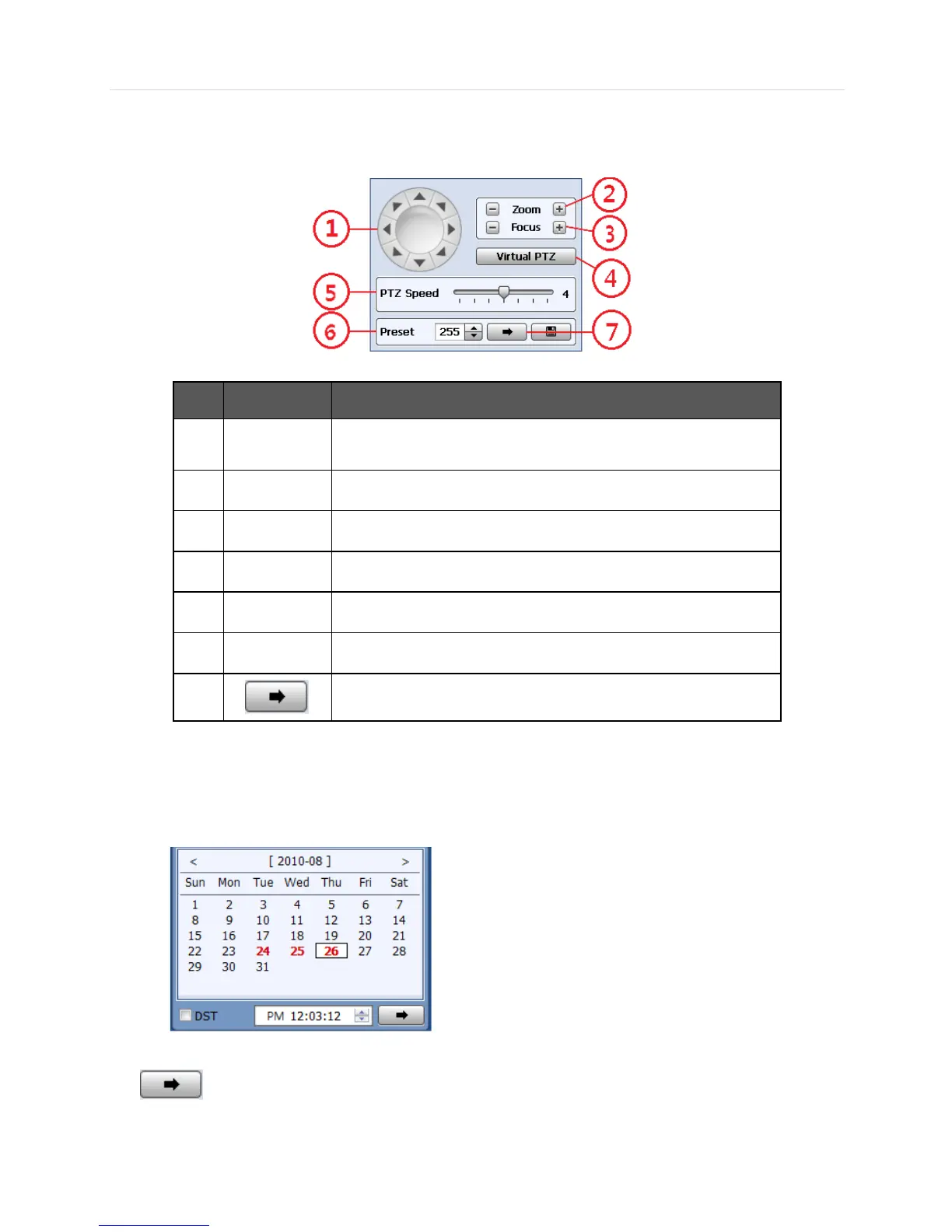
6.4.5 PTZ control Panel
PTZ camera control in live mode.
No. Button
Description
1
Navigation
PTZ camera can be moved in 8 directions.
2
ZOOM
Zoom in & Zoom out
3
FOCUS
Adjust the focus of PTZ camera
4
Virtual PTZ
PTZ can be controlled by clicking mouse on channel screen directly
5
PTZ Speed
PTZ moving speed can be operated by the control bar
6
PRESET
Select the preset location
7
Go to the preset location
6.4.6 Calendar Panel
Calendar panel is only available in search mode.
- The date is highlighted by red color if the record data exist.
- (Go button) should be pressed to start playback from the selected time.
- If DST is enabled, the earlier one-hour overlapped video will be shown first.



 To Next Page