EasyManua.ls Logo

Pravis 4CH Compact Case - Tool Bar

Pravis 4CH Compact Case
125 pages
Print Icon
To Next Page IconTo Next Page
To Previous Page IconTo Previous Page
Loading...
Users Manual | 78
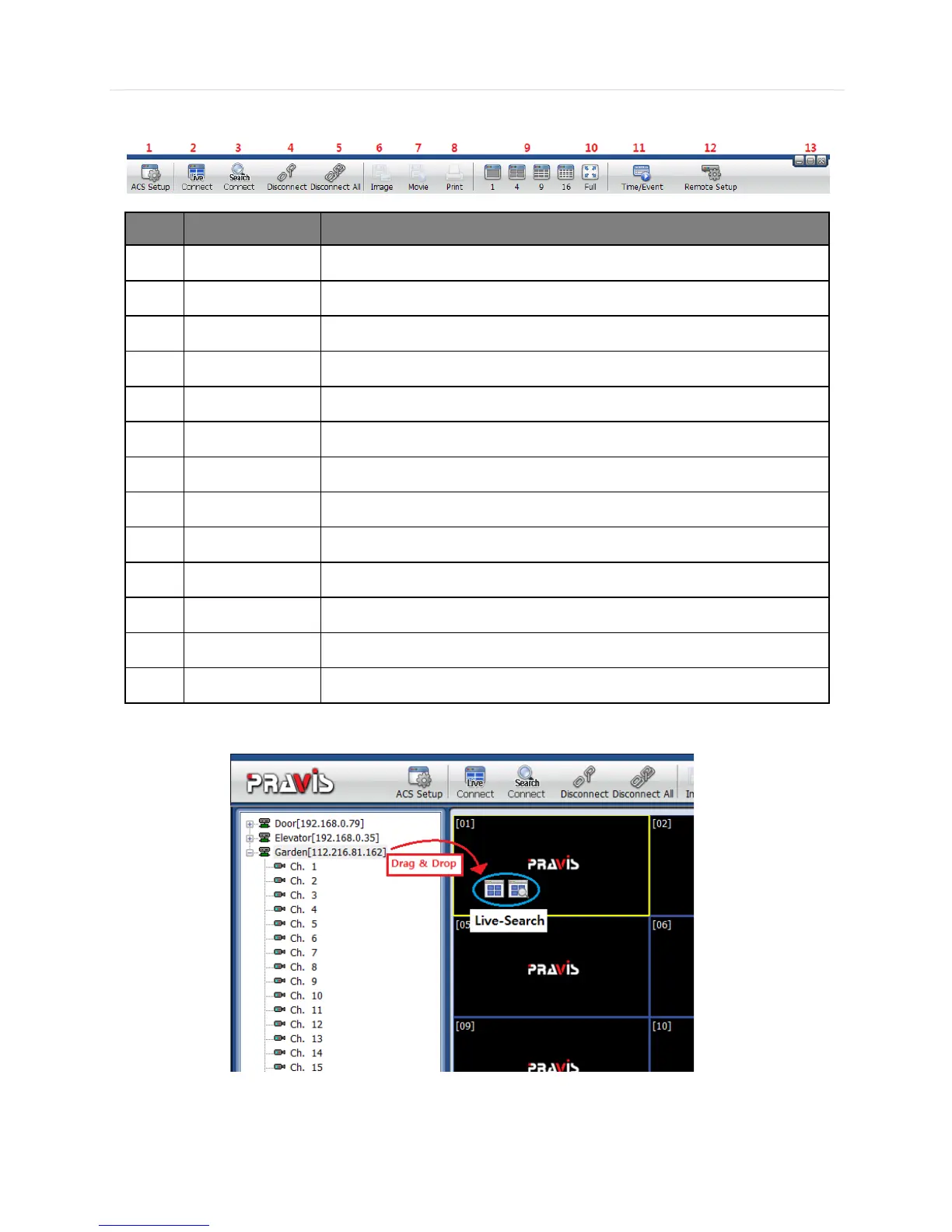
6.4.3 Tool Bar
No.
Icons
Description
1
ACS Setup
Option setup for Advanced Client Software
2
Live
Showing live images
3
Search
Showing recorded images
4
Disconnect
Disconnect a selected channel
5
Disconnect All
Disconnect all channels
6
Image
Save a selected image
7
Movie
Save a selected video (asf format)
8
Print
Print out still image
9
Split
Single channel, 4-split channel, 9-split channel, 16-split channel
10
Full
Full screen mode
11
Time/Event
Toggle between Search panel & Event list panel
12
Remote Setup
Configure settings of DVR remotely
13
Window control
Minimize, Maximize & Exit Advanced Client Software
6.4.4 Site List Panel
- The site list panel shows registered DVR lists. To make a connection, Drag & Drop the site or camera and then select between
Live or Search mode.