User’s Manual | 32
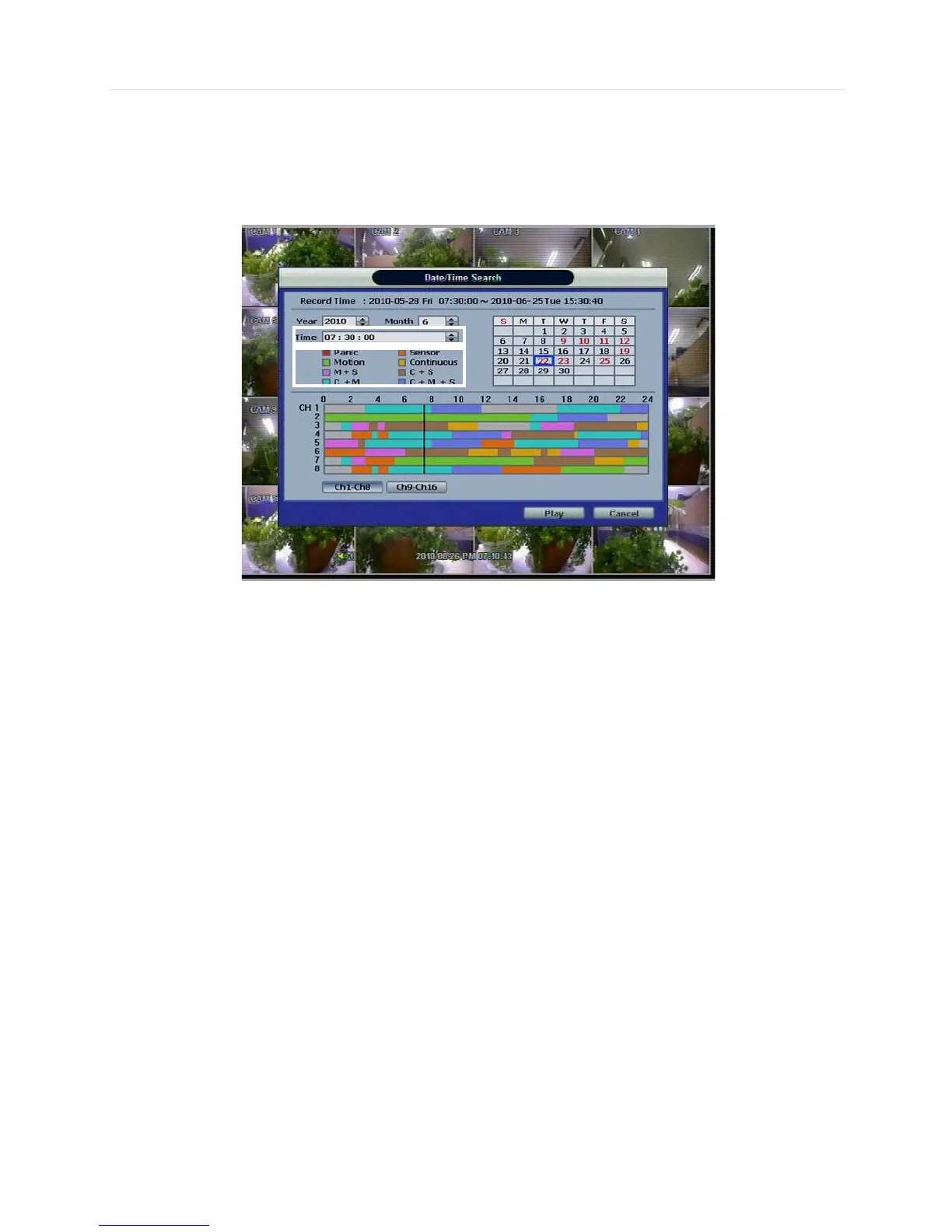
Once the recorded video data of the selected date is shown, user can adjust the vertical search line to the time that user
wants to search by dragging a mouse. As the vertical line is moving back and forth, user can see “the Search time” clock is
also changing. When user decides the Search time, click Play to see the selected video data.
The colors of the time bar are different, depending on the recording mode.
No color - NONE
“NONE” means no recording. Even though user set recording frames to and on in “Type” in record
setup menu, the DVR will not record.
Red color - Panic recording
In continuous recording mode, the system records all the time as set by “CAMERA”.
Yellow color - Continuous recording
Green color - Motion-detection recording
In this mode, the system records only when motion is detected
In addition, users can set motion-recording configuration in “MOTION ALARM” at the menu setup
If user sets “MOTION ALARM” to “OFF” on the “DEVICE” and sets “MOTION” to “SCHEDULE”, then
the system will record when motion is detected but motion alarm is not activated.
Orange color - Sensor-activated recording
In sensor mode, the system will record when a sensor is triggered only during the dwell time as set
in “SENSOR” of the “DEVICE” menu.
If user sets “SENSOR” to “OFF” in the “DEVICE” and sets “SENSOR” in “SCHEDULE”, then the
system will not record anything even though a sensor is triggered.
Sky Blue color - “Continuous” + “Motion detection” recording
The system records all the time by “continuous” as set by the “CAMERA” in the “RECORD” but will
switch recording mode to the motion configuration specified by “MOTION ALARM” in the “DEVICE”
menu, if motion is detected in the motion area. The system will also send a “motion event” message
to the Advanced Client Software over the network.
If user sets “OFF” in “MOTION ALARM” of “DEVICE” and sets “CONT + MOT” in “SCHEDULE”, then
the system will record with continuous recording mode even though motion is detected in motion
area.



 To Next Page