User’s Manual | 50
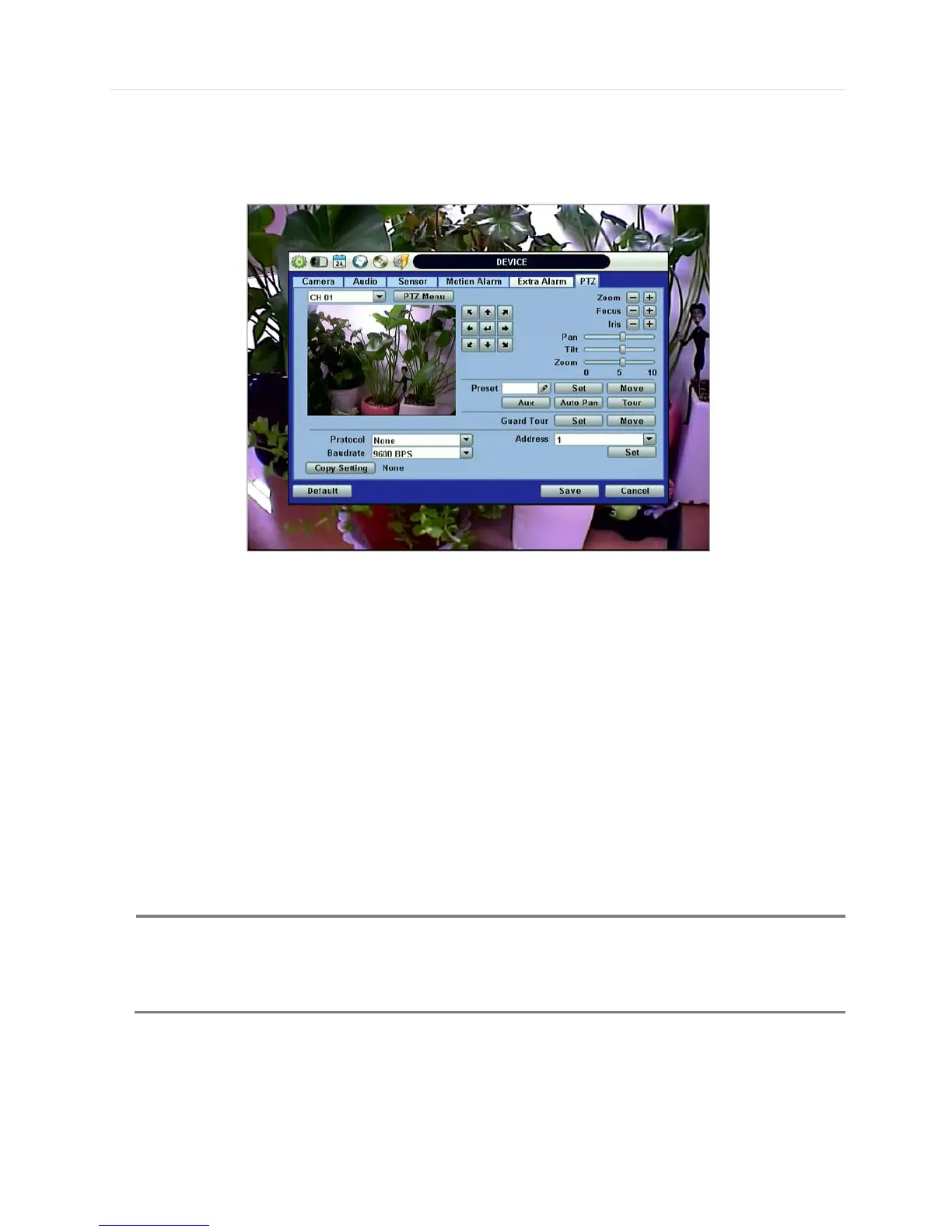
4.2.6 PTZ
Full control of PTZ camera is available in this menu.
For details, please refer to Section 3.3 PTZ Operation.
“PTZ Menu” (Depending on the model of PTZ camera)
If selected, the OSD menu of PTZ camera is imported and shown on the DVR monitor allowing the user to control the full PTZ
settings.
Protocol
Select the proper protocol of the connected PTZ camera.
Address
Set the PTZ driver address of the connected camera.
Check the below items for proper P/T/Z operation.
1. Check if the protocol of the connected PTZ camera is correct.
2. Check if the communication settings, including the baud rate, of the connected PTZ camera are in accordance with
the assigned value for that P/T/Z protocol.
3. Check if the address of the connected PTZ camera is correct.
4. Check if the wiring to the P/T/Z controllers are correct.
Preset
The system supports the number of preset from 1 to 255.
Baudrate
User can select the baud rate level from 1,200bps up to 115,200bps.
How to setup PTZ camera with Pelco-D protocol (example)
1) Make sure the serial communication with the PTZ camera is through RS-485 port.
2) Select “Pelco-D” at the protocol list, and set the address.
3) Select Baud Rate to be the same as the PTZ camera



 To Next Page