8. S40 control unit and available settings
Premier Tech 41 / 64 Solido SMART
DOKK5110E 15.04.2020
8.4 Settings during start-up
If the S40 control unit is being connected to
the Solido SMART plant and mains supply,
the start-up routine is called automatically.
Important plant parameters are defined, in
which the following logic applies in the three-
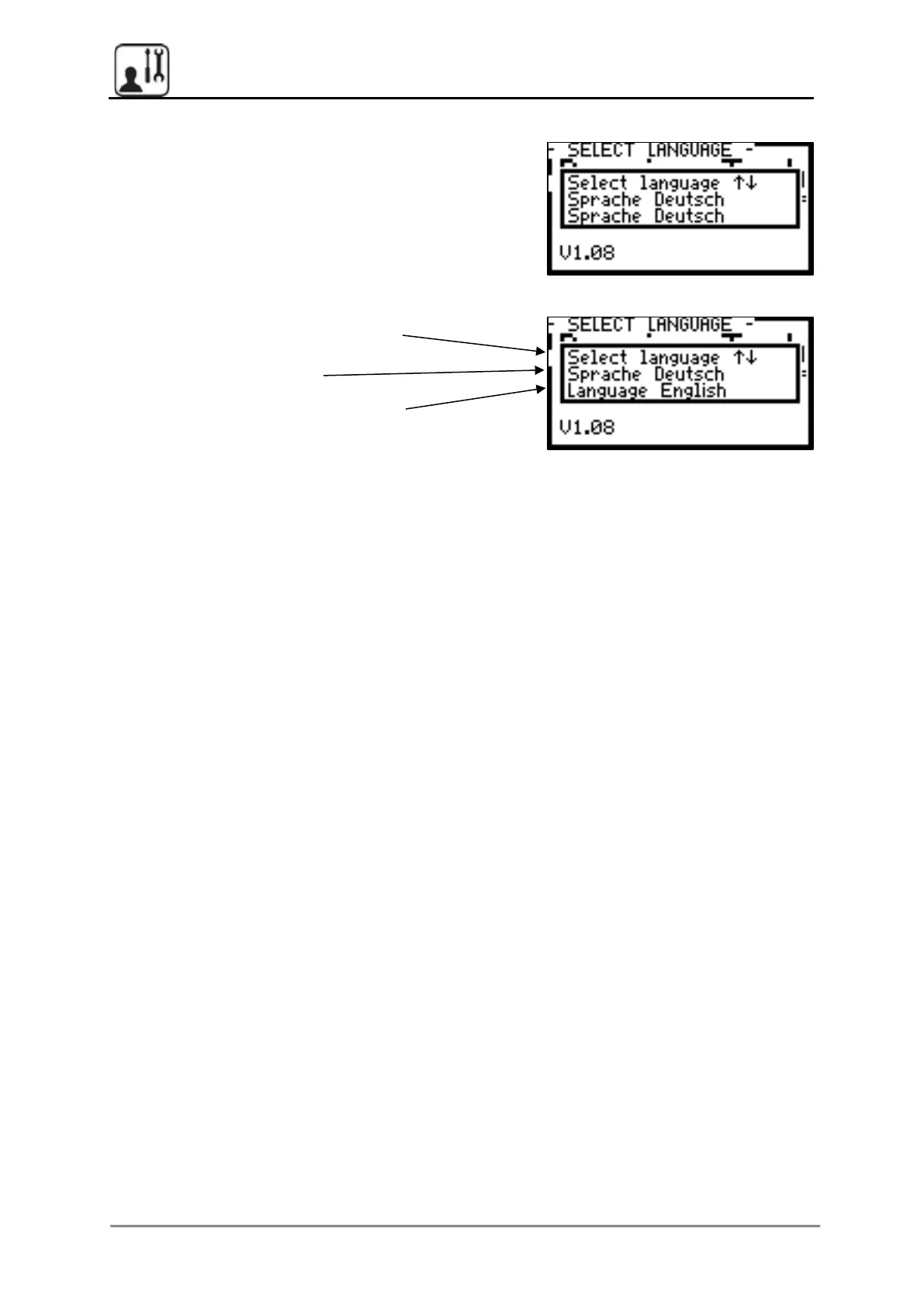
line “pop-up” menus:
Line 1: Header - which parameter is
defined
Line 2: Current setting
Line 3: New setting to be selected
if required (can be changed using
arrow buttons)
Possible result after the change:
Selection of “Language English”
The following parameters are requested in the following order, using a comparable logic:
7682, fixed (only valid for start-up), or
service password based on the “established” pattern
YES (standard, with infiltration/seepage system: NO,
see chapter 8.6.3)
60, 80, 120, 150, or 200 l/min
Select between 2 to 26 PTs
(for 8 PTs or more, the selection is made in two steps)
NO
(setting “YES” after installation of a clearwater pump
instead of lifter = pumped outlet)
All consumers are activated once, test mode is finished
by pressing the button
YES/NO (when you enter NO, start-up begins again)


 To Next Page