8. S40 control unit and available settings
Premier Tech 43 / 64 Solido SMART
DOKK5110E 15.04.2020
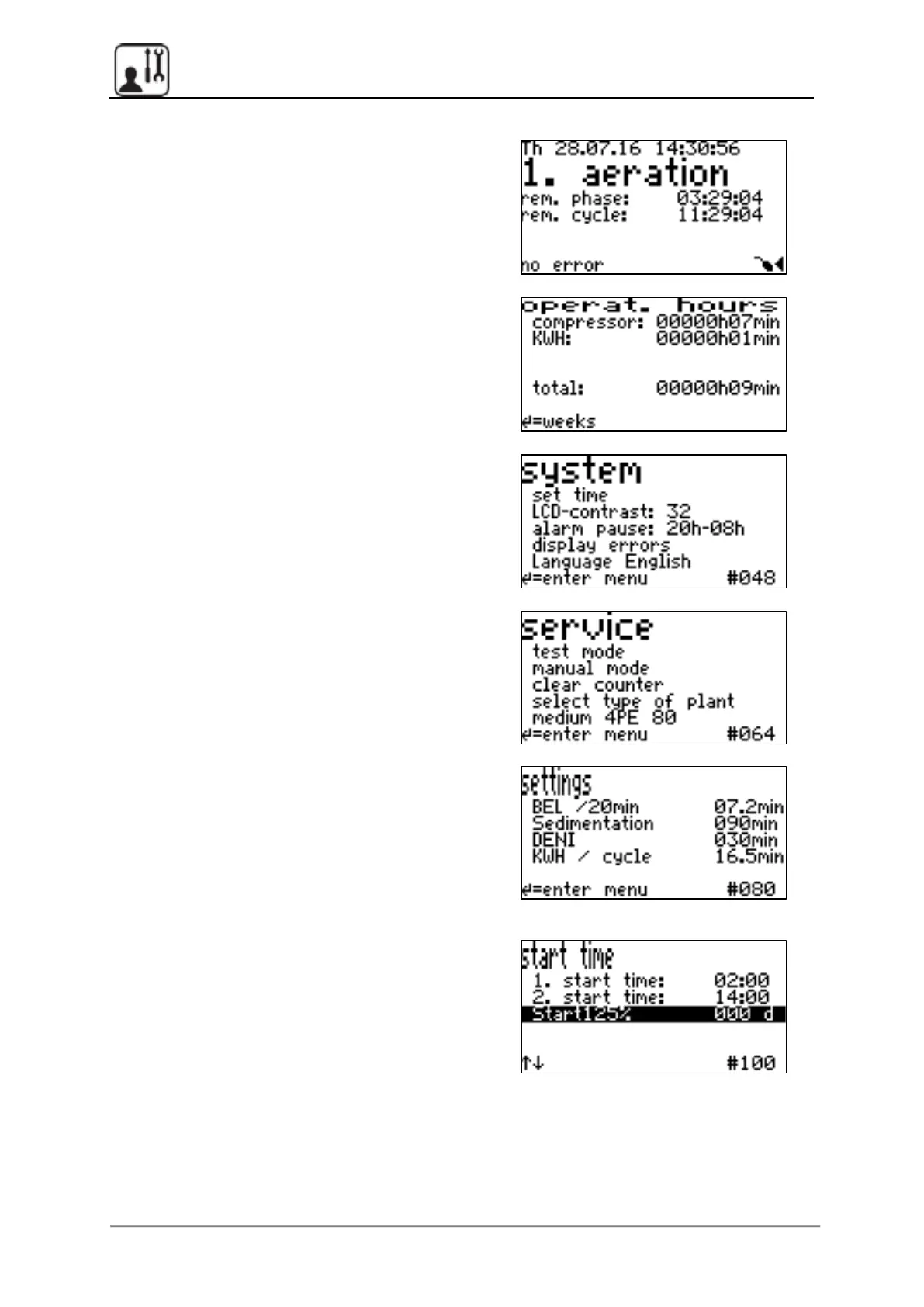
8.6.2 Other main menu levels
Press the arrow buttons to navigate from the
basic screen through the main menu levels
Display the operating hours for individual
consumers and for the plant as a whole. Press
the confirmation button to switch to a weekly
display.
Changes can be made to the system settings,
for example, changes to the “alarm pause” (time
interval in which no audible alarm is emitted)
Settings and a test mode that must be made and
performed only by service technicians are
provided in the Service menu.
DENI:
30 min pre-selected, also in filtration level C
12 hour cycle -> two start times,
24 hour cycle -> one start time,
set to low-inflow times
Start125%: Start-up phase, aeration time at
125% of the set value (max.18 min), Can be
de/activated, duration in days, configurable


 To Next Page