EasyManua.ls Logo

PREMIER TECH Solido SMART - S40 control unit and available settings; select compressor; aeration level; select number of PE

PREMIER TECH Solido SMART
64 pages
Print Icon
To Next Page IconTo Next Page
To Previous Page IconTo Previous Page
Loading...
8. S40 control unit and available settings
Premier Tech 46 / 64 Solido SMART
DOKK5110E 15.04.2020
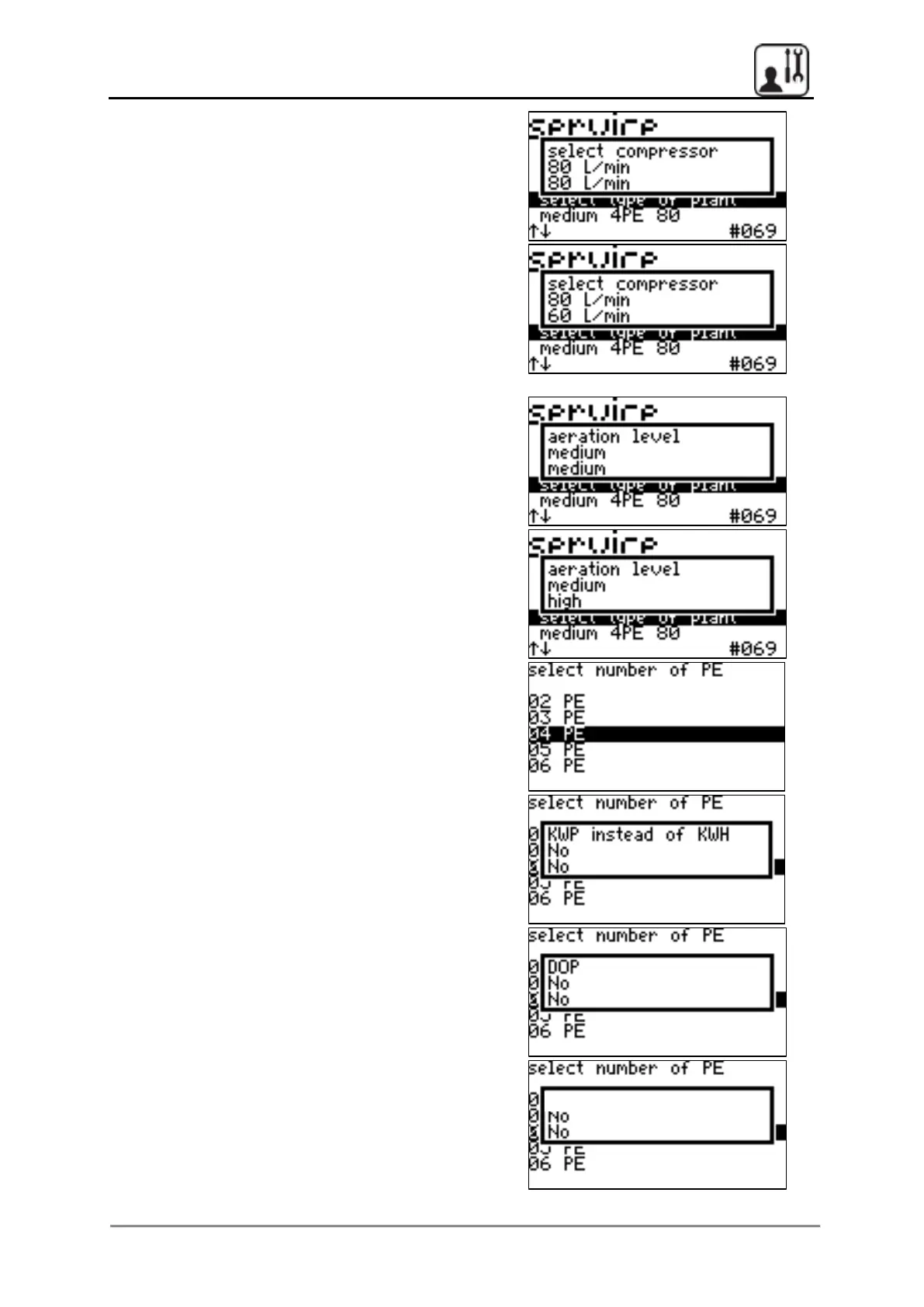
Use the arrow buttons to select the
compressor type of 80 l/min to 60 l/min and
choose the middle button to confirm
Use the arrow buttons to change the aeration
level from medium to high and choose the
middle button to confirm
Press middle button again, then select the
number of persons PE
Press the middle button to confirm KWP instead
of KWH NO
Press the middle button to confirm DOP NO
Press the middle button to confirm SSP NO
SSP

Table of Contents

Related product manuals