6161
Owner’s Manual
Quick Start:
Level
Setting
OverviewHookupControlsTutorialsTechnical
Information
Trouble-
shooting
and Warranty
Scenes, Presets,
and System Menu
Software: Universal Control,
SL Remote, Capture,
and Studio One Artist
Connecting to a Computer 6
Connecting
to a
Computer
Installation for Mac OS X 6.3
6.3 Installation for Mac OS X
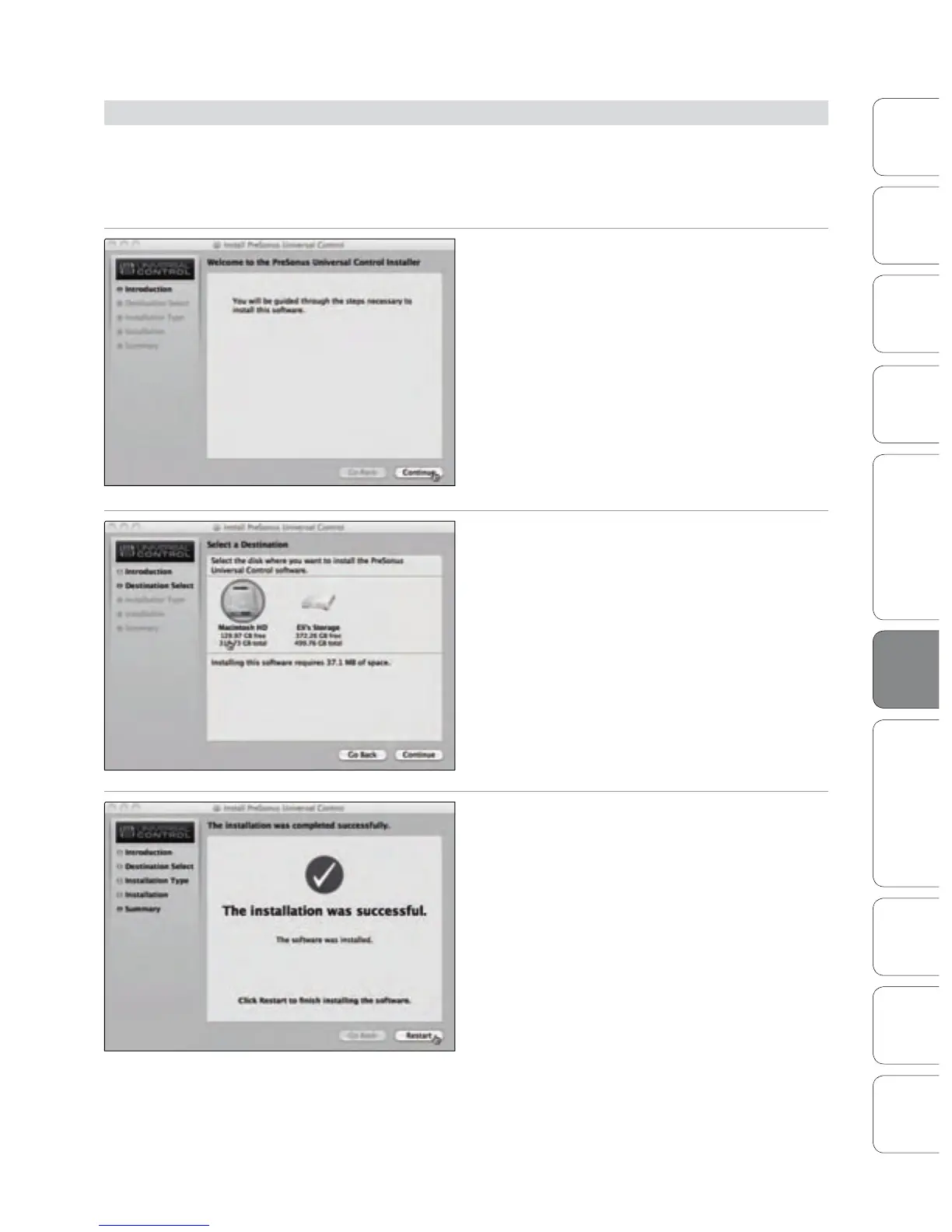
After inserting the Installation CD into your disc drive, browse the disc
and run the StudioLive installer, which will take you through each step
of the installation process. Please read each message carefully, and be
especially careful that you do not connect your StudioLive too soon.
1. You will be directed to the Welcome screen. Click
“Continue” and follow the onscreen instructions.
2. You will be directed to choose the hard drive onto
which you want to install the drivers and Universal
Control Panel. You must choose your system drive.
Storage drives and partitions cannot be used as
hosts for the driver.
Once the installation is completed, you will nd the
Universal Control program in your Applications folder.
It is recommended that you place this in your Dock.
Click “Install.”
3. When the installation is completed, you will be
prompted to reboot your computer. After it has
restarted, connect your StudioLive to your Mac with
a FireWire cable and power it on. You are now ready
to use your StudioLive!











 To Next Page