9090
PreSonus StudioLive
™
16.4.2
Quick Start:
Level
Setting
Overview Hookup Controls Connecting
to a
Computer
Tutorials Technical
Information
Trouble-
shooting
and Warranty
Scenes, Presets,
and System Menu
7 Software: Universal Control, SL Remote, Capture, Studio One Artist
Software: Universal Control,
SL Remote, Capture,
and Studio One Artist
7.3.2 SL Remote: Overview Page
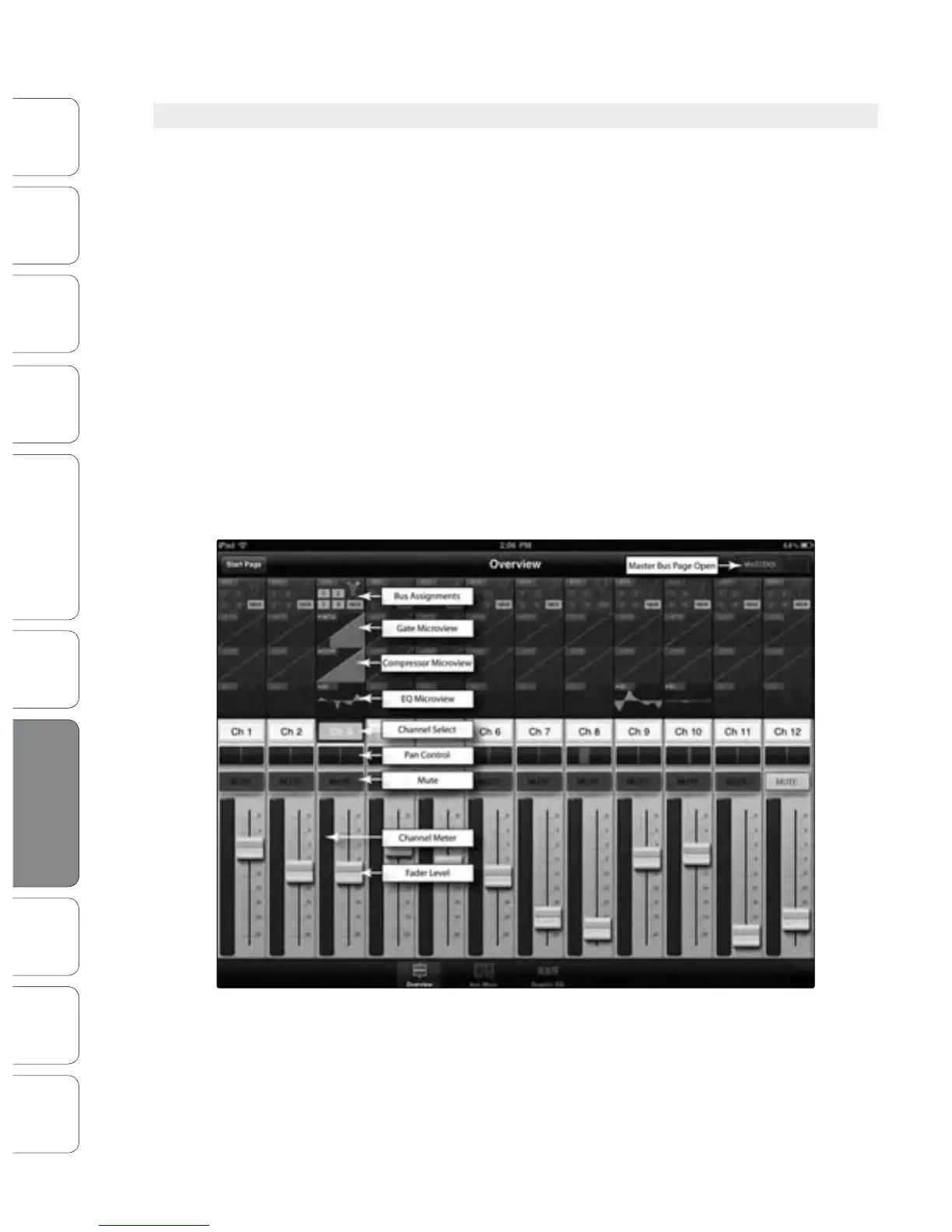
The Overview page in StudioLive Remote corresponds directly with
most of the controls on the Overview page in VSL. The following
parameters can be controlled and/or viewed from this page:
• Channel and Main Volume
• Channel and Main Select
• Channel Mute
• Channel and Master Metering
• Channel Panning
• Channel FireWire Return
• Channel and Main Gate, Compressor, and EQ overview
• Channel and Main Gate, Compressor, and EQ zoom
If you have labeled your channels using the Scribble Strip on the Overview
tab in VSL, you will also be able to see your channel names.
POWER USER TIP: Because StudioLive Remote is a wireless controller for Virtual StudioLive, the
fastest way to get comfortable with StudioLive Remote is to get well acquainted with VSL.
7.3 Using StudioLive Remote for iPad




 To Next Page