ProfiHub B5+ / B5+RD User Manual
_______________________________________________
Version 2.0 – July 2014 Page 21 / 56
ProfiHub-B5-Plus-Manual-EN.docx © PROCENTEC 2014 - Copyright - all rights reserved
2.10 Baudrate switch
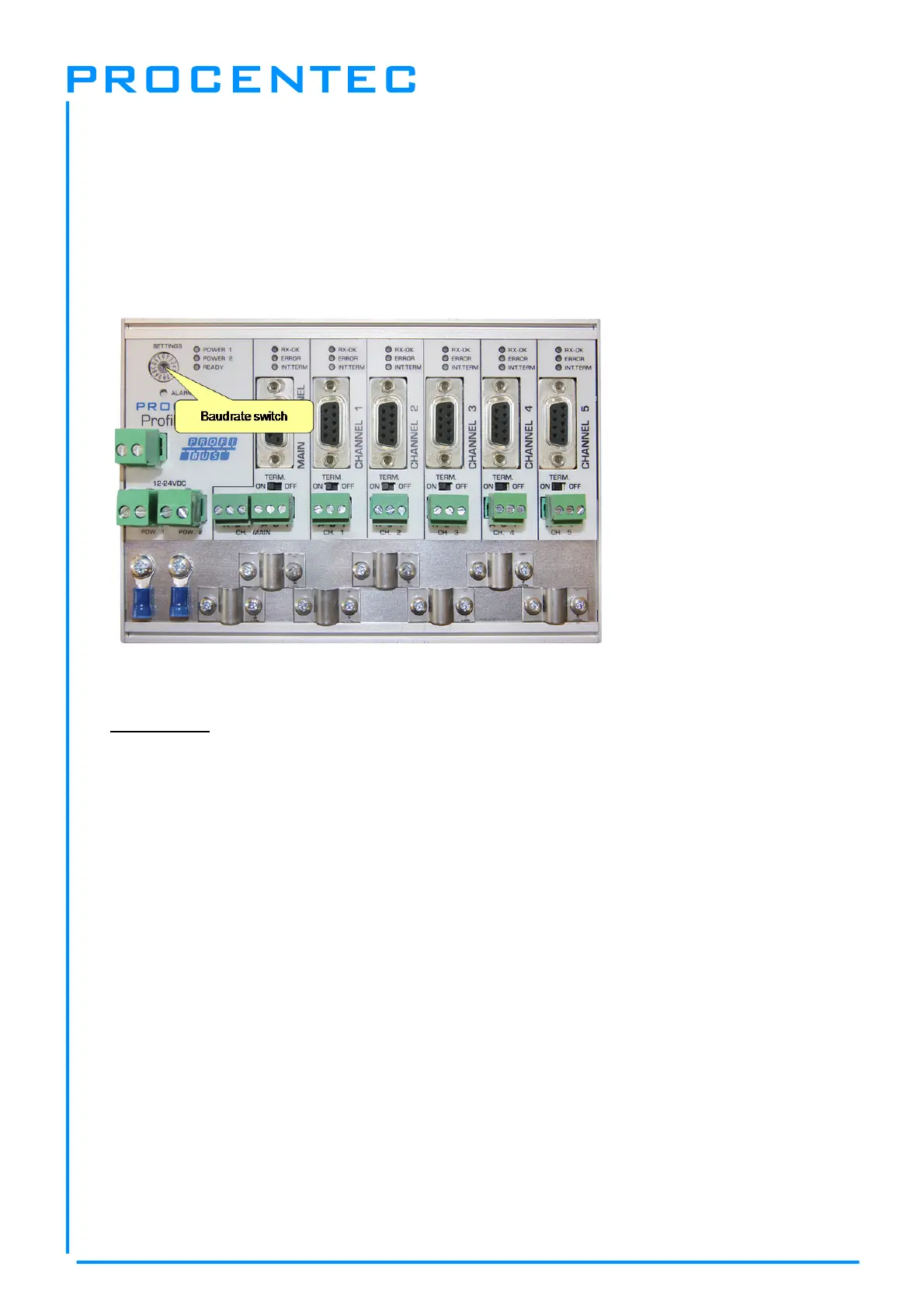
The ProfiHub B5+ recognizes the transmission speed by default. If it is required that the ProfiHub B5+
is locked to a certain transmission speed, the baudrate switch should be set to the required value (
Fig.
16
).
To set the rotary switch, use a 3 mm screwdriver.
Switch values:
0 = Normal repeating, Auto detect (default)
1 = fixed 9.6 kbps, diagnostics device ON (B5+RD only)
2 = fixed 19.2 kbps, diagnostics device ON (B5+RD only)
3 = fixed 45.45 kbps, diagnostics device ON (B5+RD only)
4 = fixed 93.75 kbps, diagnostics device ON (B5+RD only)
5 = fixed 187.5 kbps, diagnostics device ON (B5+RD only)
6 = fixed 500 kbps, diagnostics device ON (B5+RD only)
7 = fixed 1500 kbps, diagnostics device ON (B5+RD only)
8 = fixed 3000 kbps, diagnostics device ON (B5+RD only)
9 = fixed 6000 kbps, diagnostics device ON (B5+RD only)
A = fixed 12000 kbps, diagnostics device ON (B5+RD only)
B = Robust repeating, Auto detect, diagnostics device ON (B5+RD only)
C = Robust repeating, redundancy on channel 4 and 5, diagnostics device ON (B5+RD only)
D = Robust repeating, diagnostics device ON (B5+RD only)
E .. F = Reserved for future use
Please note that the position of the rotary switch is only sampled during start-up. Changing the
position of the switch will not have effect during operation.
The auto baudrate detect feature will search for the correct baud rate within 10 seconds of receiving
the first telegram. This baud rate lock will be lost after 50 seconds of incorrect or no message
reception.
In robust repeating mode, only messages starting with a valid PROFIBUS start delimiter are repeated
(SD1, SD2, SD3, SD4 and Short Acknowledge). In Normal mode, every bit is transferred immediately
onto the other channels.
Fig. 16 - Baudrate speed switch


 To Next Page