ProfiHub B5+ / B5+RD User Manual
_______________________________________________
Version 2.0 – July 2014 Page 23 / 56
ProfiHub-B5-Plus-Manual-EN.docx © PROCENTEC 2014 - Copyright - all rights reserved
3 Diagnostics Device
The B5+ is available with a built-in Diagnostics Device option. The order code for this ProfiHub B5 with
diagnostics device is 17020RD.
The Diagnostics Device is a very versatile statistics/diagnostics logger. It can be used to keep track of
the overall PROFIBUS network health and inform the PLC or DCS of any network failure such as
repeats or illegals, missing ProfiHub termination, live list changes, or power supply problems. Audible
or visible feedback is also possible by automatically switching the integrated alarm relay.
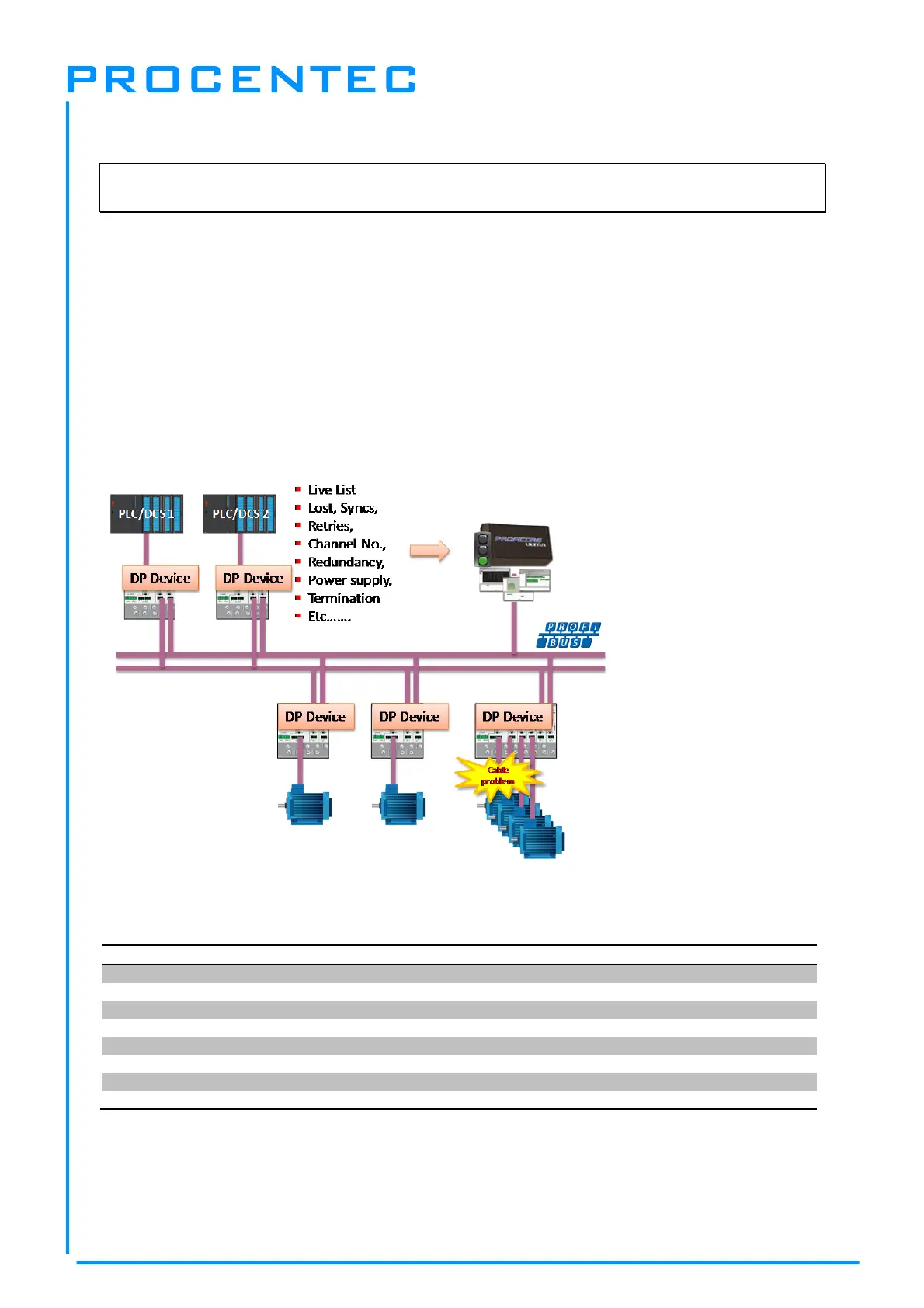
This information can also be read easily with ProfiTrace because the Diagnostic Device sends this
data over PROFIBUS. This enables maintenance engineers to immediately identify the affected
segment in case of cable problems or instrument failure. Having a Diagnostics Device in your network
dramatically decreases downtime because problems can be solved much quicker; it tells you where to
look. SCADA applications can make this even easier.
Fig. 18 – Cable problems or node loss can be identified by the ProfiHub channel, and send this
information over PROFIBUS to the PLC. ProfiTrace can also read this.
The following statistics and events are continuously monitored:
Events: Statistics:
Alarm Relay opened/closed Losts
Cable Redundancy change Syncs
Baudrate change Repeats (total)
Power input changed Repeats (max. changed in 1 cycle)
Termination of Channel changed Illegals
Communication on Channel stopped/started Internal Diagnostics
Livelist changed (station removed or added) External Diagnostics
Diagnostics while in Data Exchange
All of these events and statistics can be transferred in four different ways, so that the PLC/DCS or user
can be warned that something is happening in the PROFIBUS network: a PROFIBUS input message,
a diagnostic message, an external diagnostics message, or it can trigger the built-in alarm relay.


 To Next Page