ProfiHub B5+ / B5+RD User Manual
_______________________________________________
Version 2.0 – July 2014 Page 35 / 56
ProfiHub-B5-Plus-Manual-EN.docx © PROCENTEC 2014 - Copyright - all rights reserved
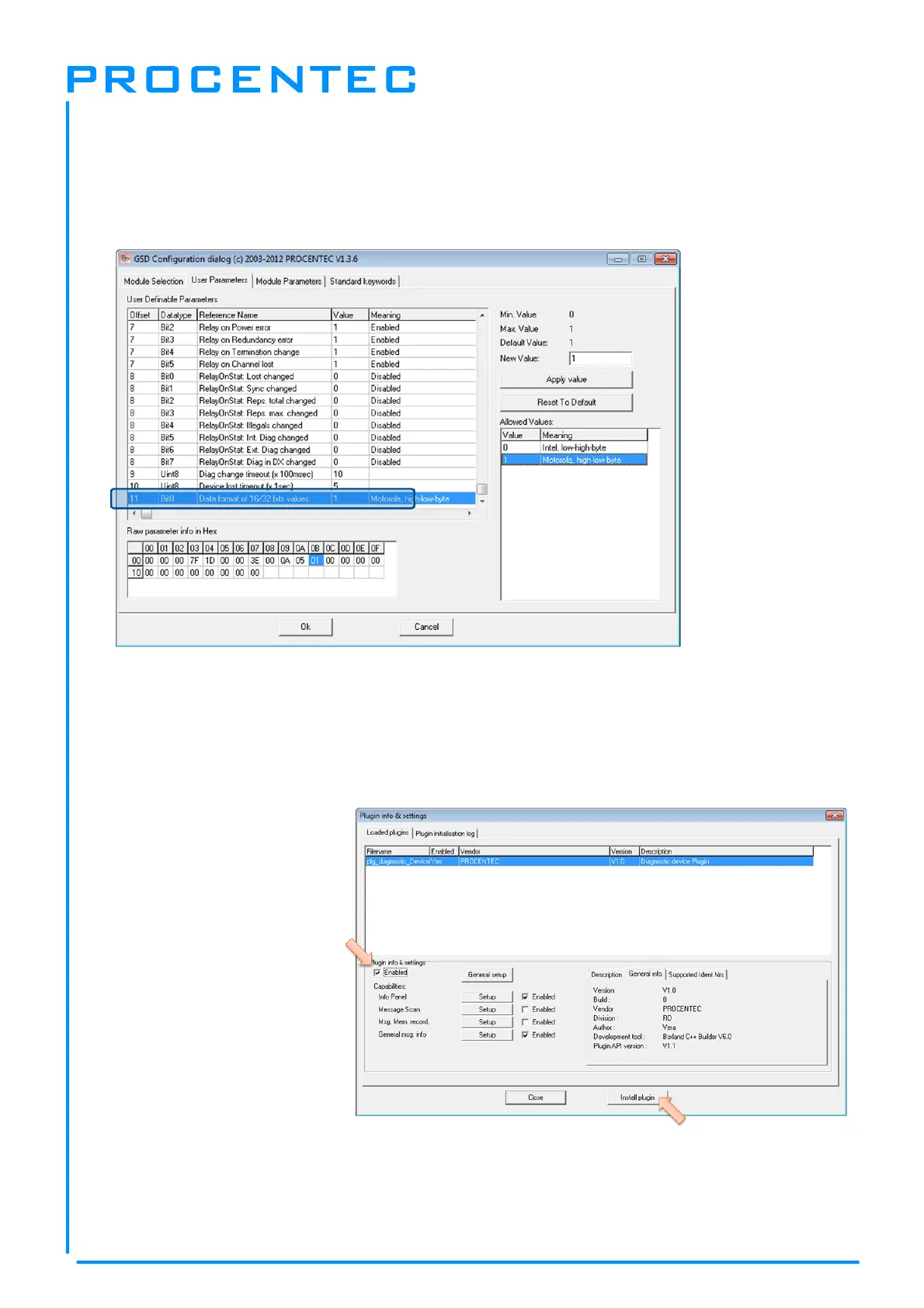
3.3.9 Changing the data format
The data format can be changed if needed. Default is Motorola, high-low-byte format.
You can change it to Intel, low-high-byte format.
3.4 ProfiTrace plugin for the Diagnostic Device
On the download section of www.procentec.com you can download a useful plugin for the Diagnostic
Device. It interprets all messages to and from the Diagnostic Device and displays the data in the Info
Panel of ProfiTrace.
3.4.1 Installing the Plugin
Once you have downloaded the
file and extracted it to your hard
drive, start ProfiTrace and
choose ‘Settings – Plugins’ to
bring up the Plugin window.
Click ‘Install Plugin’ and locate
it on your harddrive.
Next, click ‘Enabled’ so that
ProfiTrace starts the plugin on
startup.


 To Next Page