ProfiHub B5+ / B5+RD User Manual
_______________________________________________
Version 2.0 – July 2014 Page 24 / 56
ProfiHub-B5-Plus-Manual-EN.docx © PROCENTEC 2014 - Copyright - all rights reserved
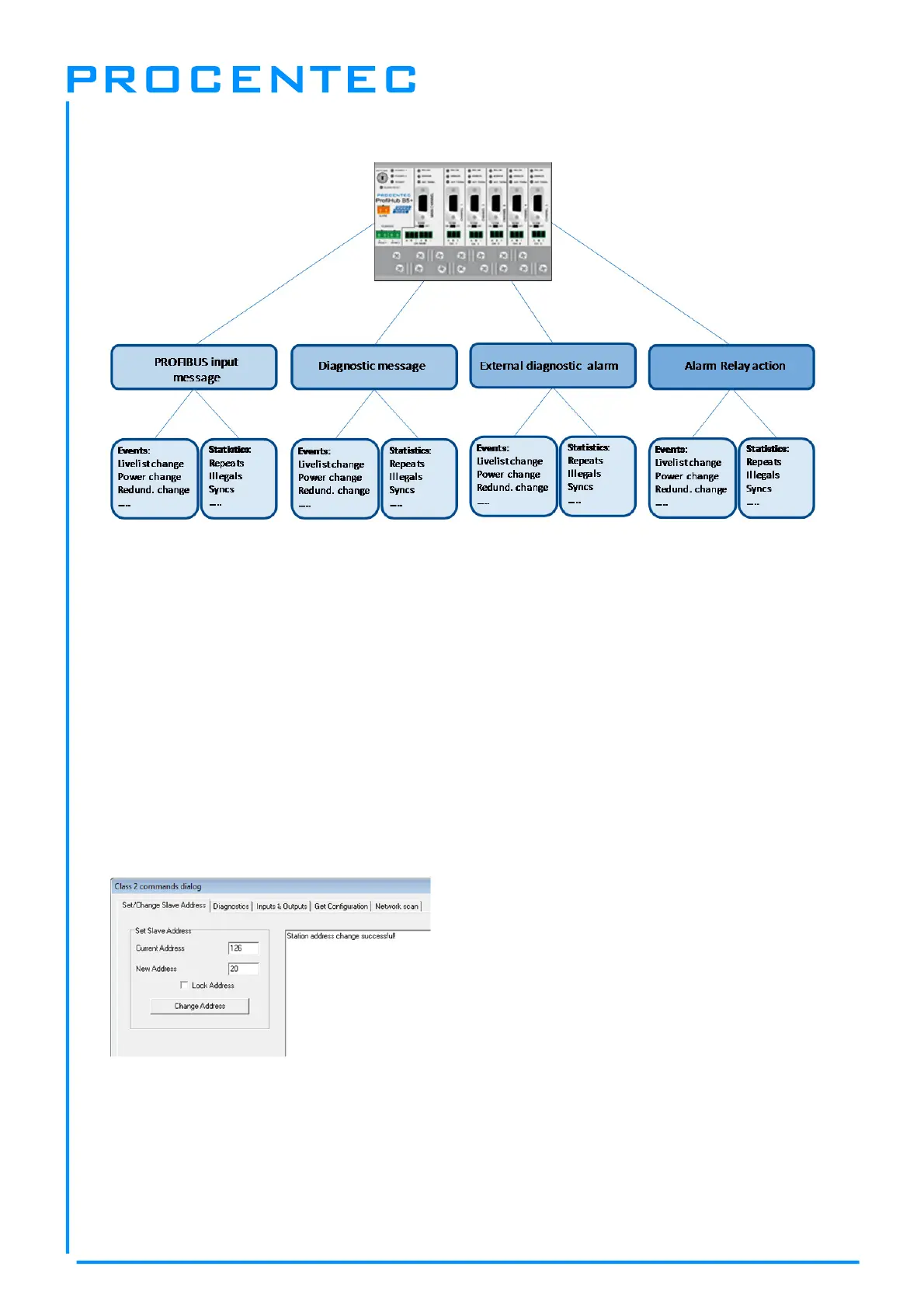
Fig. 19 - Ways of notifying the user in case of problems
3.1 Setting up the Diagnostics Device
3.1.1 Enabling the Diagnostics Device
To enable the Diagnostics Device in the ProfiHub, set the rotary switch on the top left side to any
position from 1 to D (for a complete list of rotary switch settings, refer to the Technical Data chapter).
Next, power-cycle the device by removing power and applying the power again. The rotary switch
position is only read during start-up of the ProfiHub.
3.1.2 Changing the default PROFIBUS address
By default the address of the Diagnostic Device is set to 126. To change the address, use a
configuration tool which supports the ‘Set Slave Address’ command. Most configuration tools support
this feature.
Fig. 20 - ProfiCaptain changes the address from 126 to 20


 To Next Page