PROLiNK® PRC2401U Wireless AC2600 MU-MIMO Dual-Band Gigabit Router
44
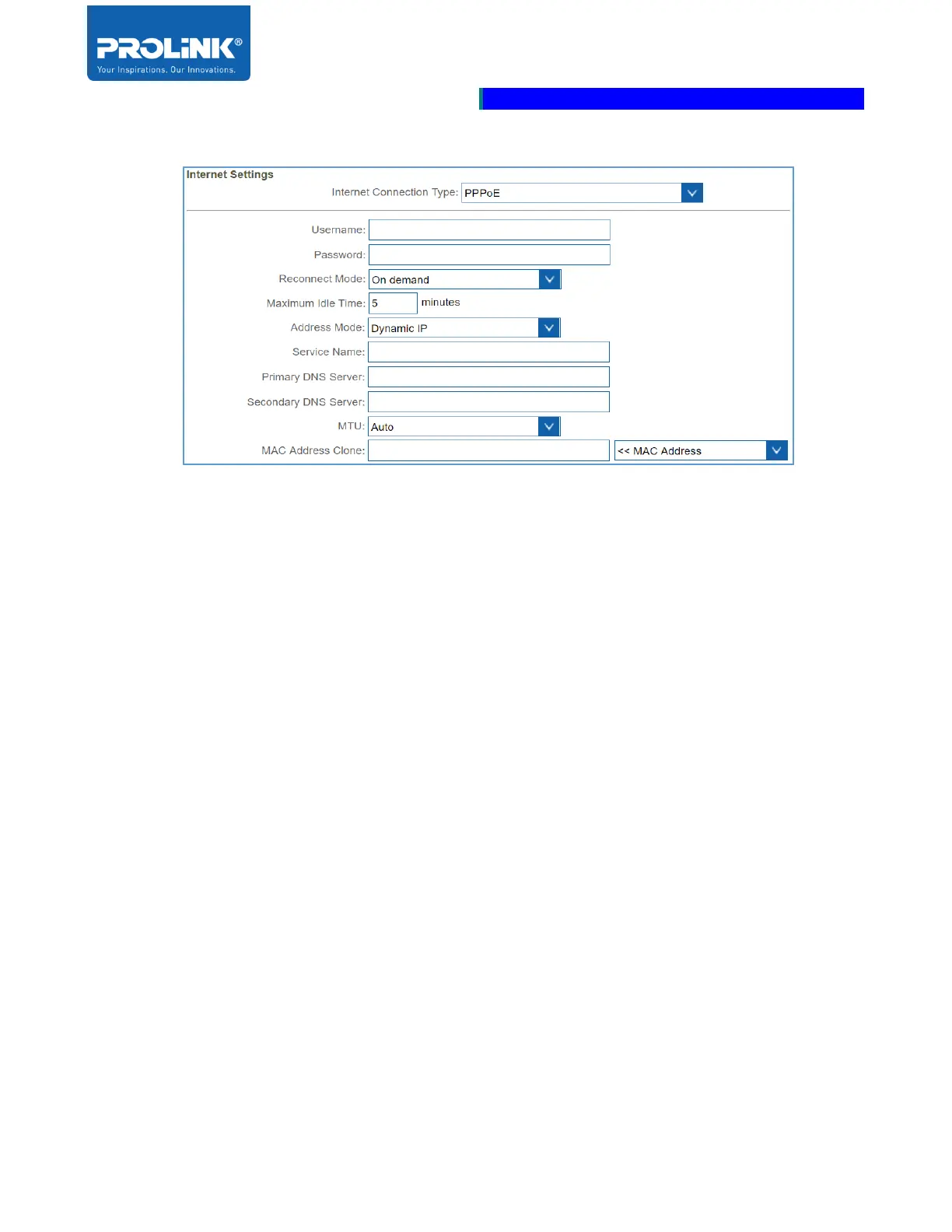
PPPoE
• Username: Set the Username as provided by the ISP.
• Password: Set the Password as provided by the ISP.
• Reconnect Mode: Choose the reconnect mode for the Internet access either Always On, On
demand or Manual.
• Maximum Idle Time: This selection only available for On demand Reconnect Mode. Set the
Maximum idle time for the Internet connection is maintained during inactivity.
• Address Mode: Select to Static IP if your ISP is providing you with IP Address, subnet mask,
gateway, and DNS Server addresses. If you are unsure, select to Dynamic IP.
• Service Name: Set your ISP Service Name. This is optional setting.
• Primary DNS Server: Set the Primary DNS Server IP Address specify by the ISP.
• Secondary DNS Server: Set the Secondary DNS Server IP Address specify by the ISP.
• MTU: By default MTU (Maximum Transmission Transmission Unit) is set to Auto. Select to
Manual if you would like to set the MTU for the optimal performance with your ISP.
• MAC Address Clone: By default MAC Address is configure to the WAN Port’s of physical
interface of the MAC address on the router. The MAC Address could be change with the MAC
Address of a connected client.



 To Next Page