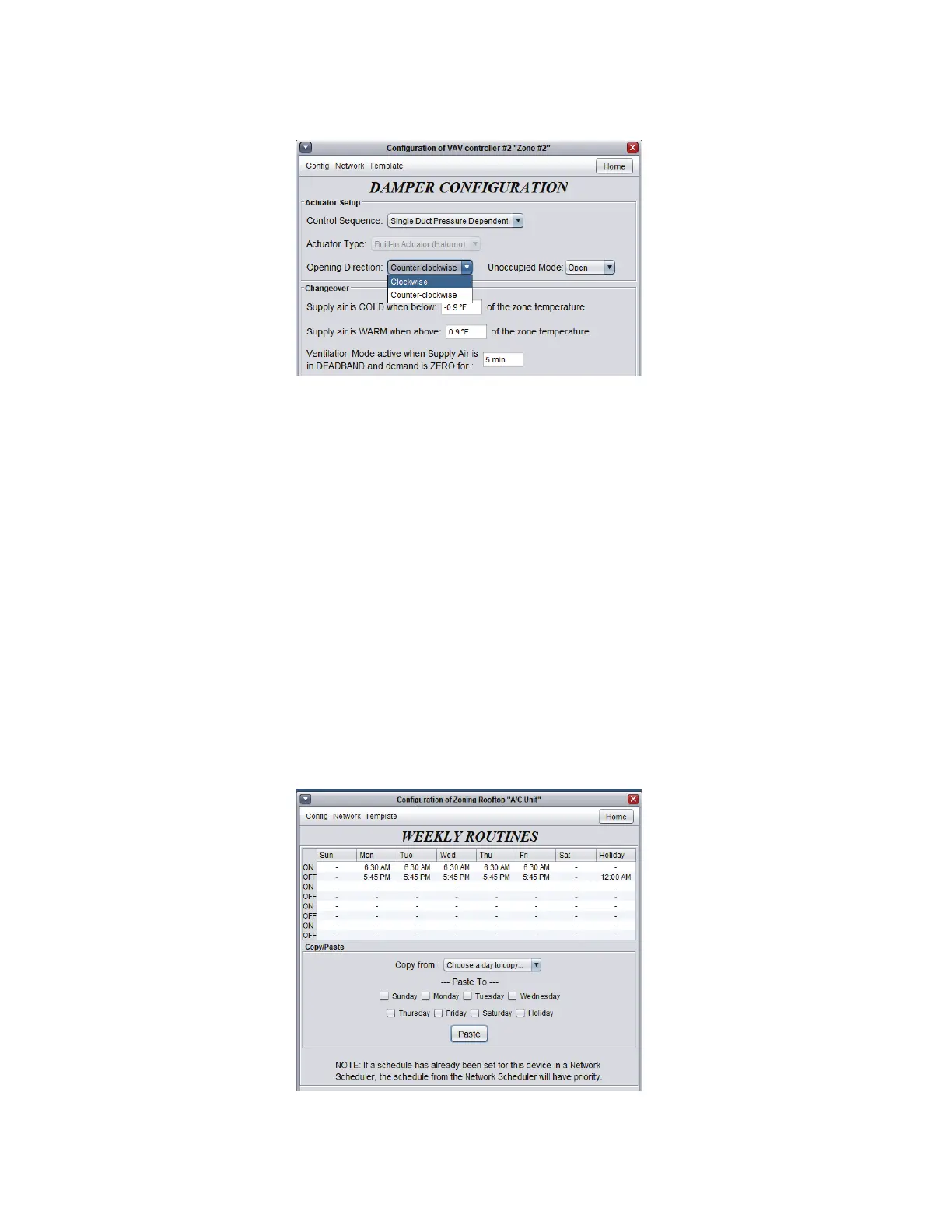
Inverting a zone damper’s opening direction
• To invert the damper’s opening direction, double-click the zone controller icon to open its menu, then double-click directly
on the zone damper shown on the screen. You then access the page: “Damper Conguration”.
• At the bottom of this page, “Damper Setup”, choose the correct opening direction (clockwise or counterclockwise) and
then click “Apply”.Physicallyconrm.
Date and time
• From the unit controller’s home screen, check that the date and time are correct. To modify them, click on “Edit” and then
click “Copy” to copy the computer’s date and time, or manually type the change then click “OK”.
Schedule
• Also from the unit’s home screen, click “Network” and then “Schedule”toaccesstheschedulecongurationpage.
• Double-click the “ON” line in the “Monday”column.Whilethecursorashesinthemiddleofthisperiod,typethestart
“Occupied” pediod. Eg: 6 to start the ‘occupied’ period at 6:00am or 630 for 6:30am.
• Double-click the “OFF” line in the “Monday”column.Whilethecursorashesinthemiddleofthisperiod,enterthetime
to end the “Occupied” period. Eg 16 for 16:00 (4:00pm) or 1745 for 17:45 (5:45pm).
• To copy a schedule, click the day to copy on the “Copy from” dropdown list and then check the other days which will have
the same schedule in the “Paste to” list. Click “Paste” and then click “Apply”.
8-6



 To Next Page