MVI56E-GSC/GSCXT ♦ CompactLogix or MicroLogix Platform Reference
Enhanced Generic ASCII Serial Communication Module User Manual
ProSoft Technology, Inc. Page 125 of 140
April 24, 2017
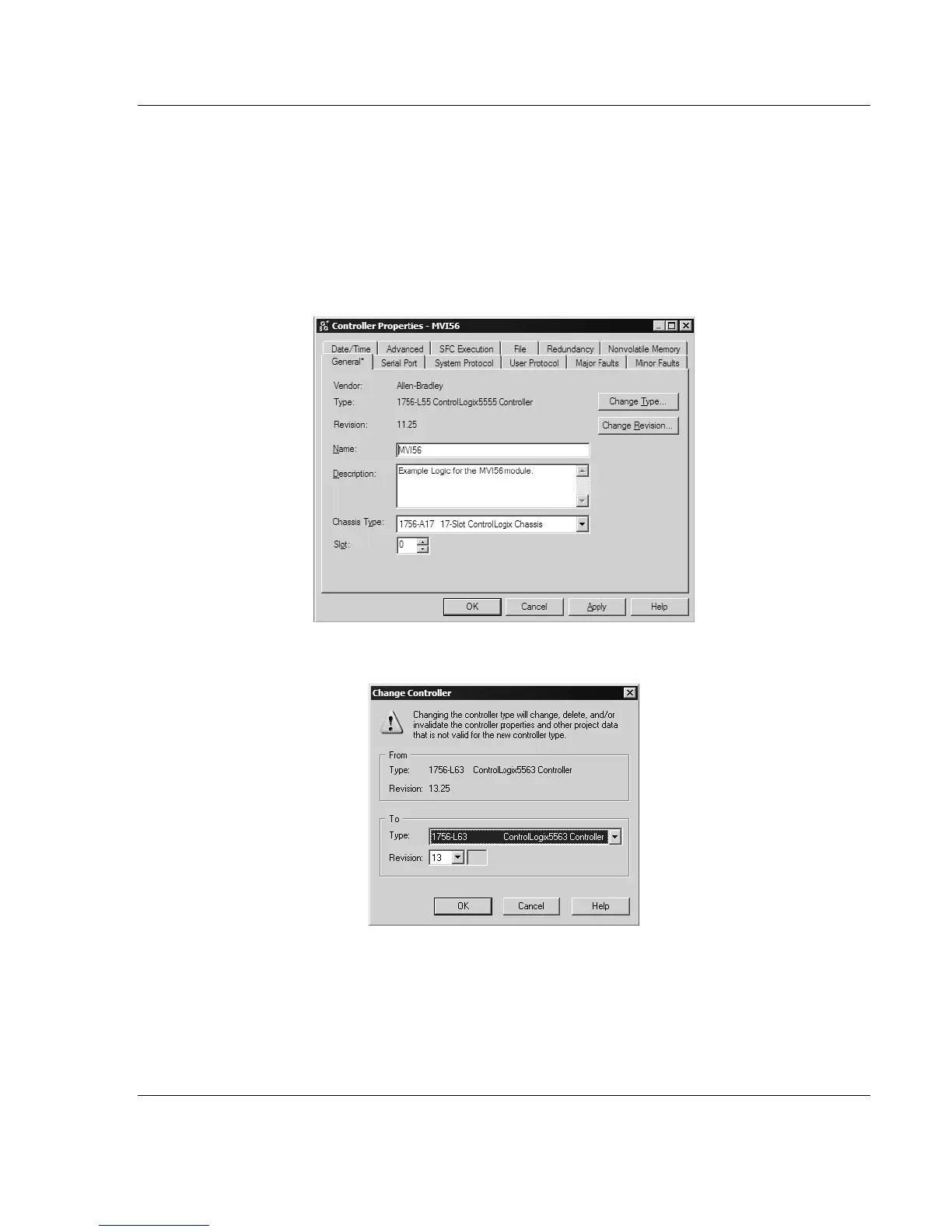
4.7.2 Choosing the Controller Type
The sample application is for a 1756-L63 ControlLogix 5563 Controller. If you are
using a different model of the ControlLogix processor, you must configure the
sample program to use the correct processor model.
1 In the Controller Organization list, select the folder for the controller and then
click the right mouse button to open a shortcut menu.
2 On the shortcut menu, choose PROPERTIES. This action opens the Controller
Properties dialog box.
3 Click the CHANGE TYPE or CHANGE CONTROLLER button. This action opens
the Change Controller dialog box.
4 Open the TYPE dropdown list, and then select your ControlLogix controller.
5 Select the correct firmware revision for your controller, if necessary.
6 Click OK to save your changes and return to the previous window.



 To Next Page