VIBTOOL 02.2009
28
Vibration measurements with VIBTOOL
During measurement keep the sensor firmly pressed
against the measurement point and keep it still - measure-
ment duration depends upon signal strength and stability:
the stronger and more constant the measurement signal is,
the quicker the display response will be.
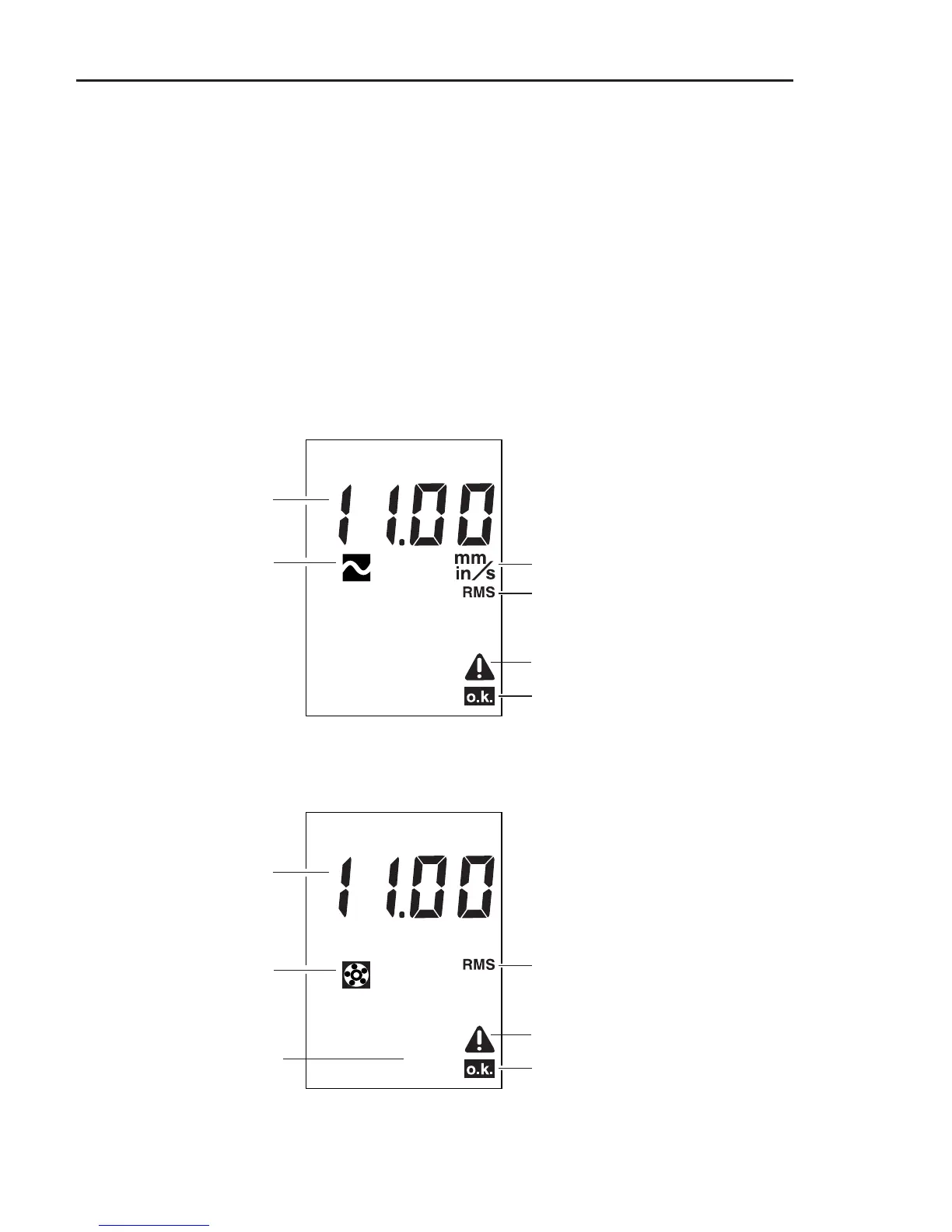
Vibration display
The following display shows all the symbols which can
appear during a vibration measurement. However, the
symbols may not all appear simultaneously.
Vibration measurements
Units of vibration velocity measurement
(inch/s or mm/s)
Measurement quantity RMS
Measurement is OK.
OK indicates that the measurement is
complete and was within defined
stability limits.
Measurement value
Symbol indicating vibration
velocity measurement
Symbol indicating measurement
error (instable signal, etc.)
Measurement quantity RMS
Measurement is OK.
OK indicates that the measurement is
complete and was within defined
stability limits.
Measurement value
Symbol indicating vibration
acceleration measurement
Symbol indicating measurement
error (instable signal, etc.)
Units of vibration accelerati-
on measurement (g or m/s²)
Note:
m/s² cannot be displayed:
‘ - - ’ is shown instead!
g



 To Next Page