Chapter 5: Accessories
The Hand Strap - Model ST6025
137
Psion Omnii Hand-Held Computer User Manual
5.2.1 The Hand Strap - Model ST6025
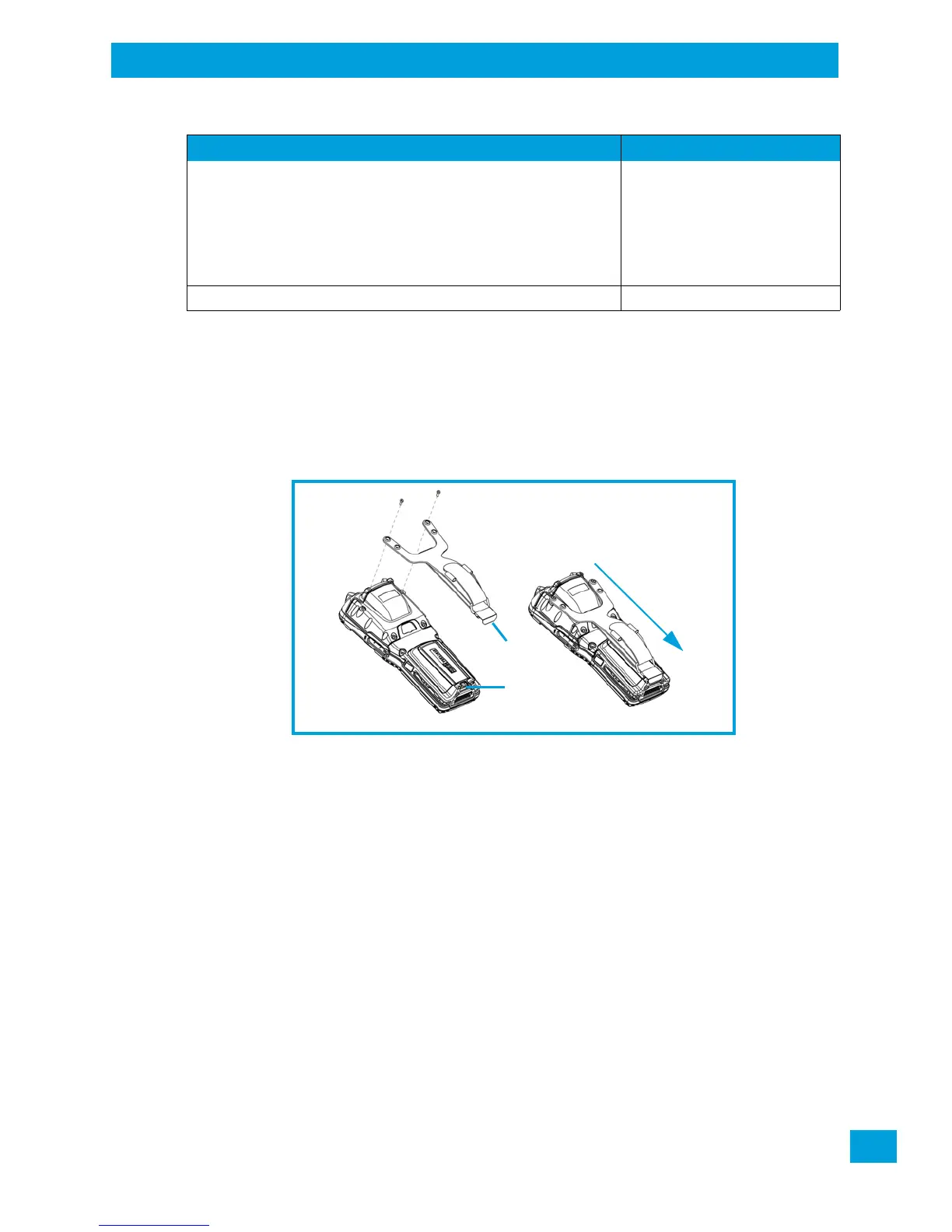
• Attach the strap to the two threaded inserts located at the back of the hand-held near the top of the
unit (see Figure 5.3), using the two Phillips head screws provided with this accessory.
• Stretch the handstrap toward the base of the hand-held, and hook the clip at the bottom of the
handstrap into the slot near the base of the battery pack.
Figure 5.3 Attaching the hand strap
5.2.2 Protective Carrying Case - Model ST6090
A carrying case is available for the Omnii to shield the unit from damage. It is compatible with the hand
strap. A variety of cases are available, depending on the type of end-cap attached to your unit.
5.2.3 Hard Shell Holster - Model ST6055
A hard shell holster that includes a belt, leg tie-down, and tether, can be used to hang the Omnii with a
pistol grip from your waist, on either your left or right side.
• Feed the belt through the top panel of the holster, and adjust the belt as needed.
• If using the leg tie-down strap, wrap it around your leg and snap the buckle closed. Adjust the tightness
of the strap for security and comfort.
• Place the Omnii into the holster with the grip extending back through the custom opening.
• If desired, attach the tether to the pistol grip.
Grey – Standard back covers A & B ST6081
Yellow – Expansion Back Covers ST6082
Grey – Expansion Back Covers ST6083
Yellow – Expansion Back Covers, WWAN End-cap ST6084
Grey – Expansion Back Covers, WWAN End-cap ST6085
Blue – Freezer Standard Back Covers ST6086
Table 5.2 Accessories Model Numbers
Accessory Model Number



 To Next Page