Chapter 4: Configuration
Device
59
Psion Omnii Hand-Held Computer User Manual
4.4.2.3 Device Pop-up Menu
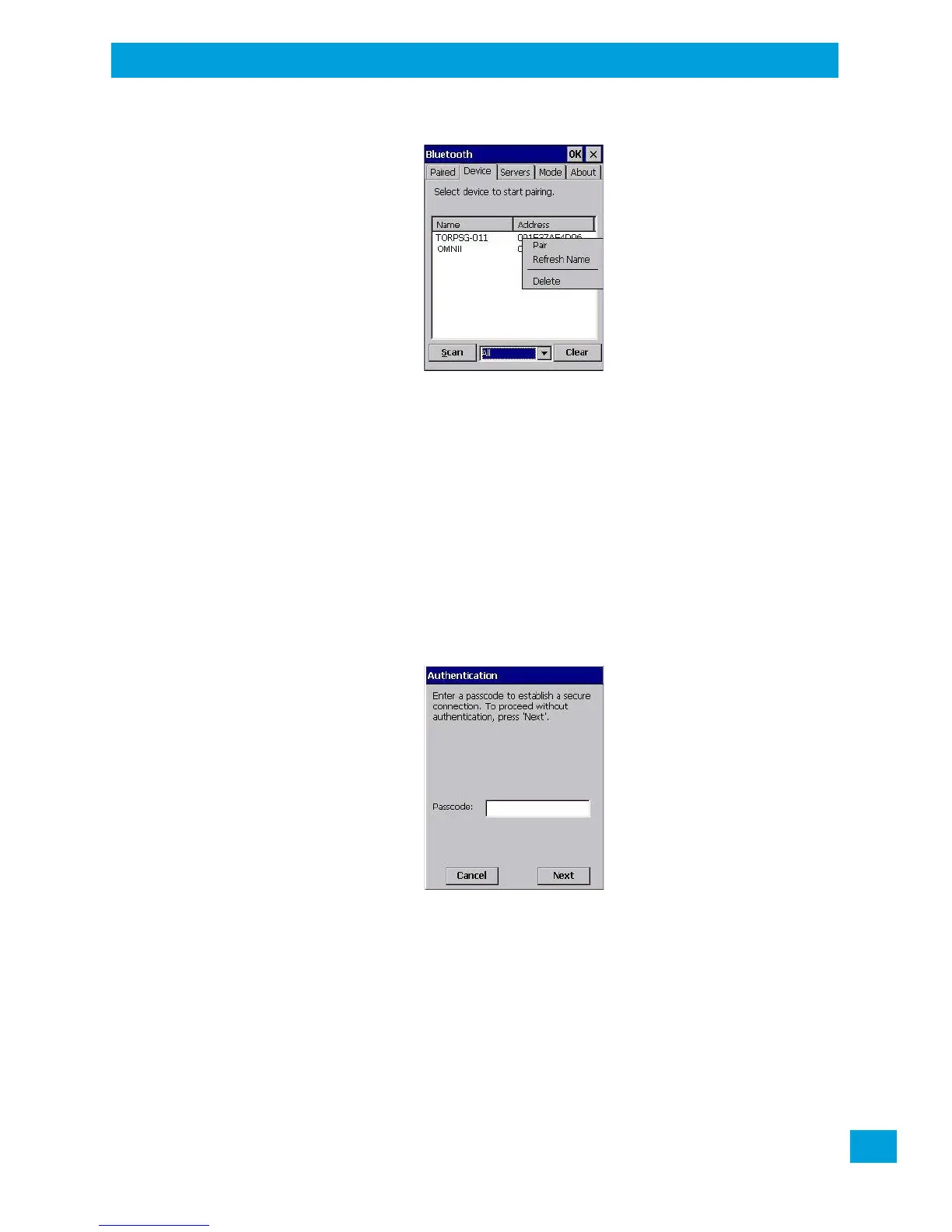
The Device pop-up menu allows you to pair a device, update a device name or delete a device from the list.
Pair begins the pairing process by querying the services and profiles of the discovered device. An authenti-
cation dialog box is displayed the first time a Bluetooth device is paired.
Refresh Name repeats the device name inquiry, updating the name. This command is useful if a device is
listed without a name (unknown), or if a device name has been changed remotely.
Delete removes this device from the list.
4.4.2.4 Pairing a Device
To pair dev ices:
• Follow the manufacturer’s instructions to place the remote device in pairing mode.
• Choose the Devices tab and Scan for devices in your area.
• When the scan is complete, tap on the device to which you want to pair.
• In the pop-up Device menu, tap on Pair.
An Authentication dialog box is displayed.
• If the remote device has authentication enabled, type the PIN in this dialog box.
• To proceed without authentication, tap on Next.
After entering the device PIN, the Services dialog appears with a list of services available for that device.



 To Next Page