Chapter 5: Accessories
Insertion and Removal of Omnii
Psion Omnii Hand-Held Computer User Manual
152
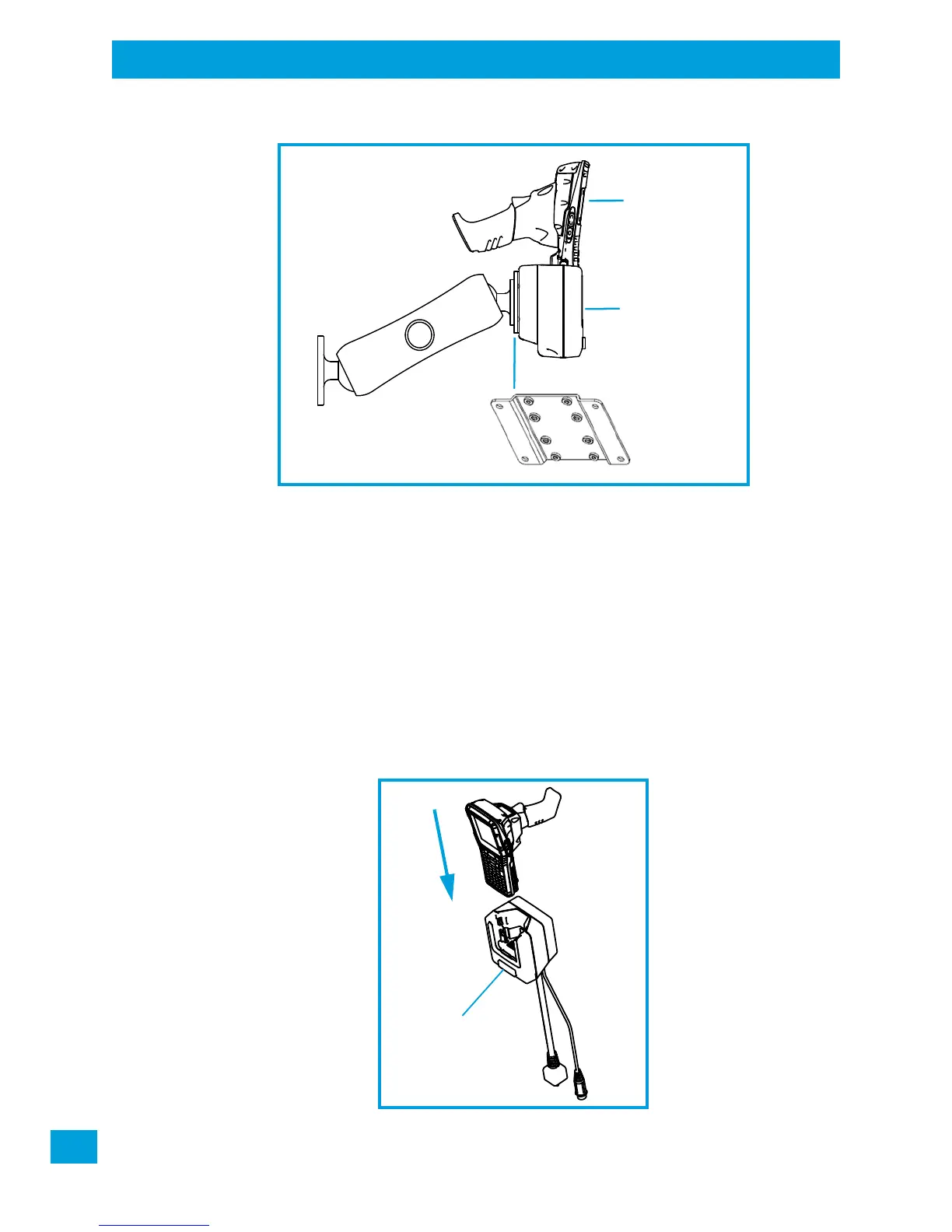
Figure 5.18 MT3325 Standard Arm Kit with Omnii Vehicle Cradle Clamp and Rail Bases (Torque to 26 in-lbs)
To accommodate the service loop of the connector cable, leave a 4" clearance at the bottom of the cradle.
Leave a 7" (minimum) clearance at the top of the cradle to allow easy removal of the hand-held. Refer to
the detailed assembly instructions that are packaged with the cradle when selecting a mounting location
(Omnii Vehicle Cradles Quick Start Guide PN 8000221).
5.7.2 Insertion and Removal of Omnii
If your Omnii is equipped with a cover, or the ST6025 Double Loop Handstrap, these accessories need to be
removed before installing the unit in a vehicle cradle. There is no need to remove other handstraps or pistol
grips from the unit.
• Slide the Omnii into the cradle, and press firmly downward until it locks into place. On a vehicle, it’s a
good idea to pull up on the Omnii to be certain that it is secure.
• To remove the Omnii, press the release button on the front of the cradle until it releases.
Figure 5.19 Inserting Omnii into the vehicle cradle
MT3326 Bracket
MT3325 Arm
ST1002 Cradle
(powered)
Omnii



 To Next Page