Chapter 3: Getting To Know Your Omnii
The Windows Classic Shell Startup Desktop
39
Psion Omnii Hand-Held Computer User Manual
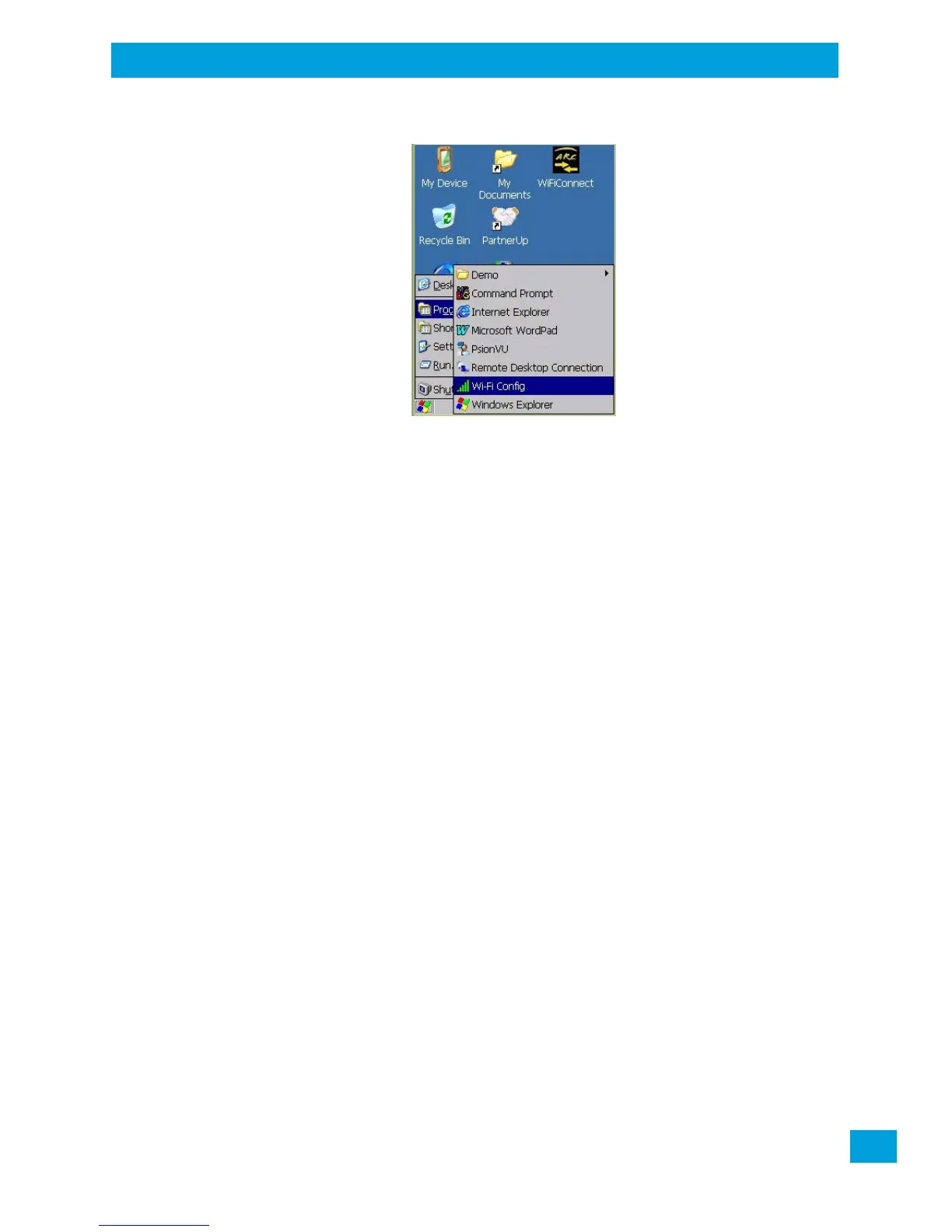
Figure 3.6 Program Sub-Menu
This sub-menu allows you to choose Command Prompt, Internet Explorer, installed applications (e.g., Micro-
soft WordPad), PsionVU Access, Remote Desktop Connection, Wi-Fi Config, or Windows Explorer.
Demo
This folder contains the Scanner Demo, Demo Signature and Demo Sound applications. Scanner Demo can
be used to test how the hand-held reads barcodes. Demo Signature allows you to capture a signature
written on the screen with your stylus and save it to a file. Demo Sound allows you to record and playback
sound files. The ‘Sample Rate’ and the ‘Bits Per Sample’ are the rates at which the sound will be recorded.
Sounds recorded at the higher sample rate or bits per sample will be higher quality sound but will require
more file storage space. Lower sample rates and/or bits per sample produces a smaller file, but the sound
quality suffers. The record and play buttons operate the same as any recording device. The X icon deletes
the sound and the diskette icon allows you to save your sound.
Command Prompt
Command Prompt is used to access the DOS command prompt. At the prompt, you can type DOS com-
mands such as dir to display all the directories in the drive.
Internet Explorer
The Omnii is equipped with Microsoft Internet Explorer for Windows Embedded CE. You can access the In-
ternet Options icon through the Start Menu under Settings>Control Panel or by double-tapping on the
desktop icon My Device and then, double-tapping on the Control Panel icon.
Microsoft WordPad
WordPad is a basic word processor used to create, edit, and print .rtf, .doc, and .txt files.
PsionVU Access
PsionVU Access allows you to change the appearance and actions of the desktop from the default Windows
Classic Shell to the PsionVU shell.
Remote Desktop Connection
Remote Desktop Connection is an Omnii application used to connect to a Windows Terminal Server so that
you can run a “session” on the Server machine using the hand-held (Windows Embedded CE device).
“Remote Desktop Connection” on page 97 provides a website with details about this option.
Wi-Fi Config
The Wi-Fi Config application is used to configure the Omnii 802.11a/b/g/n radio for one or more wireless
network profiles.


 To Next Page