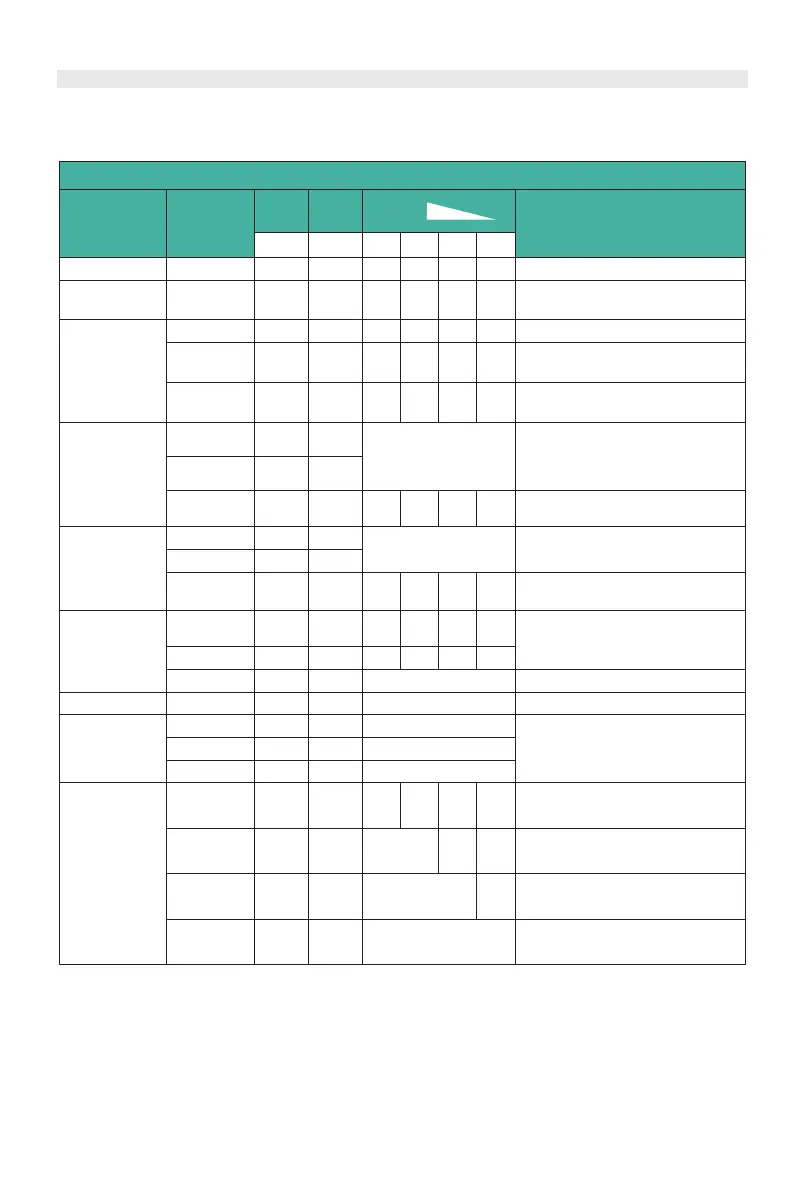
Status and SOC Indicators
Status light: to show the battery module’s status (RUN
●, Alarm●).
SOC(Battery capacity indicator): 4 green lamps, each light represents 25% capacity.
Success
OffOffflash 5
BlackStart
Normal
flash 2 Power On DeviceOffflash 2
STL Fault
flash 2 MCU self-check problemflash 2Off
Power On
Fault
flash 4Off OffOffOffOff
Stop charging/discharging,
STATUS(red) lighting
Protection
LightOff
Alarm
OffFlash2
Indicates the battery voltage or
temperature is over or under.
Info
Update
flash 2
flash 2Offflash 2 Info/Update(Finished)
History
Update
OffOffflash 2
History/Update(Updating)
Event
Update
OffOff
flash 2
Offflash 2
Event/Update(M2SING)
Misc
Update
OffOffOff
flash
2
Offflash 2
Other Fault
OffOffOffOffLightOff
Protection
OffOffOffOff
OffOffOffOffLightOff
Protection
OffOffOffOffLightOff
Status and SOC Indicators Instructions
Battery Status
Protection /
Alarm /
Normal
STATUS
(red)
STATUS
(green)
SOC
Descriptions
All off
Indicates Sleep Mode, to
save the power.
Indicates save power mode.
Indicates the battery voltage or
temperature is high or low.
Waiting
flash 5
Black Start Function
Misc/Update(Before Forceup)
Offflash 5
Fail
Offflash 5Off
Idle
Charge
Abnormal
USB
During start-up
Discharge
Sleep
Shut Down
Alarm
OffOffOffOffOffLight
Alarm
OffLight
Normal
OffLight
Normal
OffOffOffOffOffLight
Normal
OffFlash2
Normal
● ●●●●●
OffOffOffOffOffFlash2
OffOffOffOffOffOff
The highest capacity
indicator LED flashes
(flash 2),others lighting
The highest capacity indicator
LED flashes (flash 2), others
lighting, horse race lamp when
SOC>= DODH;
Stop charging, STATUS(red)
lighting
Indicate based on capacity
Stop discharging, STATUS(red)
lighting
Indicate based
on capacity
Note: The flashing instructions,
flash 1 - 0.25s light / 3.75s off;
flash 2 - 0.5s light / 0.5s off;
flash 3 - 0.5s light / 1.5s off;
flash 4 - 1s light / 1s off;
flash 5 – 0.1s light / 0.1s off;
13
/
42


 To Next Page