Pre-charge error.
(Bit23)
hardware
Pre-charge
circuit error.
1. Check the external power cables of
the polarity and connection
2. Change the pre-charge circuit board
3. If problem remain, contact Pylontech
service engineer.
Current IC Error
(Bit22)
hardware
current measurement
board error
1. Restart
2. Change the current measurement
board
3. Change the CMU or BMS.
4. If problem remain, contact Pylontech
service engineer.
BMU Internal bus
error
(Bit18)
Comm. and
hardware
BMU internal error
Failure Definition SolutionPossible ReasonFailure Type
1.Change the BMU of the RED LED
module.
2.If problem remain, contact Pylontech
service engineer.
5.2.1.1 Use a charger to charge the new battery module and existing module to full (SOC 100%)
5.2.1.2 Turn off the whole battery string’s power. Must confirm the D+ and D- terminal are without
power. The turn off progress refer to chapter 3.8
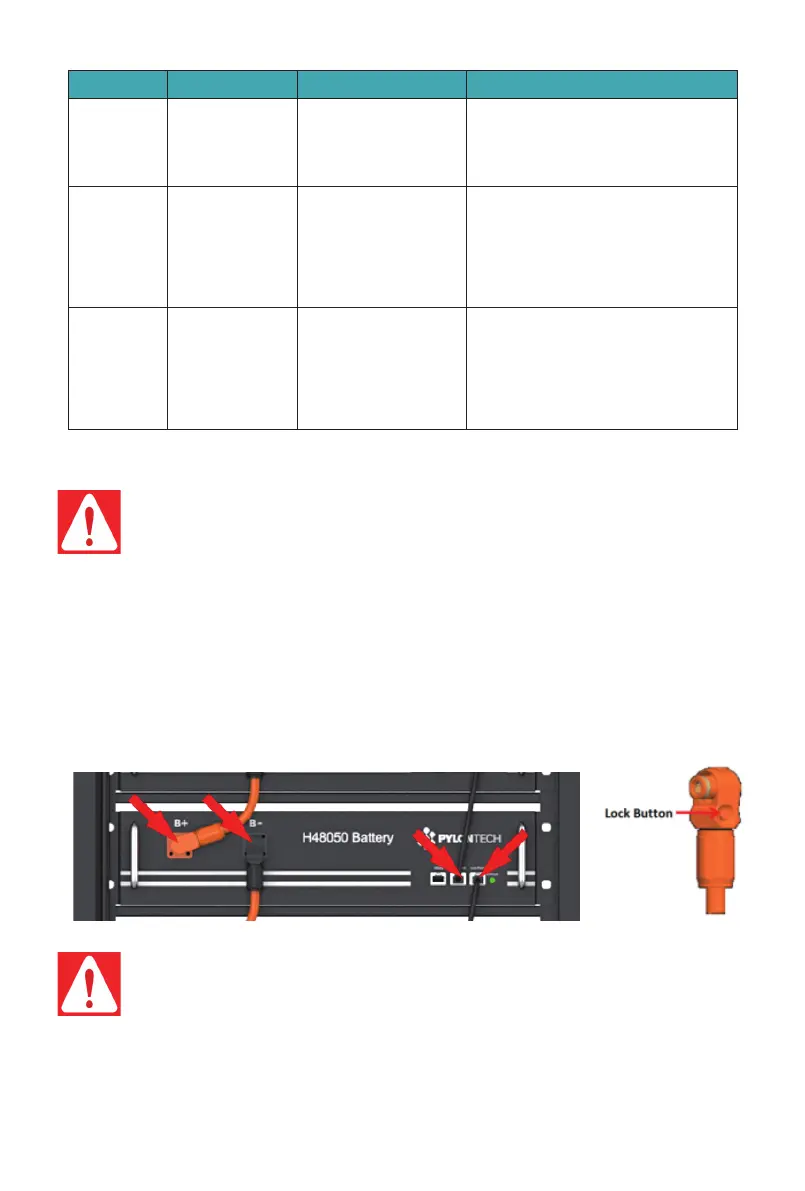
5.2.1.3 Pull out the Plug of Power Cable +/-. Pull out the plug of communication cable.
5.2.1. Replacement of Battery module
5.2. Replacement of main component among the BESS
Danger: the power cables and plugs still have high voltage DC power from serial connected
battery modules (battery module can’t be turned off), must be careful to handle the Power
plugs.
Danger: The PowerCube-H1/H2-V2 is a high voltage DC system, operated by qualified and
authorized person only.
Danger: Before replacing the main component user must shut off the maintenance battery
string’s power. Must confirm the D+ and D- terminal are without power. The turn off progress
refer to chapter 3.8
37
/
42


 To Next Page