.
4) After a few seconds, the screen
will indicate that cooking has
started and show the current time
Note: You may cancel the automatic cooking mode any time by go manuel mode.
Oven time is 2 hours from now on meal furnace was programmed to cook
for 15 minutes. Other control buttons on the oven and heat to desired
cooking function, do not forget to appropriate locations.
D
ELAYED COOKING
By pressing the key will be ready meal (cooking end) and if desired, also possible to set
the time to see. Enter the cooking time as described in the scheduled time for cooking. Then
press the key and enter the cooking end time. Image flashes on the screen.
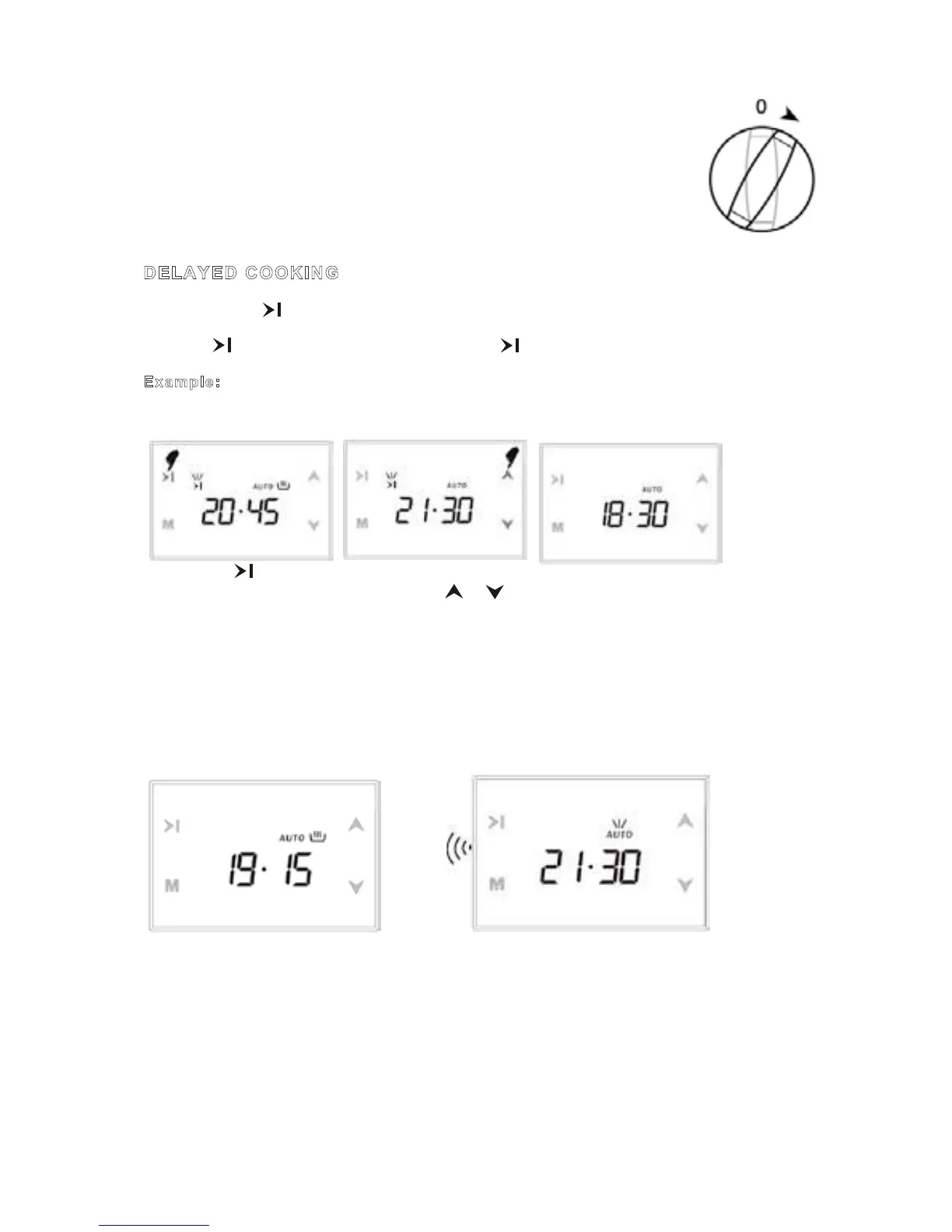
Example: We want to cook dinner, around 21:30 or 18:30 o'clock thinking that it would be
ready.
1) Press the button 2) Set it to the desired time 3) In a few seconds, screen
The display will be ready by using the or buttons. switches to clock mode.
for meal time, cooking time
added +2.15 18:30 will
appear at 20:45
We have now programmed our oven to get the food ready at 21:30. Since the cooking time
was preprogrammed as 2 hours 15 minutes, your oven will start cooking at 19:15, so that the
food is ready at 21:30.
Screen just when cooking starts Screen just when cooking ends
When automatic cooking is completed, a buzzer alarm is heard and will sound, if not
stopped, for 7 minutes.
1) Switch your oven OFF 2) Reset the timer
Note: Your oven will be inoperative until you reset the timer.
In the example above was entered before the cooking time, cooking end time, automatically
calculated in the second stage was changed by us. If you are prompted to enter before the
end time of cooking is also possible, in which case the second stage cooking time is
automatically calculated and can be changed if desired.
.
Note: The meat probe is attached to the automatic cooking programs. Just an alarm time
adjustment can be made available.
.
4) After a few seconds, the screen
will indicate that cooking has
started and show the current time
Note: You may cancel the automatic cooking mode any time by go manuel mode.
Oven time is 2 hours from now on meal furnace was programmed to cook
for 15 minutes. Other control buttons on the oven and heat to desired
cooking function, do not forget to appropriate locations.
D
ELAYED COOKING
By pressing the key will be ready meal (cooking end) and if desired, also possible to set
the time to see. Enter the cooking time as described in the scheduled time for cooking. Then
press the key and enter the cooking end time. Image flashes on the screen.
Example: We want to cook dinner, around 21:30 or 18:30 o'clock thinking that it would be
ready.
1) Press the button 2) Set it to the desired time 3) In a few seconds, screen
The display will be ready by using the or buttons. switches to clock mode.
for meal time, cooking time
added +2.15 18:30 will
appear at 20:45



 To Next Page