Oven Cavity Temperature Sensor Open Circuit
PT–1000-M2-XXX sensor may be defect
POC 400 PM may be defect
Front Panel Temperature Limit Exceeded
The Temperature of the UM exceeded limit (100 ºC) , check cooling fan
POC 400 UM may be defect
PM Temperature Limit Exceeded
The Temperature of the PM exceeded limit (105 ºC) .
POC 400 PM may be defect
UM heat sensor error
POC 400 UM may be defect.
PM heat sensor error
POC 400 PM may be defect.
No Temperature Regulation
Check heating elements and connections
POC 400 PM may be defect
In case of an Error Message:
If those errors cannot be recovered by touching the button, disconnecting the oven
from mains power and connecting again after 2 minutes may correct the errors.
PROGRAMMABLE OPTIONS
Buzzer Tone: There are three buzzer tones to select.
Touch the key 5 seconds long, time of day display will show the currently valid tone
as “tn 1” (high) or “tn 2 (medium)” or “tn 3 (low)". The valid tone can be changed by a
key touch within 7 seconds after the last one. Default tone is “tn 1”.
Key Sound: There are three key sound options to select.
Touch the key key 5 seconds long, time of day display will show the currently valid key
tone as “bt” (beep tone) or“c” (click tone) or “nt" (no tone). The valid key sound can be
changed by a key touch within 7 seconds after the last one. Default key sound is “bt”.
Time of Day Mode 24h/12h: Default mode is 24 hours. If 12h am/pm mode is desired,
touch both and keys 5 seconds long. Mode changes and a beep tone occur. Do the
same for vice versa.
Auto Power Save (APS): APS is an option not set as factory setting. If set, the control
will be switched OFF automatically, whenever there is nothing other than the time of day to
be displayed. Touching 5 seconds long in idle mode (no cooking related operation
present) activates this option, Time of day digits will show PS ON for a few seconds
accompanied with a beep tone. Cancelling this option is done in the same way, PS OF will
be shown on the screen.
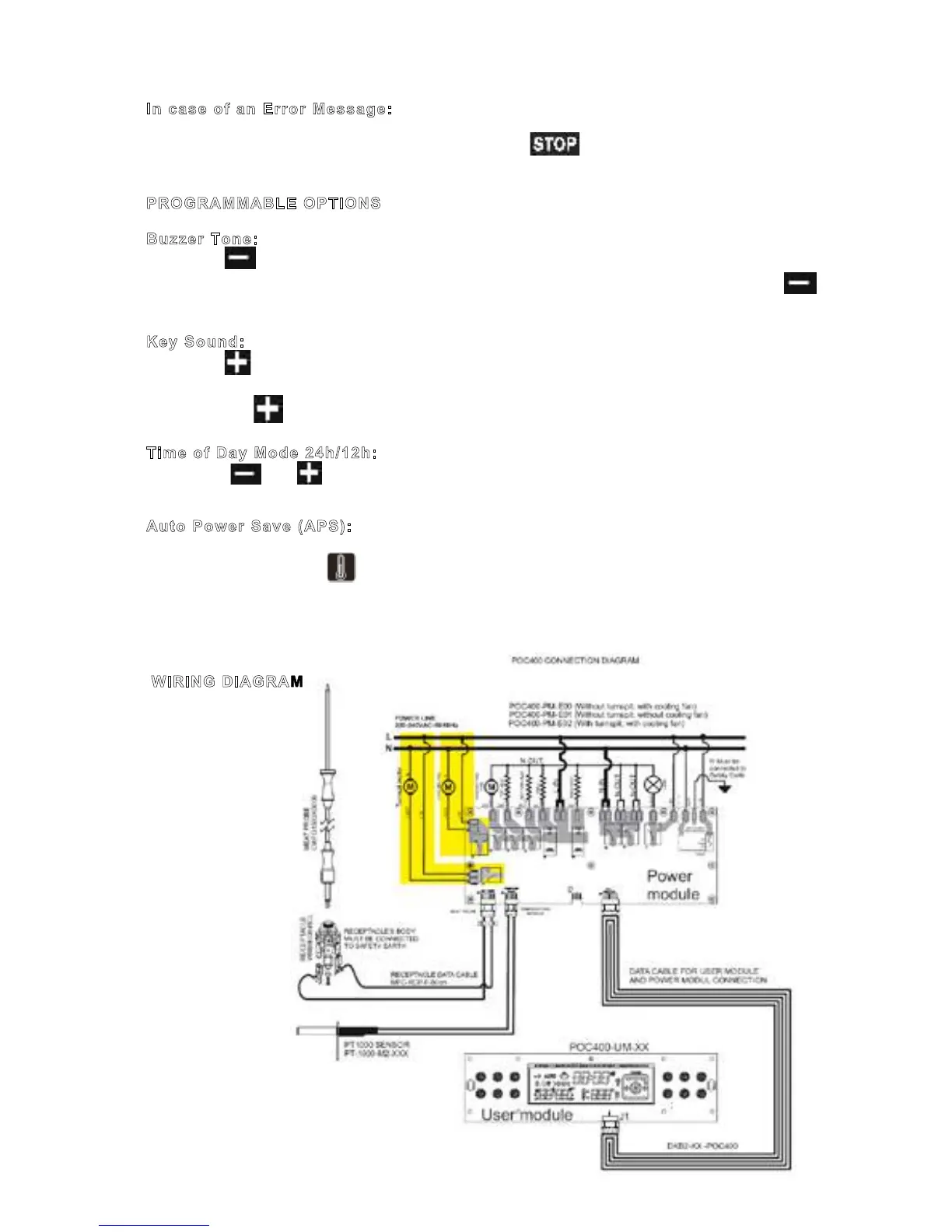
WIRING DIAGRAM
Page 8 / 8
Auto Power Save (APS): APS is an option not set as factory setting. If set, the control
will be switched OFF automatically, whenever there is nothing other than the time of day to
be displayed. Touching 5 seconds long in idle mode (no cooking related operation
present) activates this option, Time of day digits will show PS ON for a few seconds
accompanied with a beep tone. Cancelling this option is done in the same way, PS OF will
be shown on the screen.
WIRING DIAGRAM



 To Next Page