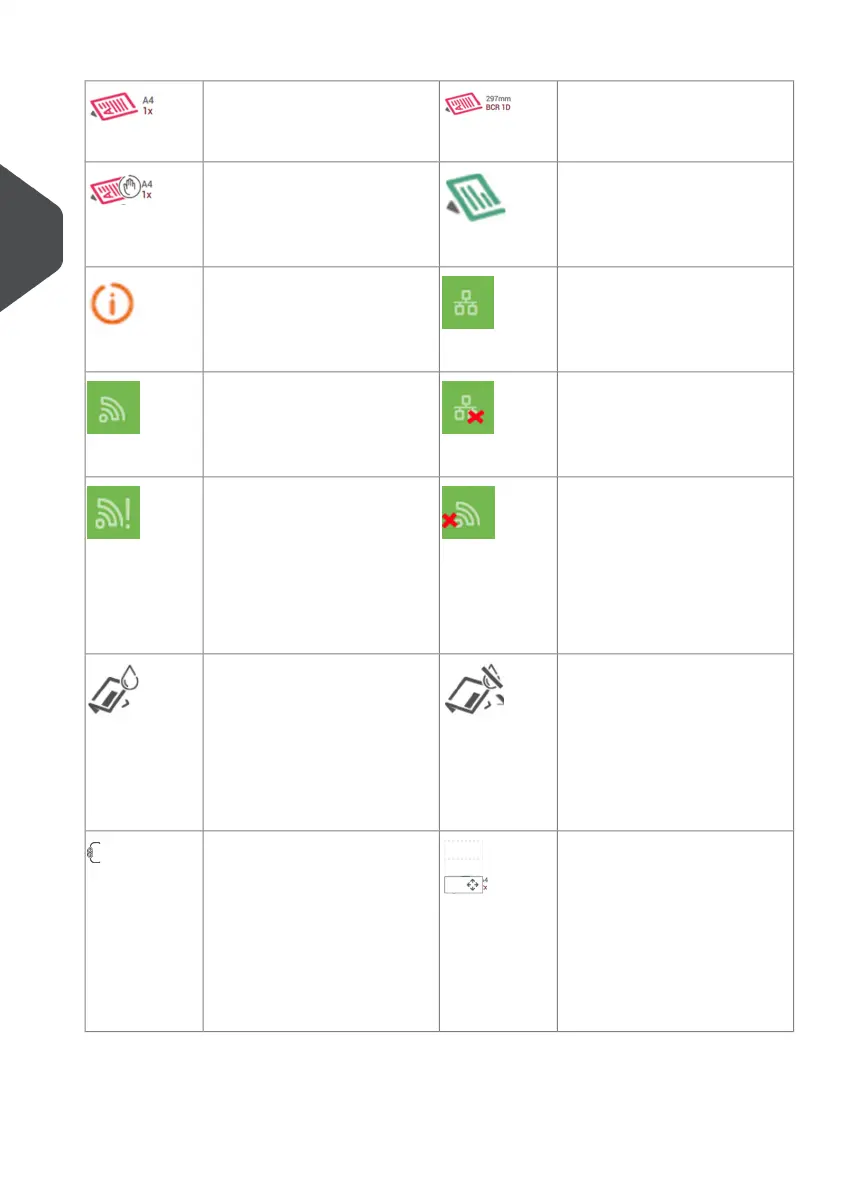
The following is a list of symbols or icons and their descriptions.
Document with reading
Shows the correct document
orientation; A is the address.
Main document.
Shows the correct document
orientation; A is the address.
EnclosureDaily mail
Feature to manually insert
mail-sets one by one into the
system.
Wired LAN connected
Network connection is avail-
able via a network cable
connection.
Notification
Next to this symbol, a mes-
sage appears, e.g. Sealing
liquid low, empty feeder.
Wired LAN not connected
Network connection is not
available via a network cable
connection.
Wireless LAN connected
Network connection via Wi-Fi
is available.
Wireless LAN not connec-
ted
Network connection via Wi-Fi
is not connected or out of
range.
Wireless LAN connected,
no internet
Network connection via Wi-Fi
is available, network is not
connected to internet.
Check with your network ad-
ministrator.
Envelope sealing off
Envelopes will not be sealed.
The symbol shows the cor-
rect envelope orientation.
When sealing is off, the flap
of the envelope is closed but
not moistened.
Envelope, sealing on
Envelopes will be sealed. The
symbol shows the correct
envelope orientation.
Change feeder trays
Possibility to change from
one feeder tray to another.
Feeder linking
Linking means that when one
feeder is empty, the system
automatically starts feeding
documents from the other
feeder. This symbol at the
feeders shows if the feeders
are linked.
16
| Page 16 | Nov-25-2020 04:16 | Meet your Document System
3
English



 To Next Page