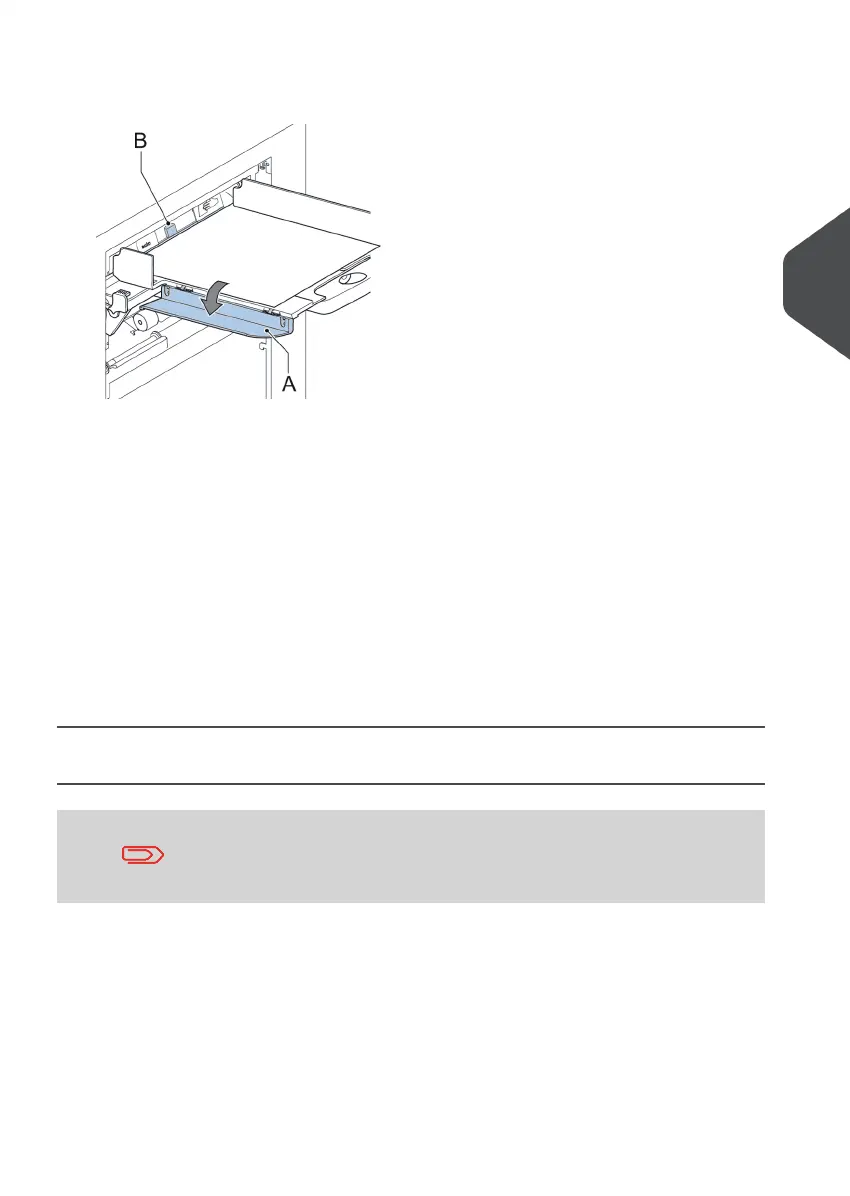
4. Turn down the left side guide A of the upper tray (not applicable when using a High
Capacity Document Feeder). Now you can see the Daily Mail handle B.
5. Move the handle B to the right to enable the Daily Mail function.
6. Turn side guide A upwards.
7. Place the document or document set in the feeder tray.
The document or document set will be folded and inserted into the envelope as
described in the selected job.
8. Place the next document or document set in the feeder tray. The system will keep
running to process the inserted document or document set.
9. When finished with Daily Mail, tap [stop] to stop the job.
10. Set the Daily Mail handle B to the ‘AUTO’ position to disable the Daily Mail and enable
the automatic document separation.
Create a Job with Custom Envelopes
Makes sure that your custom envelopes fit within the specifications
(see Envelope Specifications).
Create a Manual job and select envelope.1.
2. Tap [Custom].
4
English
45
| Page 45 | Nov-25-2020 04:16 | Working with Jobs



 To Next Page