mask and gateway IP address.
Delete a 980 - Enables you to delete a 980 device from
the 980 Manager application.
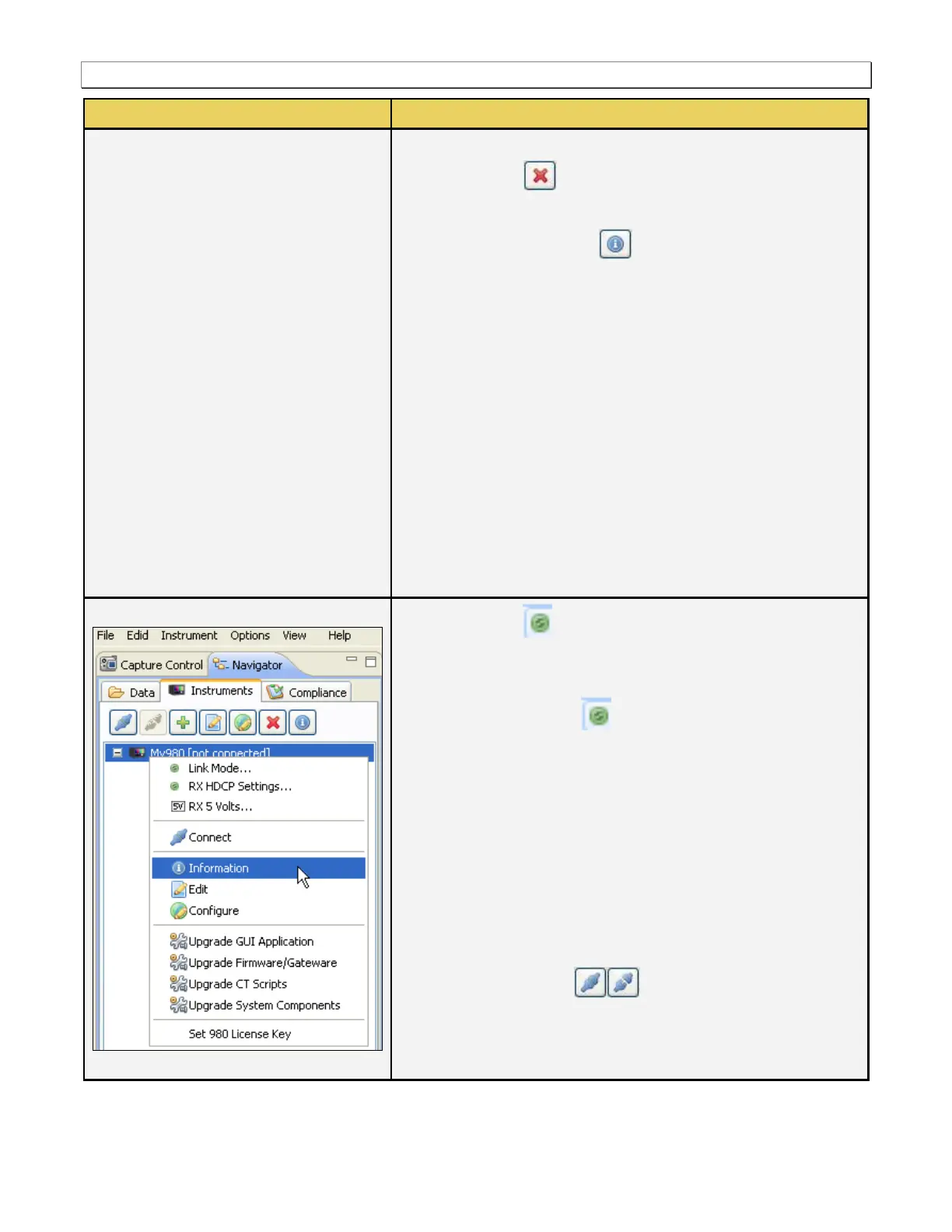
[Instrument] Information - Provides information about the
980 that the 980 Manager is currently connected to. This
information includes:
o 980 Name
o IP address of the 980
o Netmask
o Gateway IP address
o Hardware revisions of the 980 circuit boards
o Firmware/Gateware version of the release applied to the
980
o Serial number of the 980
o OS version
o Licensed options applied to the 980
Link Mode… – Opens up a dialog box that enables you
to set the configuration mode to: 1) Sink Emulation, 2)
Pass-Through, 3) Encrypted Link Analyzer.
RX HDCP Settings… – Opens up a dialog box that
enables you to set the HDCP mode: 1) Enable/disable HDCP
on the 980 Rx port, 2) Set the HDMI status to HDMI or DVI,
3) Set the BCAPS register values.
5V RX 5 Volts - Brings up a dialog box that enables you to
define various parameters related to the 5V source.
o Also shows the current measured voltage level of the
source +5V supply.
o Allows one to set the threshold and current load that the
980 applies to the source +5V supply.
Connect/Disconnect – Enables you to connect or
disconnect to the selected 980, if you have not already
established a connection to it. This item will not be available if
you have already connected to the selected device.



 To Next Page