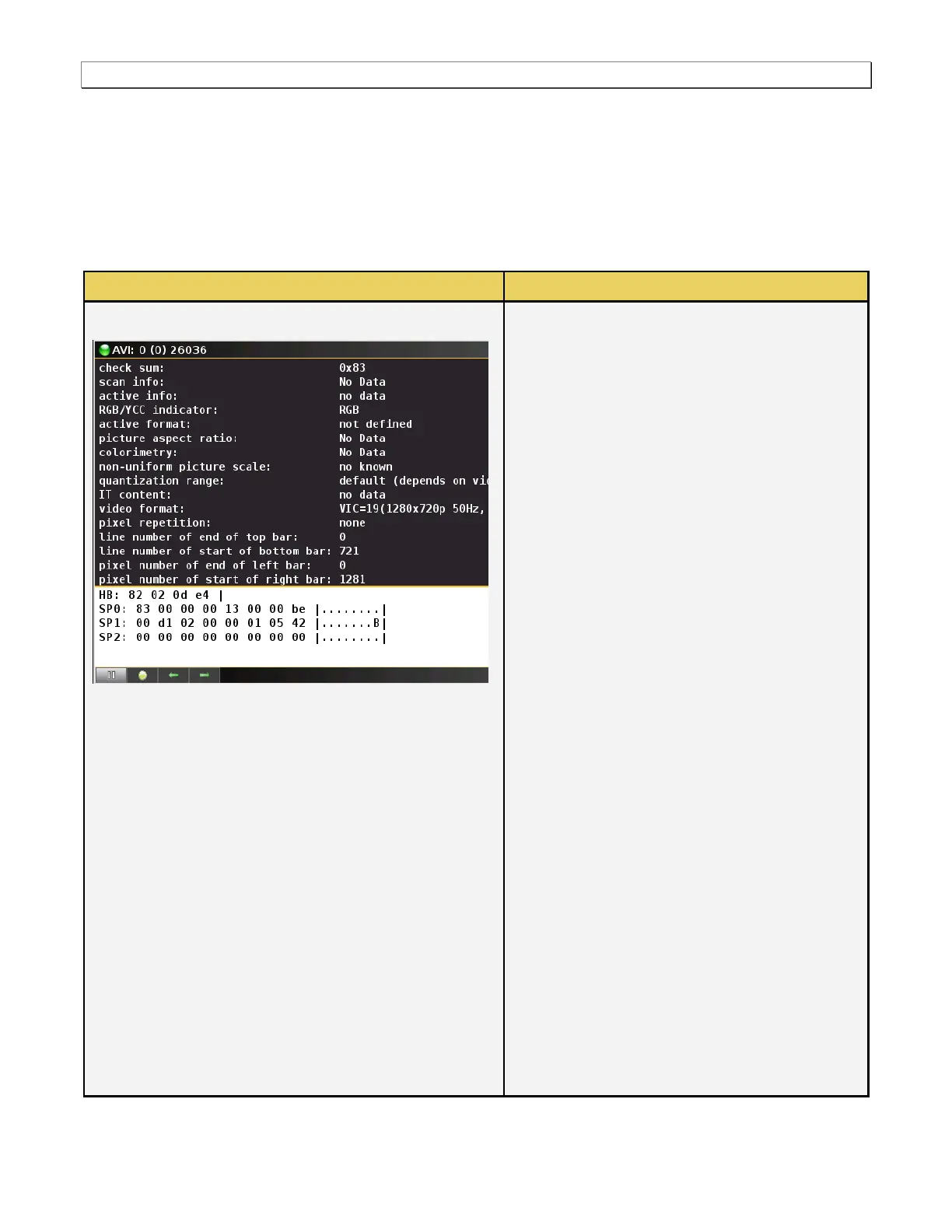
data. There is a control pull down menu associated with the AVI Info panel. The control menu can be accessed
The following information is provided in the AVI
Infoframe dialog box:
Checksum – Calculation of a checksum to
ensure integrity of the data.
Scan Info – Indicates whether there is any
underscan or overscaning applied to the
video.
Active info – Indicates whether the Active
Format Descriptor is information is valid.
RGB/YCC indicator – Indicates whether the
incoming video is in the RGB mode or the
YCC mode and what sampling mode is used
with YCC (YCbCr 4:4:4 or 4:2:2)
Active format – Active format aspect ratio.
Picture aspect ratio – The aspect ratio of the
video format transmitted.
Colorimetry – The colorimetry standard used;
typically ITU-601 or ITU-709.
Non-uniform scaling – Indicates if the picture
has been scaled vertically and/or horizontally.
Quantization range – Indicates the range of
values for defining the data is limited or full.
IT content – Indicates when the picture
content is composed in accordance with
common IT practices.
Video format – The CEA video identification
code (VIC) and the resolution and frame rate.
Pixel repetition – Indicates to the DTV how
many of each unique pixels are transmitted.
Line number of end of top bar.
Line number of start of bottom bar.
Pixel number of end of left bar.
Pixel number of start of right bar.



 To Next Page