Application Setup
QUBEVSM-V01-R0 Installation and Operation Manual Intelligent Electric Vehicle Chargepoints
February 2023 Page 28 of 42
Configure Load Balancing
IMPORTANT:
Load balancing figures should be entered when first setting up the charger to load balance the
power used by the charger.
If the Input order (load balancing property fuse rating) is entered incorrectly, the device will still
beep twice, but the order will not be executed. The incorrect Input order cannot be corrected
until you disconnect device from the APP and wipe the data and connect it again. This is also
the case if the property fuse rating is changed at a later date.
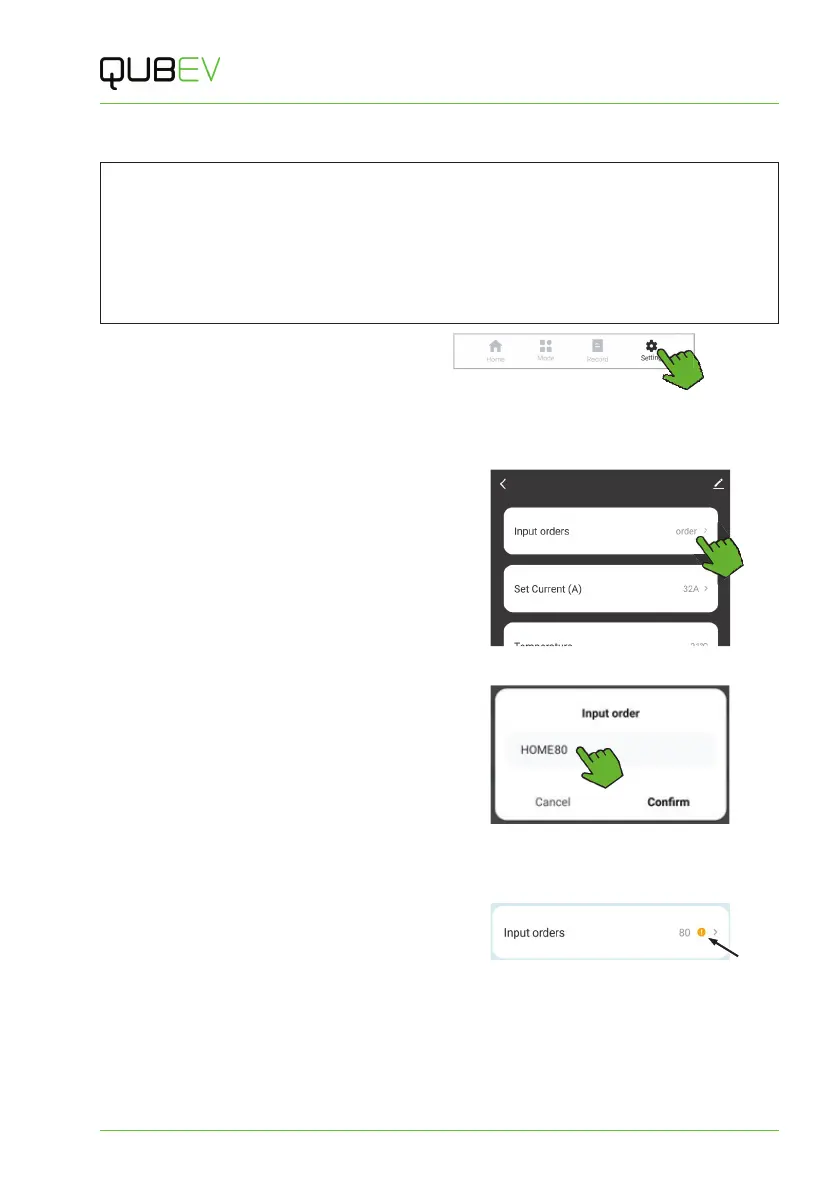
1. On the Home screen, tap the Setting icon.
x The screen will change to show the setup options.
2. Ignore any entries that may already displayed on screen. The figures shown will not
take effect until tapping to confirm the new entry.
3. Tap the Input orders label.
Figure 20 Input Orders Selection
4. Enter on the screen, HOME followed by
value of the property fuse (main
breaker). For example, HOME80, for an
80A fuse.
x Setting range is 08-120.
5. Tap Confirm to enter the figure into the
system. The charger will beep twice to
acknowledge the setting.
Figure 21 Load Balancing Amp Setting Text
If the setting is entered incorrectly or must be
changed. Refer to Change the Load Balancing
Setting on page 30.
x An incorrectly entered setting may be
indicated by an orange exclamation icon.
Figure 22 Incorrect Setting Indication


 To Next Page