EasyManua.ls Logo

Queclink CV200 - Interface View; Function Cable

Queclink CV200
47 pages
Print Icon
To Next Page IconTo Next Page
To Previous Page IconTo Previous Page
Loading...
CV200 Dash Camera User Manual
6
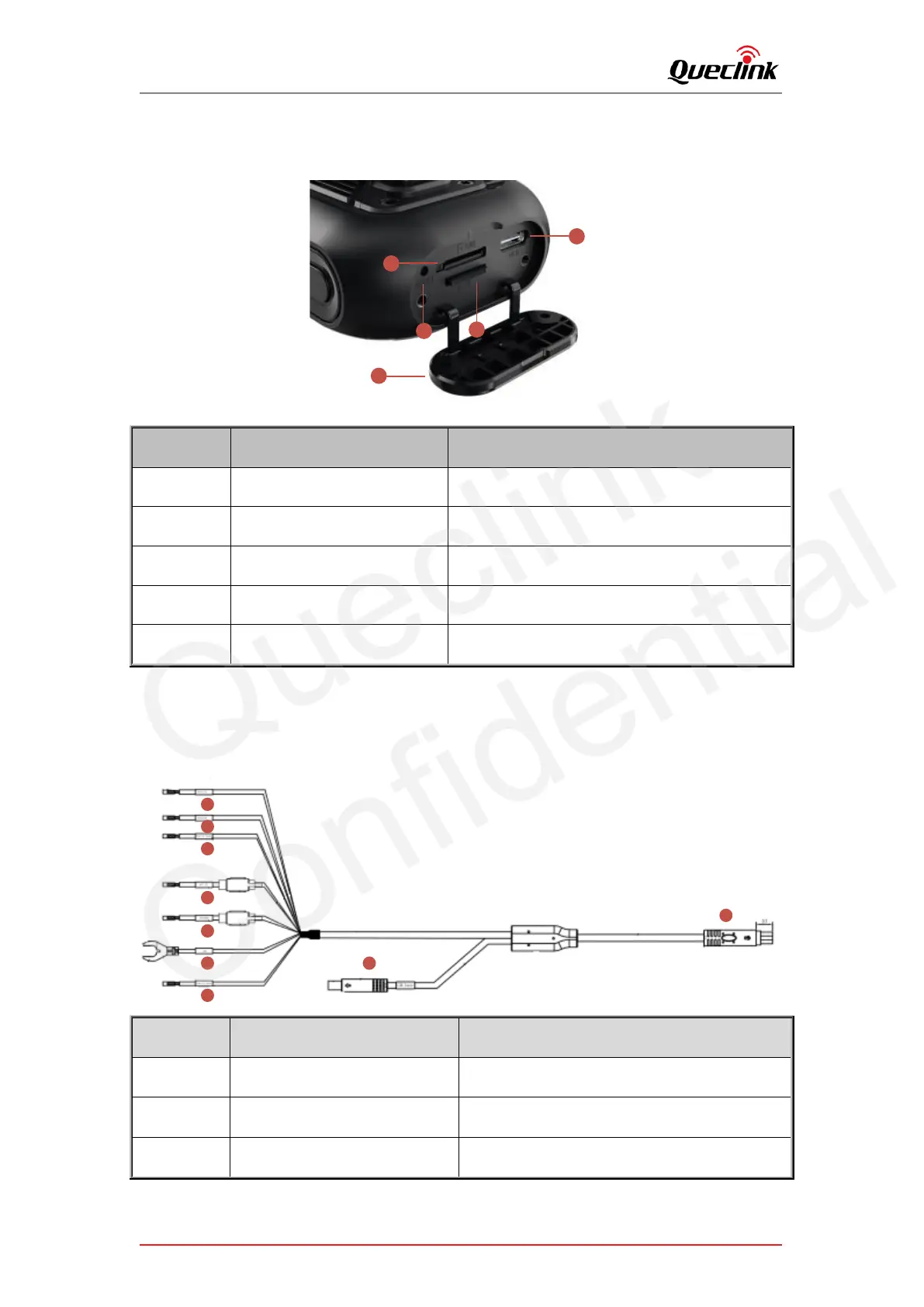
2.5. Interface view
4
2
1
5
3
Number
Definition
Feature
1
Tamper-Resistant Cover
Prevent the SIM & TF cards from theft
2
USB-C Slot
For debugging and data communication
3
TF Card Slot
For TF card
4
SIM Card Slot
For nano SIM
5
Reboot Button
Click to reboot the device
2.6. Function cable
The products supply the hardwired connection with your vehicle, please plug the proper cables
as the descriptions.
Length = 4000mm
1
2
3
4
5
6
7
8
9
Number
Definition
Feature
1
RS232_TX (Blue_White)
Serial Communication for peripheral devices
2
RS232_RX (Blue_Black)
Serial Communication for peripheral devices
3
Digital_Output (Yellow_White)
Open drain, software-defined feature

Queclink
Confidential

Related product manuals