EasyManua.ls Logo

Queclink CV200 - Page 33

Queclink CV200
47 pages
Print Icon
To Next Page IconTo Next Page
To Previous Page IconTo Previous Page
Loading...
CV200 Dash Camera User Manual
29
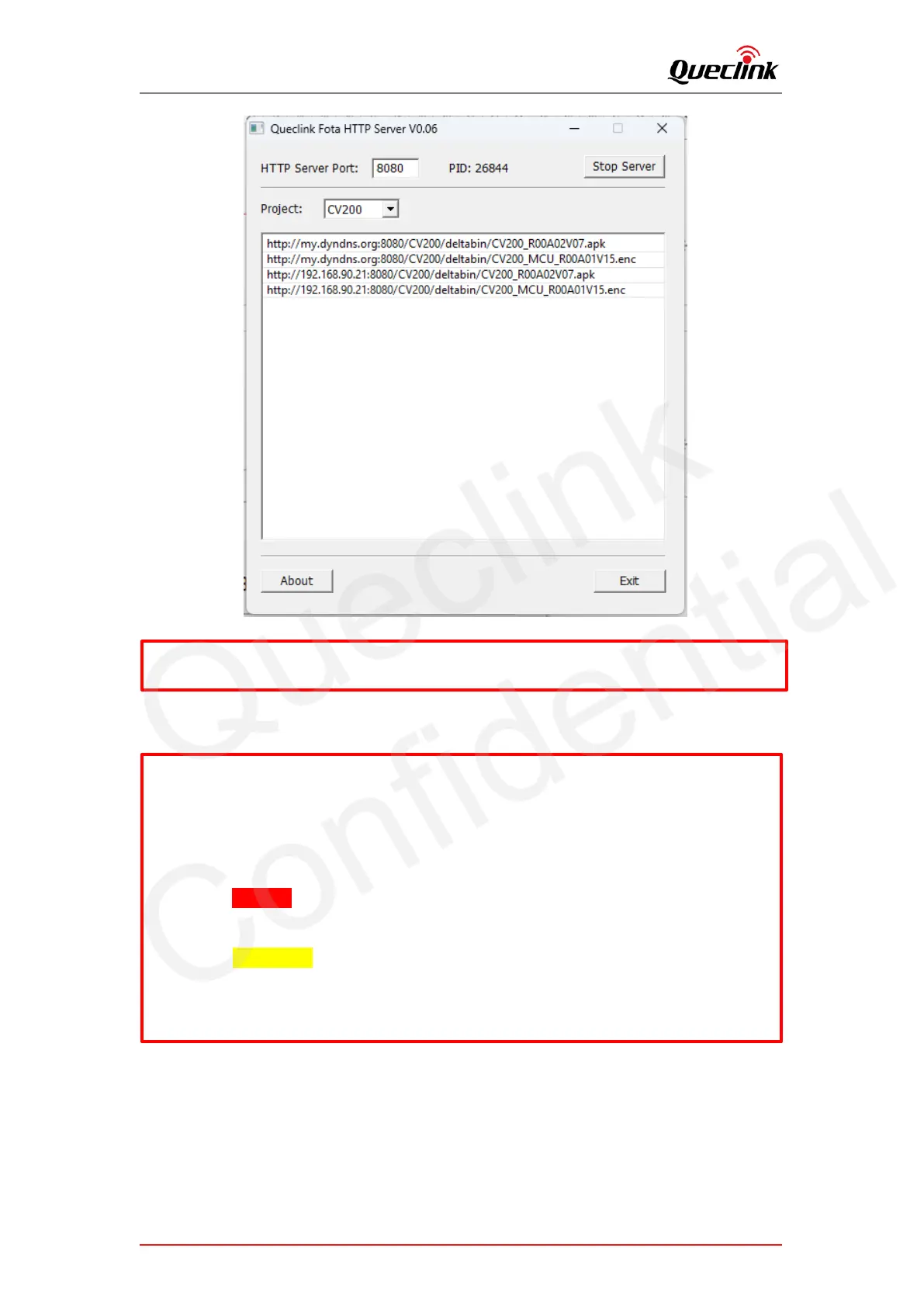
Copy the corresponding URL to add into ‘GTUPD’ command. For example:
4) Send the GTUPD command by TCP socket to start the updating process
5) Monitor the report feedback on the server or debug window of Manage tool, the local
Power indicator is fast flashing during updating. The updating is completed after hear the
beep sound.
AT+GTUPD=cv200,0,0,10,0,,,http://192.168.90.21:8080/CV200/deltabin/
CV200_MCU_R00A01V15.enc,,1,,,,0001$
AT+GTUPD=cv200,0,0,10,0,,,http://192.168.90.21:8080/CV200/deltabin/
CV200_R00A02V07.apk,,0,,,,0001$
Symbol #1 (red color): it indicates the transmission protocol.
Value “0” means HTTP
Symbol #2 (yellow color): it indicates the application type.
Value “0” means .apk file.
Value “1” means .enc file

*All available links will be auto-generated and listed.
Queclink
Confidential

Related product manuals