buttons indicate that a change has been made. They turn red when the respective monitoring process
is idle and they change into Apply button when the monitoring is running, i.e. when the respective
Start (File Start) button has been gray. Clicking the Apply button enforces the configuration change
(e.g. adding one more interface) to the running monitoring process
■ Internal interfaces description
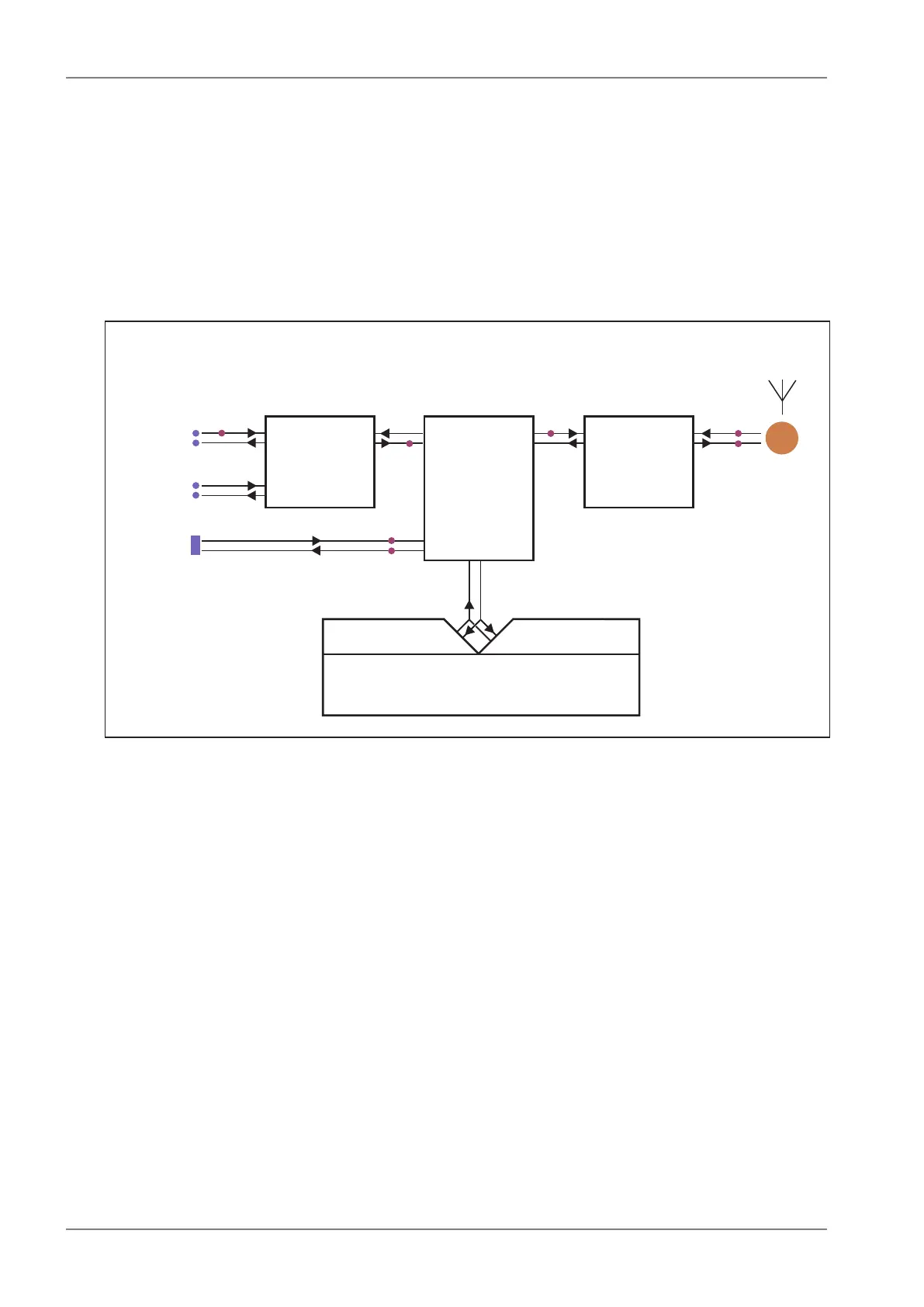
Internal interfaces are the interfaces between a SW module and the central router module. All these
interfaces can be found in next figure:
COM PORTS
MODULE
ROUTER
&
BRIDGE
MODULE
TERMINAL & MODBUS TCP
SERVERS
& TCP PROXY
RADIO
CHANNEL
MODULE
COM1
COM2
ETH
RADIO
virtual com/TCP ethernet
Radio Modem Unit
Rx
Tx
Rx
MP1
MP6
MP5MP3
MP7
MP2
MP4
Rx RxRx
Rx
Rx
Tx
Tx TxTx
Tx
Tx
COM: phy COM: rou RF: rou RF: phy
Fig. 7.13: Interfaces
• The Router and Bridge module acts as a standard IP router or bridge, i.e. decides to which
interface an IP packet goes next.
• The COM ports module does the conversion from messages received over the serial ports to
UDP datagrams and vice-versa.
• The Radio channel module wraps (unwraps) IP packets into radio channel frames and handles
all sorts of service frames.
• The Terminal servers process messages from/to virtual COM ports, transforming them into/from
the same UDP datagrams as the COM port module does.
• The Modbus TCP server similarly processes packets of Modbus TCP(RTU) protocol - see the
relevant application note (Modbus TCP/RTU) for details. Since it is possible to monitor the
messages from virtual COM and the resulting UDP datagrams independently, the TSn and the
Modbus TCP have two internal interfaces – distinguished as (com) and (router).
• The TCP proxy server converts TCP datagrams to UDP ones, while maintaining the original
TCP session locally. The two internal interfaces can be used to independently monitor the TCP
and UDP sides on the (com) and (router), respectively.
•
MP1, MP2, ... labels are the monitoring points referred to in following Monitoring examples.
RipEX Radio modem & Router – © RACOM s.r.o.192
Advanced Configuration


 To Next Page