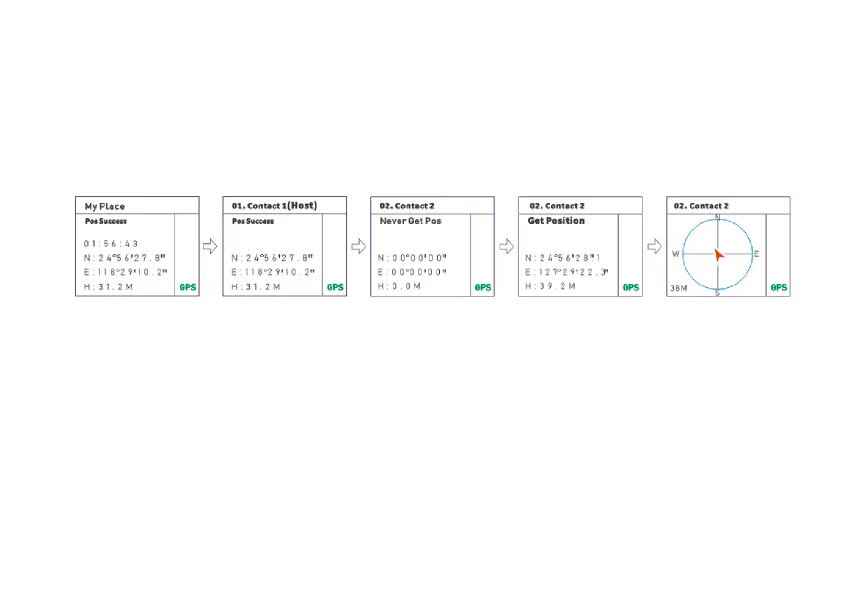
member sequences that are not marked as " Host ".
3. Press the [PTT] key to initiate a position request command to the target member.
4. Press the [MENU] key to switch to the electronic compass interface and display the reference distance between two radios.
-Disable transmission during waiting for reception.
-If the other party receives your request, they will reply with your location information.
-The red arrow represents your position, the arrow direction is the direction of your teammate, and the lower left corner is the reference
distance between the two radios.
7.5 Program Channel
Channel configuration is only applicable to the current channel and will not change the configuration parameters of other
channels. It allows to modify the channel name, Receive or Transmit frequency, Tx_Rx CTCSS/DCS, add the current channel to
the scan list, Working Mode, and channel memory and channel delete.
(1) Channel name (CHNAME) – MENU +1
To set the channel name you have at your disposal 26 letters (A-Z) and 10 numbers (0-9). You can use up to 8 characters for the channel name.
Edit the desired channel name with the keypad and then confirm by pushing [MENU] key. To exit the function press [EXIT]
key.
(2) RX Frequency – MENU +2
Input the RX frequency by keypad, click the [MENU] key to save, press EIXT key to return.
(3) TX Frequency – MENU +3
Input the TX frequency by keypad, click the [MENU] key to save, press [EXIT] key to return.



 To Next Page