CALIBRATION
21
6.2.1 Enter CAL Mode 1
1. Press the button and power-on the
instrument.
2. Press to select the channel you want
to calibrate (channels 1 to 5).
6.2.2 Set Weighing Mode
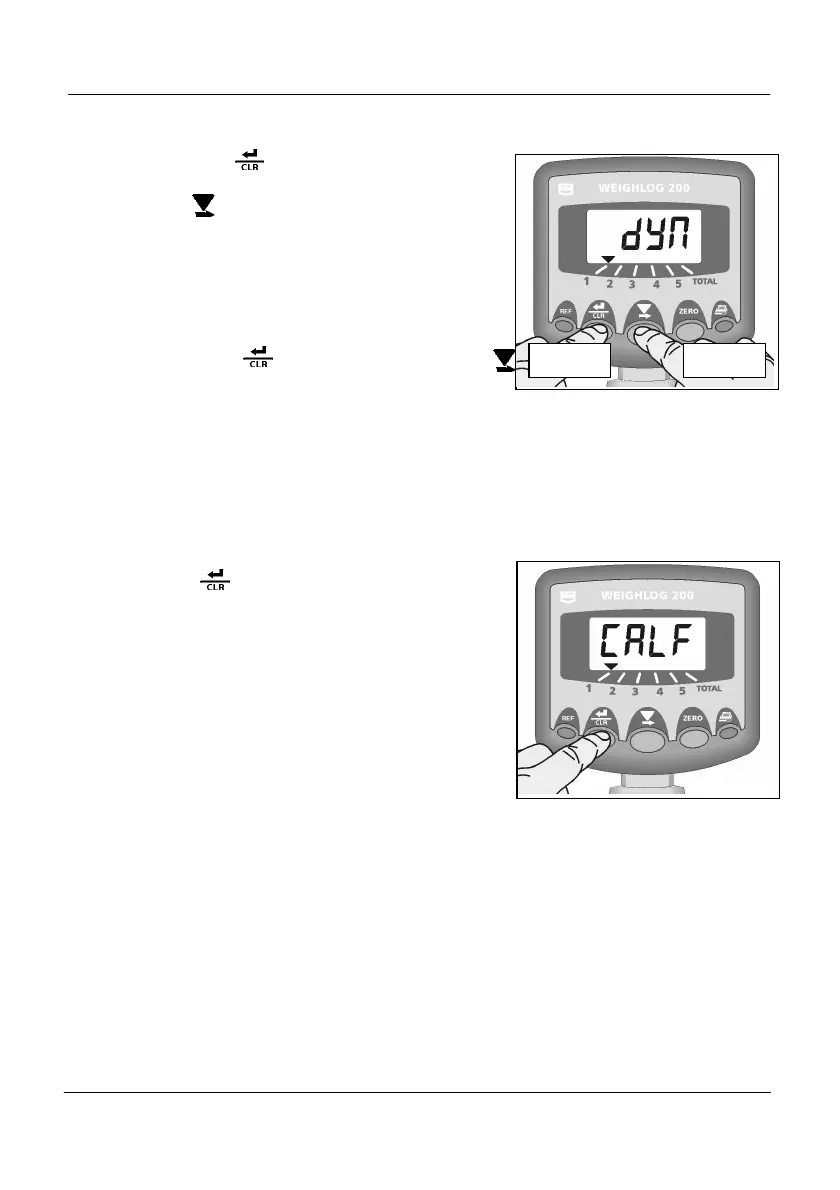
3. Hold the button and press the
button to toggle between Static mode
(“StAt”) and Dynamic mode (“dYn”).
4. Release both buttons.
6.2.3 Set Initial Cal. Factor
This continues from section 6.2.2.
5. Press again to display the weight
calibration factor “CALF”. (Fig.19).
Default Factor = 1.000
Set the initial calibration factor to equal
the lift capacity of the machine (e.g. if the
lift capacity is 1.5 tonnes, then set the
factor to 1.500).
NOTE: The Cal Factor will normally have a value
somewhere between 1 and 10.
If you are working in lbs units, regardless
if the instrument is set for “USA” units, you
must convert to decimal tons when
entering the initial cal factor. E.g for
10,000 lb capacity, enter Cal Factor of
5.000.
Figure 21 : Set Weigh Mode
Figure 22 : Set Initial Cal Factor


 To Next Page