RED DSMC OPERATION GUIDE
COPYRIGHT © 2015 RED.COM, INC 955-0020_V6.0, REV-D | 97
REDCODE BURST
NOTE: This mode is not available in Stills mode.
In REDCODE Burst mode, the camera can record at a lower compression (REDCODE) for the specified amount
of frames.
When REDCODE Burst mode is enabled and recording starts, the camera captures a “burst” of frames at the
lower REDCODE, and then continues to record at the next available REDCODE. To add more bursts to clips
during recording, press any key mapped to “Record: Mark Frame”.
To use REDCODE Burst mode, follow the instructions below:
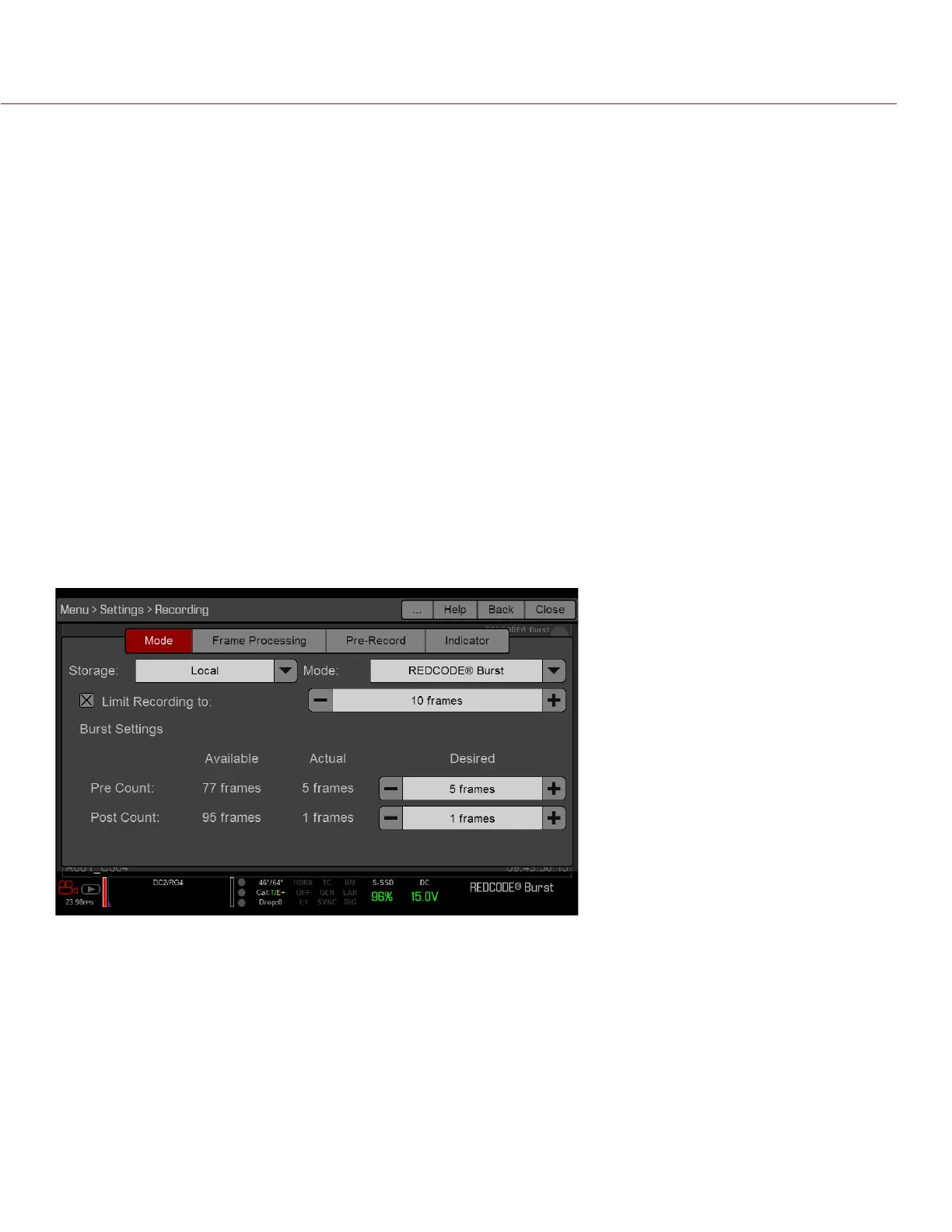
1. Go to Menu > Settings > Recording > Mode.
2. Select REDCODE Burst from the Mode drop-down menu.
3. Use the Limit Recording to fields to set the recording to end at a predefined frame limit (optional).
4. Select a Pre Count and Post Count. For more information, go to “Pre Count and Post Count” on page 97.
5. Close the menu.
6. Start recording.
PRE COUNT AND POST COUNT
When Frame Trigger or Burst mode is enabled, select the number of frames for the Pre Count and Post Count:
Pre Count: The camera captures the frame cache from the time preceding the marker.
Post Count: The camera captures the remaining frame cache after the marker.
The maximum frame counts are listed in the Available column, and are based on format and REDCODE.



 To Next Page