RED DSMC OPERATION GUIDE: WEAPON/SCARLET-W
COPYRIGHT © 2016 RED.COM, INC 955-0116_V6.1, REV-U | 45
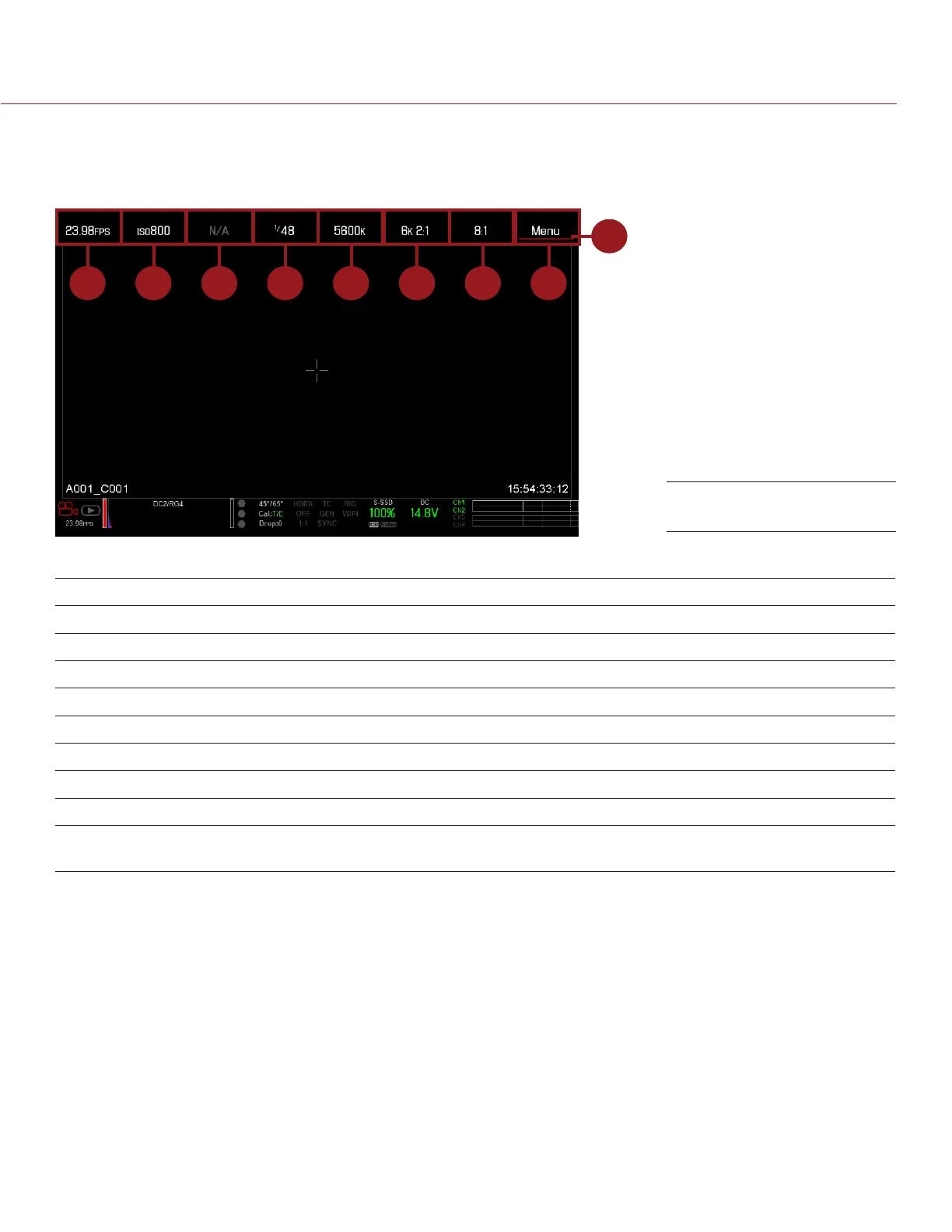
UPPER STATUS ROW (BASIC MENU)
The Upper Status Row displays basic project parameters. The currently selected parameter in the Upper Status
Row is underlined with a red bar. The Upper Status Row is also known as the Basic Menu.
1 52 8763 4
9
The Upper Status Row includes the following GUI elements:
# ITEM DESCRIPTION FOR MORE INFORMATION, GO TO...
1 Frame Rate (FPS) Recording frame rate “Frame Rate” on page 82
2 ISO Camera sensitivity “ISO” on page 79
3 Aperture Lens aperture (F stop) information “Aperture” on page 48
4 Exposure (Shutter) Integration time or shutter angle “Exposure” on page 87
5 Color Temperature White balance “Color Temperature” on page 82
6 Resolution Record resolution “Format” on page 88
7 REDCODE
®
REDCODE compression setting “REDCODE” on page 48
8 Menu Access advanced settings “Advanced Menus” on page 67
9 Cursor Indicates currently selected Upper
Status Row element
N/A
Upper Status Row



 To Next Page