TRIP COMPUTER
2
Getting to know your vehicle - 143
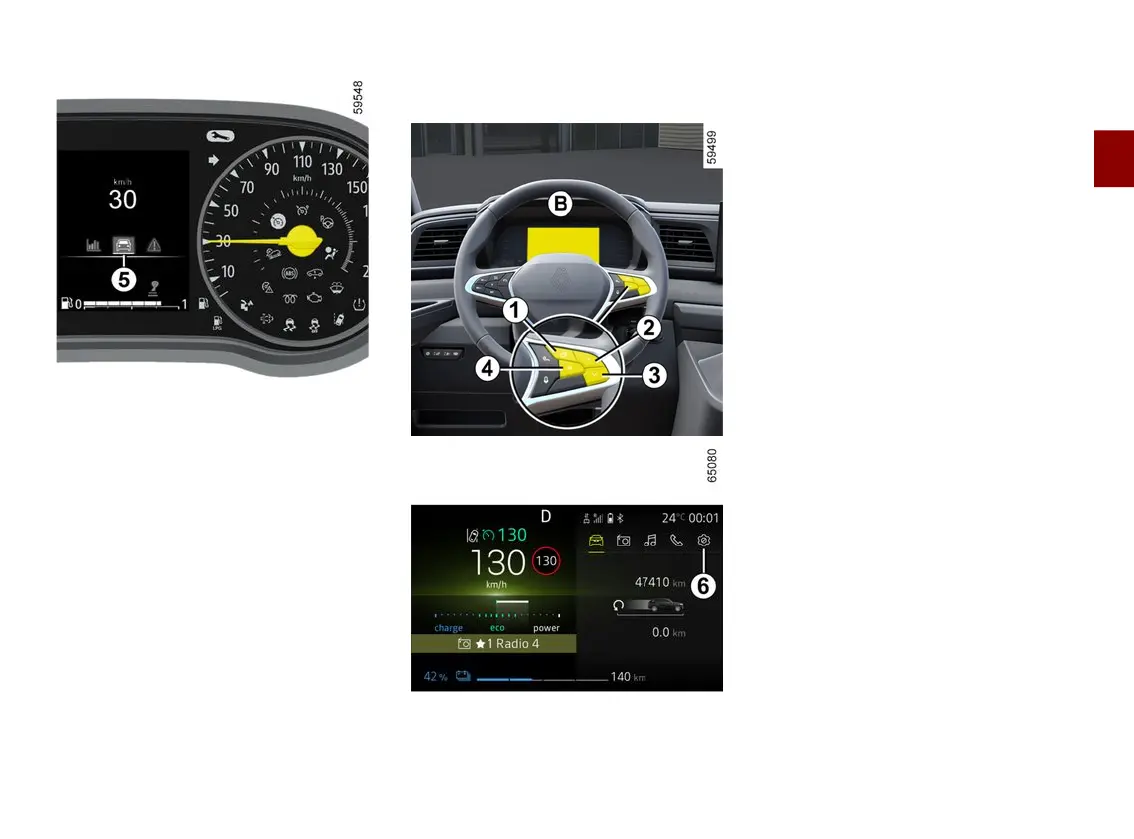
– With the ignition off, press the switch
1
as many times as required to reach
the vehicle tab
5
;
– press control
2
or
3
repeatedly to
reach the "Settings" menu, press the
switch
4
"OK";
– repeat the same operation to reach
"DASHBOARD", then "Units".
Vehiclesnotfittedwithamultime
dia screen instrument panel
B
– With the ignition off, press the switch
1
as many times as required to reach
the "Settings" world
6
;
– press control
2
or
3
repeatedly to
reach "Vehicle setting", then press
switch
4
"OK";
– press control
2
or
3
repeatedly to
reach "DASHBOARD", then press
switch
4
"OK";
– press control
2
or
3
repeatedly to
reach "Unit: km/h"(or"Unit: mph"in
the opposite case), press the switch
4
"OK".
Vehicles fitted with a multimedia
screen.
Pleaserefertothemultimediainstruc
tions to select the audio system.
Note: in both cases, once the battery
is switched off, the on-board computer
automatically returns to the original
unit of measurement.
To return to the previous mode, repeat
the same operation.
Pleaserefertothemultimediainstruc
tions for more information.











 To Next Page