ADDITIONAL DRIVING AID FUNCTIONS
3
Driving - 219
on the button
2
comes on and the
warning light or, depending on
the vehicle, the warninglightap
pears on the instrument panel;
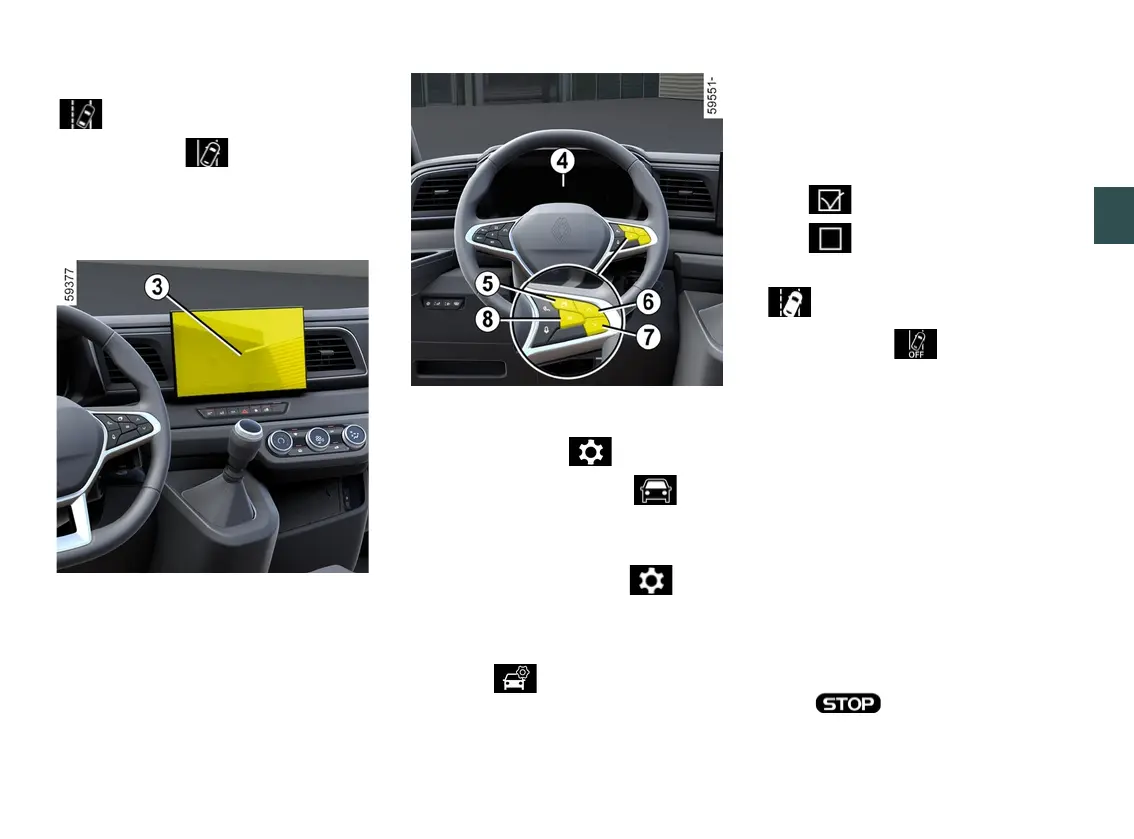
Vehicles fitted with a multimedia
screen
3
To activate or deactivate the function,
refer to the multimedia instructions.
Select ON or OFF.
Activating/deactivating the system
from the trip computer
4
(depending on the vehicle)
– With the vehicle stationary, press
theswitch
5
asmanytimesasre
quiredtoreachthe tabor,de
pending on the vehicle, the tab;
or
– press switch
5
and repeatedly press
control
6
or
7
to reach the tab;
– depending on the vehicle, press
switch
8
OK;
– repeatedly press control
6
or
7
to
reach the menu, then press
switch
8
OK;
– repeatedly press control
6
or
7
to
reach the "DRIVING ASSIST" menu,
then press switch
8
OK;
– repeatedly press control
6
or
7
to
reach the "Lane departure" menu, then
press switch
8
OK;
– press switch
8
OKagaintoactivate
or deactivate the function:
– function activated
– function deactivated
When the function is deactivated, the
warning light or, depending on
the vehicle, the warninglightap
pearsinyellowontheinstrumentpan
el.
Automatically deactivating the
function
Thefunctionisautomaticallydeactivat
ed when:
– The vehicle dynamics control system
is deactivated;
– The electronic stability system is
malfunctioning;
– Theantilockbrakingsystemismal
functioning;
– A towbar is electrically connected to
the trailer hitch socket;
– the warning light appears.











 To Next Page