ADDITIONAL DRIVING AID FUNCTIONS
3
Driving - 237
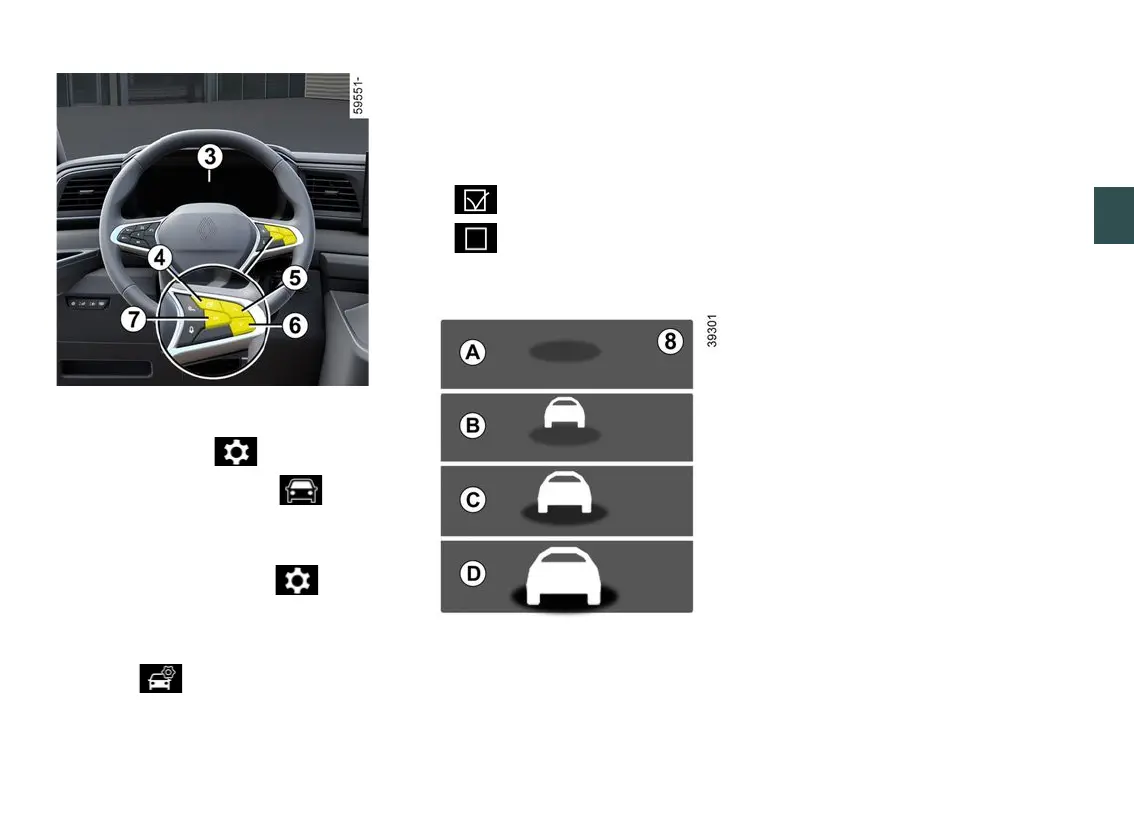
– With the vehicle stationary, press
theswitch
4
asmanytimesasre
quiredtoreachthe tabor,de
pending on the vehicle, the tab;
or
– press switch
4
and repeatedly press
control
5
or
6
to reach the tab;
– depending on the vehicle, press
switch
7
OK;
– repeatedly press control
5
or
6
to
reach the menu, then press
switch
7
OK;
– repeatedly press control
5
or
6
to
reach the "DRIVING ASSIST" menu,
then press switch
7
OK;
– repeatedly press control
5
or
6
to
reach the "Distance warning" menu,
then press switch
7
OK;
– press switch
8
OKagaintoactivate
or deactivate the function:
– function activated
– function deactivated
Operation
With the function activated the
8
indi
cator appears on the instrument panel
and informs the driver of the distance
between their vehicle and the vehicle
in front.
A
(grey): function not operational.
(green): no vehicle detected.
B
(green): the time interval is greater
than or equal to around two seconds
(distance between the two vehicles
adapted to your speed).
C
(yellow): the time interval is between
approximately one and two seconds
(insufficient distance between the two
vehicles).
D
(red): the time interval is less than
or equal to approximately one second
(very insufficient distance between the
two vehicles).
If the interval between the two vehicles
islessthanapproximately0.5sec
onds, the indicator light
8
, display
D
,
will appear in red on the instrument
panel.
Undercertainconditions,thetimein
terval may not be displayed:
– while cornering;
– when changing lane;
– if the vehicle in front is sufficiently far
or outside the range of the camera.











 To Next Page