ADDITIONAL DRIVING AID FUNCTIONS
3
Driving - 249
Activating/deactivating the system
from the trip computer
3
You can:
– deactivatetheaudiblecollisionwarn
ing;
– deactivate the system.
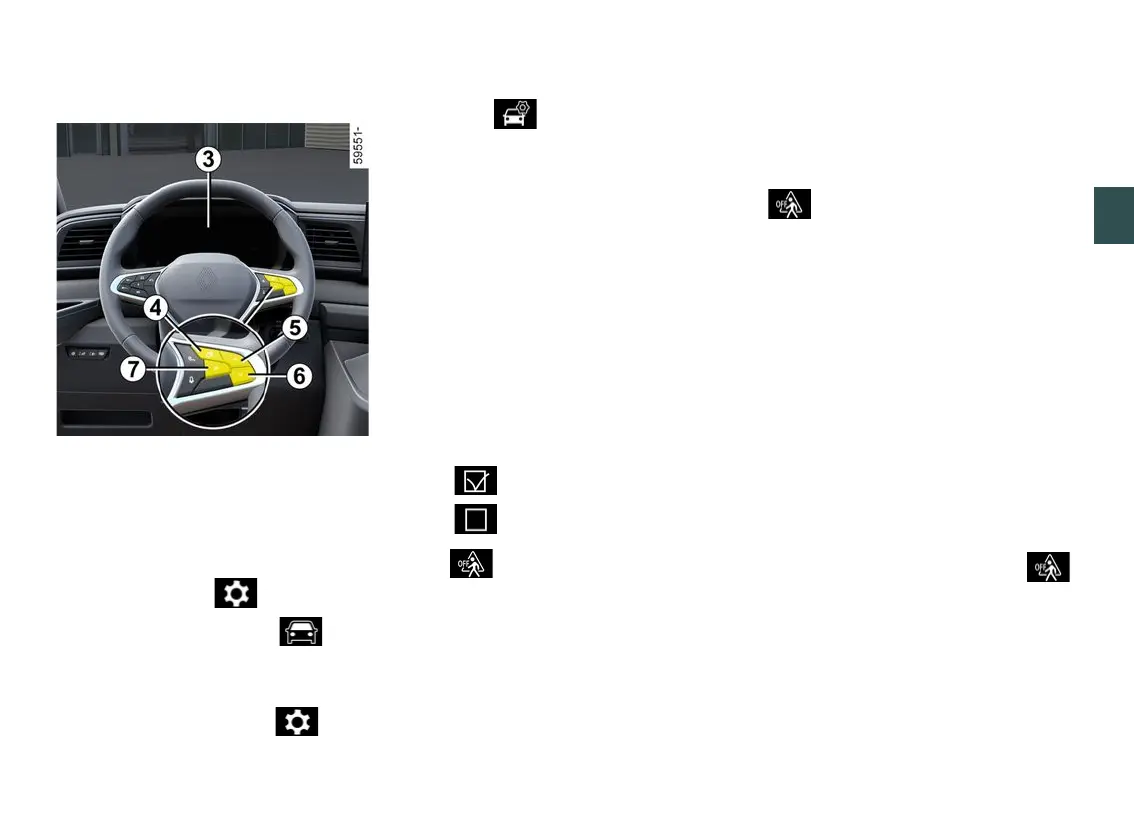
– With the vehicle stationary, press
theswitch
4
asmanytimesasre
quiredtoreachthe tabor,de
pending on the vehicle, the tab;
or
– press switch
4
and repeatedly press
control
5
or
6
to reach the tab;
– depending on the vehicle, press
switch
7
OK;
– repeatedly press control
5
or
6
to
reach the menu, then press
switch
7
OK;
– repeatedly press control
5
or
6
to
reach the "DRIVING ASSIST" menu,
then press switch
7
OK.
To deactivate the audible collision
warning;
– press control
5
or
6
repeatedly to
reach the "Pedestrian alert sound"
menu. Press the
7
OKswitch.
To deactivate the system:
– press control
5
or
6
repeatedly to
reach the "Pedestrian detection" menu.
Press the
7
OKswitch;
– press the
7
OKswitchagaintoacti
vate or deactivate the function:
– function activated
– function deactivated
The warning light appears on
the instrument panel when the function
is deactivated.
Limitations of system operation
This function does not give a warning:
– in reverse;
– when the gear lever is in the Pposi
tion (on an automatic gearbox) or in
neutral (on a manual gearbox) and
speed is zero.
Temporary unavailability
When the function is not available, the
warning light and the message
"Side radars no visibility" appear on
the instrument panel.
The system will cease to be available if
the system is temporarily disrupted (for
example: radar obscured by dirt, mud,
snow,etc.).Inthiscase,parkthevehi
cle and switch off the engine. Clean
the radar area. When you next start
the engine, the warning light and the
message go out.
If this is not the case, this may arise
fromanothercause;contactanap
proved dealer.
Operating faults
If the system detects a fault, the
warning light and the message "Check
Side radars" appear on the instrument
panel. Consult an approved dealer.











 To Next Page