ADDITIONAL DRIVING AID FUNCTIONS
3
254 - Driving
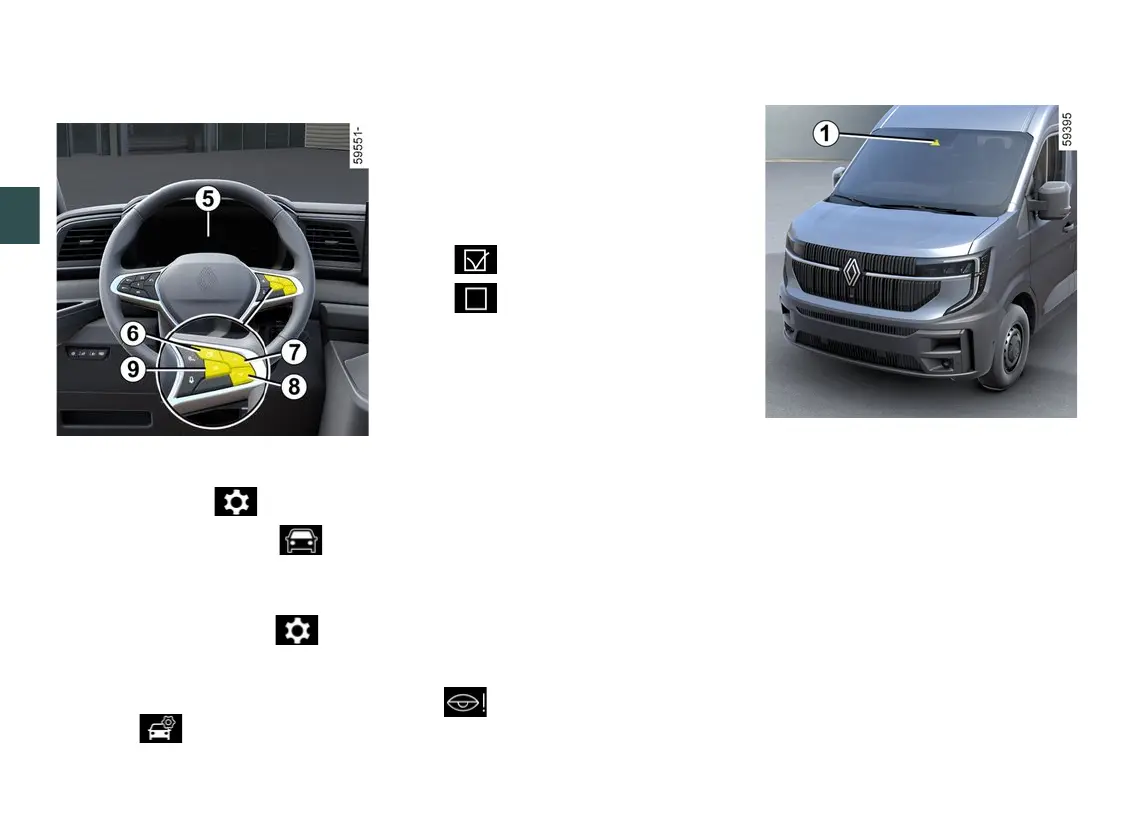
Activating and deactivating the
alerts from the trip computer
5
– With the vehicle stationary, press
theswitch
6
asmanytimesasre
quiredtoreachthe tabor,de
pending on the vehicle, the tab;
or
– press switch
6
and repeatedly press
control
6
or
7
to reach the tab;
– depending on the vehicle, press
switch
9
OK;
– repeatedly press control
7
or
8
to
reach the menu, then press
switch
9
OK;
– repeatedly press control
7
or
8
to
reach the "DRIVING ASSIST" menu,
then press switch
9
OK;
– repeatedly press control
7
or
8
to
reach the "Vigilance warning" menu,
then press switch
9
OK;
– press the switch
9
OKagaintoacti
vate or deactivate the alerts:
– alerts activated
– alerts deactivated
Limitations of system operation
Someconditionscandisruptordam
age the operation of the system, for
example:
– certaindrivingstyles(incorrectdri
ving etc.) ;
– driving on a road in poor condition;
– strong side wind;
– Theclockiswronglyconfigured(de
pending on vehicle);
– winding roads;
– trailer traction.
Operating faults
Ifthesystemdetectsafault,the"Vigi
lance monit. to check" message and
the warning light are displayed
ontheinstrumentpanel.Havethesys
tem checked by an authorised dealer.
Detection of road signs
The system displays speed limits on
the instrument panel according to road
signs detected on the side of the road.
It mainly uses information taken from
the camera
1
attachedtothewind
screen behind the rear view mirror.
Depending on the country, the system
alsousesinformationfromamapsub
scription to interpret certain signs
(town entrance, etc.).
The sign displayed on the instrument
panelchangeswhenaroadsignisde
tected by the system.
Once the speed limiter or the cruise
control is activated, you can adapt the
limited speed setpoint to the speed











 To Next Page