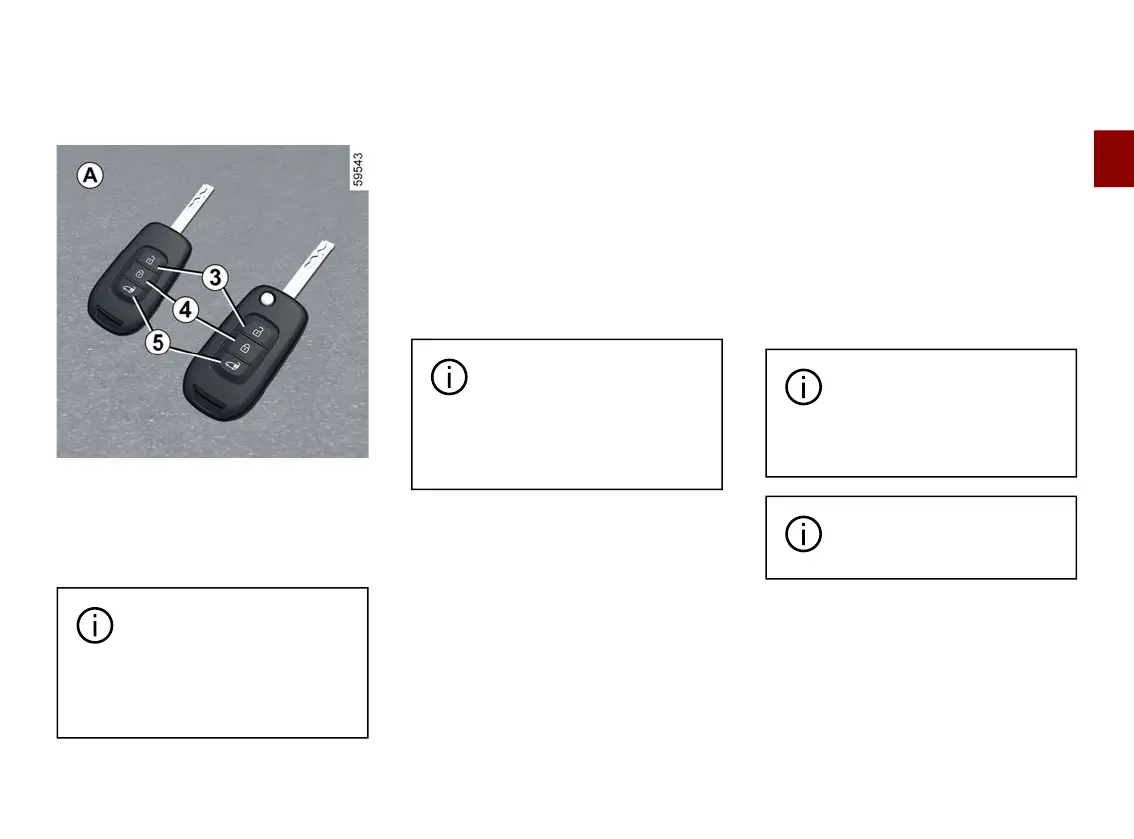
KEY, REMOTE CONTROL
2
Getting to know your vehicle - 47
Use
Radio frequency remote control A
The remote controls
A
lock and unlock
the front doors, the sliding side doors
and the rear hinged doors.
They are powered by a battery which
can be replaced 🡺49.
The key must not be used
for any function other than
those described in the
handbook (removing the cap from
a bottle, etc.).
Locking the doors
Press button
4
.
Thehazardwarninglightsandsidein
dicator lights flash twice to indicate
locking.
Depending on the vehicle, press and
hold button
4
to lock the vehicle and
close the front windows.
Note: pressing button
4
once locks
thefrontorrearzoneifalloftheopen
ing elements in the zone are locked.
If the hazard warning lights
and side indicator lights do
not flash when the vehicle
islocked,checkthatalltheopen
ing elements are locked.
Unlocking the doors
Pressing button
3
unlocks the front
doors in Secure mode and unlocks all
the opening elements in Access
mode.
There are two ways to use the remote
control: access mode and secure
mode.
To switch between the remote control
user modes, use the "Access" menu
from the trip computer or, depending
on the vehicle, from the multimedia
screen 🡺144.
Note:intheeventofdisconnection/re
placement of the 12 Volt battery, the
"Access" mode will be reconfigured by
default.
Briefly press button
5
to unlock the
rear hinged doors and the sliding side
door.
Thehazardwarninglightsandsidein
dicator lights flash once to indicate
unlocking.
With the engine running
and the ignition on 🡺184,
the remote control buttons
are inactive.
To lock/unlock the doors
from the inside 🡺57.











 To Next Page