TRIP COMPUTER
2
Getting to know your vehicle - 147
– With the ignition off, press the switch
2
as many times as required to reach
the vehicle tab
10
;
– press control
3
or
4
to reach the
"Settings", then press switch
1
"OK ";
– repeat the same operation to reach
"DASHBOARD", then "Units".
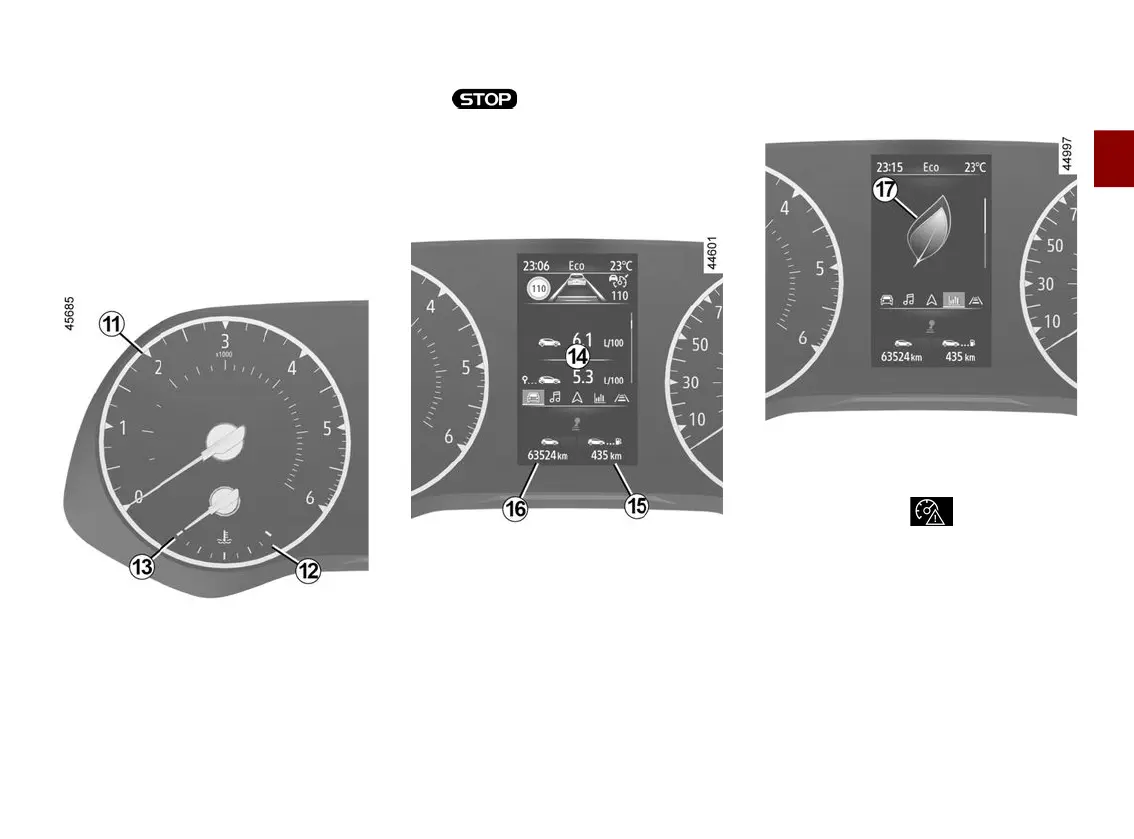
Rev counter
11
(scale x 1,000)
Coolant temperature indicator
12
In normal use, the indicator
13
should
be positioned before the red zone
12
.
Under "intensive" operating conditions,
the needle may approach this zone.
This is not serious unless the warning
light comes on accompanied
by a message on the instrument panel
and a beep.
Trip computer
14
🡺136
Estimatedrangewithremainingfu
el
15
The value is displayed after driving
400 metres 🡺139.
Total mileage recorder
16
🡺139
Driving style indicator
17
🡺199
Overspeed sound alert
The warning light comes on and
a beep sounds. This beep sounds
when a speed limit is exceeded. For
more information, 🡺242.
Speedometer
18











 To Next Page