LIGHTING AND SIGNALS
2
164 - Getting to know your vehicle
The"Lightingon___"messagefol
lowedbytheremainingtimewillap
pear as confirmation. You can then
lock your vehicle.
To switch off the lights before they
switch off automatically, turn the ring
2
toanyposition,thenreturnittoposi
tion AUTO.
Front fog lights
When driving in fog or
snow, or when transporting
objects which are higher
than the roof, the headlights do
not come on automatically.
The fog lights are controlled by
the driver: indicator lights on the
instrument panel inform you
whether they are on (indicator
light on) or off (indicator light off).
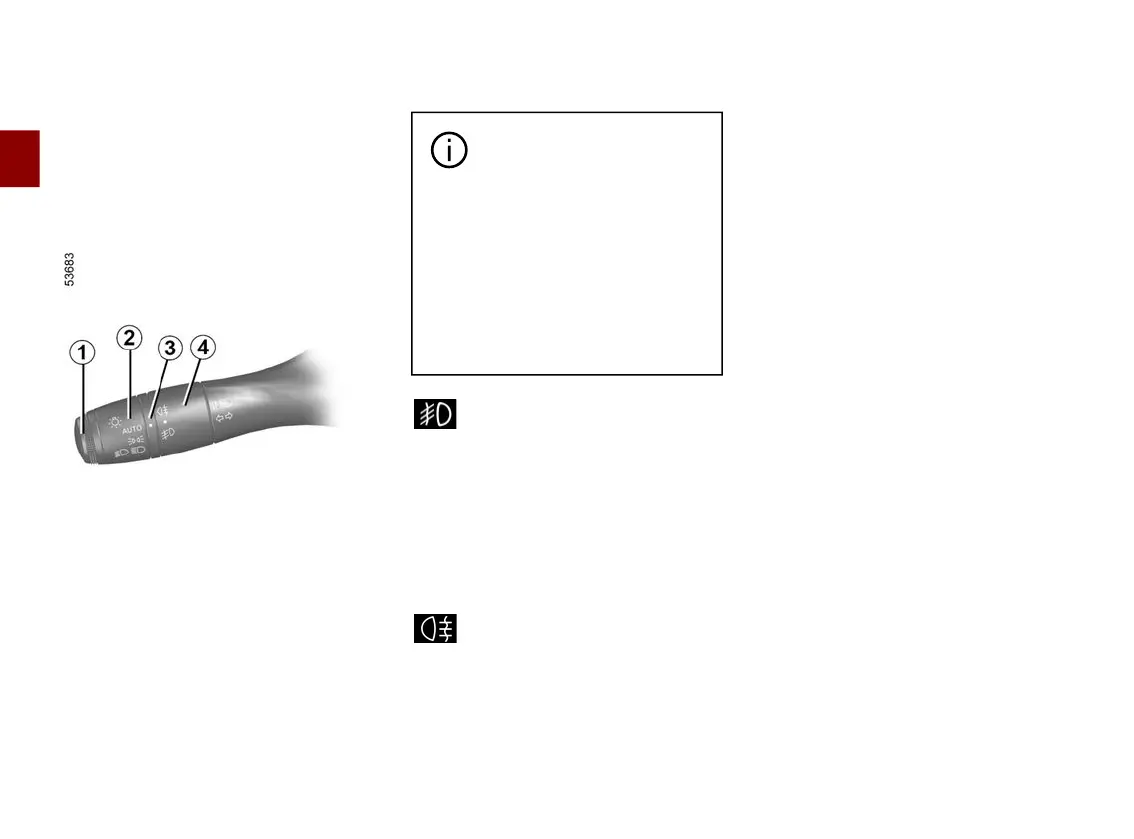
Turn centre ring
4
on the stalk
1
until the symbol faces mark
3
, then
release it.
Operation of the fog lights depends on
the exterior lighting selected, and an
indicatorlightwilllightupontheinstru
ment panel.
Rear fog lights
Turn centre ring
4
on the stalk
until the symbol faces mark
3
,thenre
lease it.
Operation of the fog lights depends on
the exterior lighting selected, and an
indicatorlightwilllightupontheinstru
ment panel.
Do not forget to switch off the fog lights
when they are no longer needed, to
avoid inconveniencing other road
users.
Switching off the lights
Rotate the central ring
4
again to align
the mark
3
with the symbol of the fog
lights that you wish to switch off. The
correspondingindicatorlightonthein
strument panel goes out.
The front and rear fog lights switch off
when the exterior lights are switched
off.
Cornering lights
(depending on the vehicle)
Driving in forward gear at a speed
below approximately 25 mph (40 km/
h), with the dipped beam headlights on
and subject to certain conditions (the
angleofthesteeringwheel,theindica
torlightson,etc.),whentakingacor
ner one of the front fog lights will
switch on to light the inside of the
bend.
When reverse gear is engaged and
the dipped beam headlights are on,
thetwofrontfoglightsilluminateauto
matically.
Note: when shifting from reverse gear
into forward gear (e.g. during a parking
manoeuvre),thetwofrontfoglightsre











 To Next Page