ADDITIONAL DRIVING AID FUNCTIONS
3
218 - Driving
Activating/deactivating the system
from the trip computer
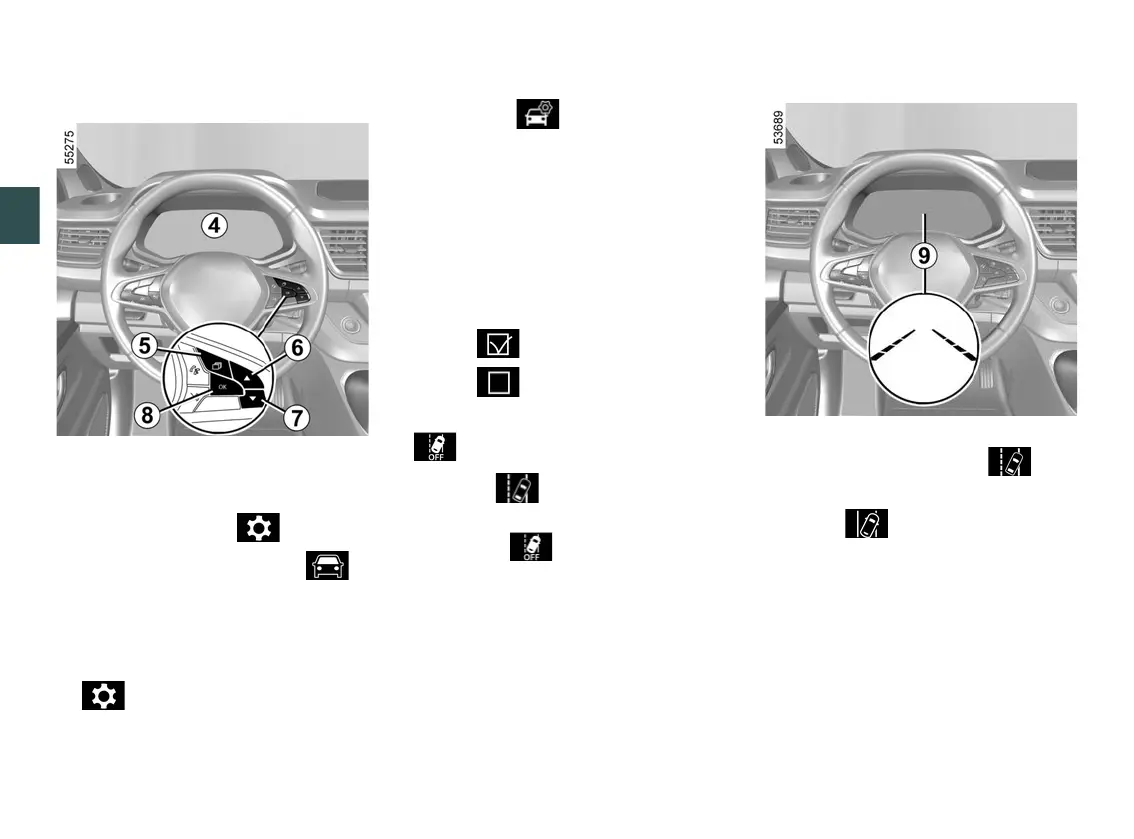
4
Withthevehiclestationary,todeacti
vate/activate the alert:
– press the switch
5
as many times as
required to reach the " " tab or,
depending on the vehicle, the " "
tab;
or
When the function is deactivated, the
warning light is displayed in
white, the warninglightisdis
played in yellow or, depending on the
vehicle, the warninglightisdis
played in yellow on the instrument
panel.
Operation
Whenthefunctionisactivated,de
pending on the vehicle, the
warninglightor,dependingontheve
hicle, the warning light and the
left-hand and right-hand line indicators
9
appear in grey on the instrument
panel.
The function is set to notify the dri
ver if:
– thevehiclespeedisbetweenap
proximately 40 mph (65 km/h) and 105
mph (170 km/h);
and
press control
5
and repeatedly
press control
6
or
7
to reach the
tab;
–
depending on the vehicle, press the
switch
8
OK;
–
repeatedly press control
6
or
7
to
reach the menu, then press
the switch
8
OK;
–
repeatedly press control
6
or
7
to
reach the "DRIVING AIDS" menu,
then press the switch
8
OK;
–
repeatedly press control
6
or
7
to
reach the "Lane departure" menu,
then press the switch
8
OK;
–
press switch
8
OK again to activate
or deactivate the alert:
–
alert activated;
–
alert deactivated.
–











 To Next Page