ADAPTIVE CRUISE CONTROL
3
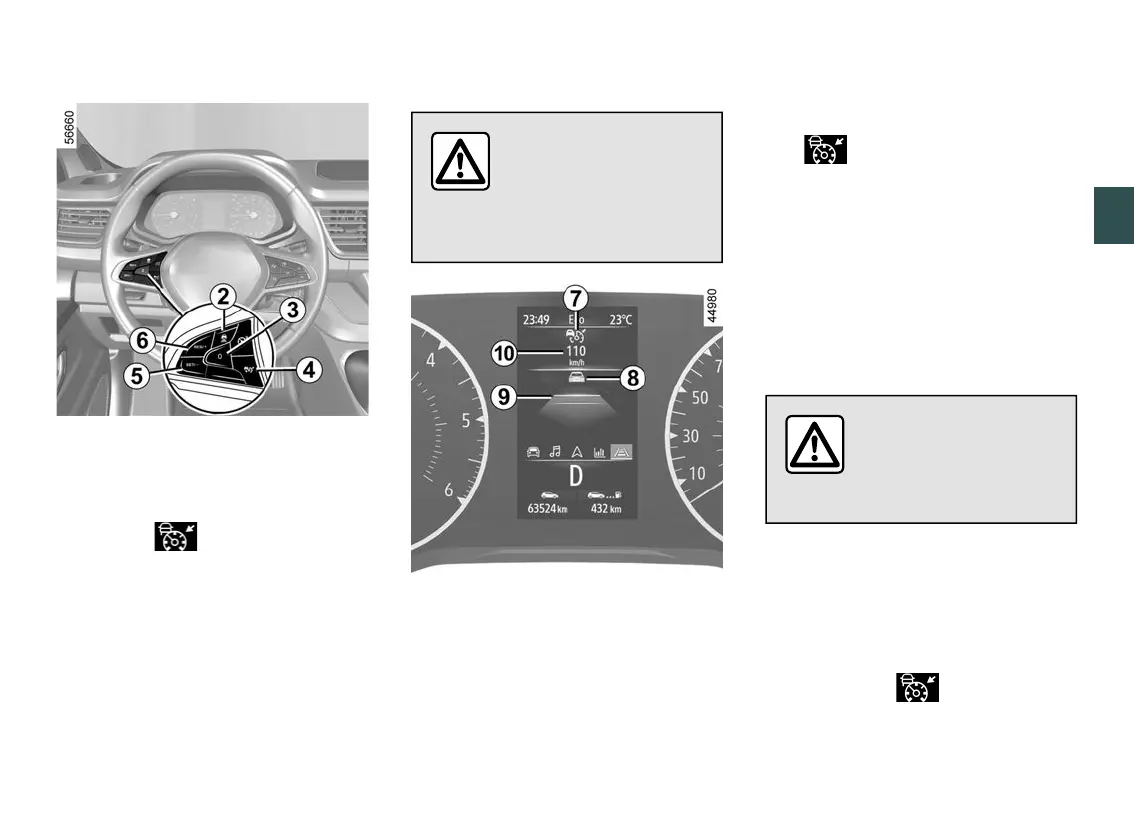
Driving - 259
Controls
2.
Safe distance settings
3.
Put the function on standby (with
cruising speed stored) (0).
4.
Adaptive cruise control main stop/
start switch .
5
Activate, store and decrease the
cruising speed (SET/-).
6.
Switch to activate and increase
cruisingspeedortorecallthememo
rised cruising speed (RES/+).
Displays
The camera should be
kept clean and free of
anymodificationsinor
der to ensure the proper
operation of the system.
7.
Adaptive cruise control warning
light.
8.
Vehicle in front.
9.
Stored safe distance
10.
Stored cruising speed.
Switching on
Press the switch
4
.
The warning light appears in
grey and the "Adaptive cruise control
ON"messageappearsontheinstru
ment panel accompanied by dashes to
indicate that the function is activated
and waiting to store a cruising speed.
The "Adaptive Cruise Ctl unavailable"
messageisdisplayedontheinstru
ment panel.
Activating cruise control
Important: you should
keep your feet near the
pedals at all times to
prepare for any event.
While the vehicle is moving at a steady
speed, press switch
5
(SET/-) or
6
(RES/+) to activate the function and
store the current speed. The minimum
cruising speed is 19 mph (30 km/h).
The cruising speed
10
replaces the
dashes and the warning light
and the cruising speed are displayed
ingreentoconfirmthatthecruisecon
trol function is in operation.











 To Next Page